


Procedura per interrogare un progetto Azure DevOps come si interroga chi lo conosce: «dove sta la logica che impedisce di annullare un ordine già spedito?», «quando si rilascia in produzione e chi approva?», «quali bug sulle spedizioni sono ancora aperti?». I file dei repository, le pagine della wiki e i work item finiscono in un indice di Azure AI Search; una console .NET fa la domanda, trova i passaggi giusti e li passa a un modello che risponde citandoli, con i link alle pagine di Azure DevOps. Una pipeline rifà l'indice ogni notte. Nessuna chiave: ogni chiamata usa l'identità di chi la fa.
Occorre: un progetto Azure DevOps con almeno un repository, una wiki e qualche work item. Qui è rag-demo, nell'organizzazione extra-net: due repository .NET, orders-api e shipping-service, una wiki di 7 pagine e 42 work item; il terzo repository, rag-tools, è quello che si scrive in questa guida. Poi .NET 11, l'Azure CLI con il login fatto (az login) e il ruolo Owner sulla sottoscrizione, per assegnare i ruoli.
Durata: circa un'ora e mezza.
Costo: zero a riposo. Azure AI Search nel livello Free e il semantic ranker nel piano gratuito non costano; la risorsa Foundry fa pagare solo i token: il listino di Azure per West Europe indica, per gpt-5.4-mini, 0,67 euro per milione di token in ingresso e 4,04 in uscita. Una domanda costa meno di mezzo centesimo, la reindicizzazione del progetto di esempio meno di un centesimo. La pipeline usa i minuti gratuiti dell'organizzazione.
Il portale di Azure, il portale Foundry e Azure DevOps delle schermate sono in inglese: i nomi dei comandi sono riportati come appaiono a schermo.
Le risorse su Azure
1. Crea il servizio Azure AI Search
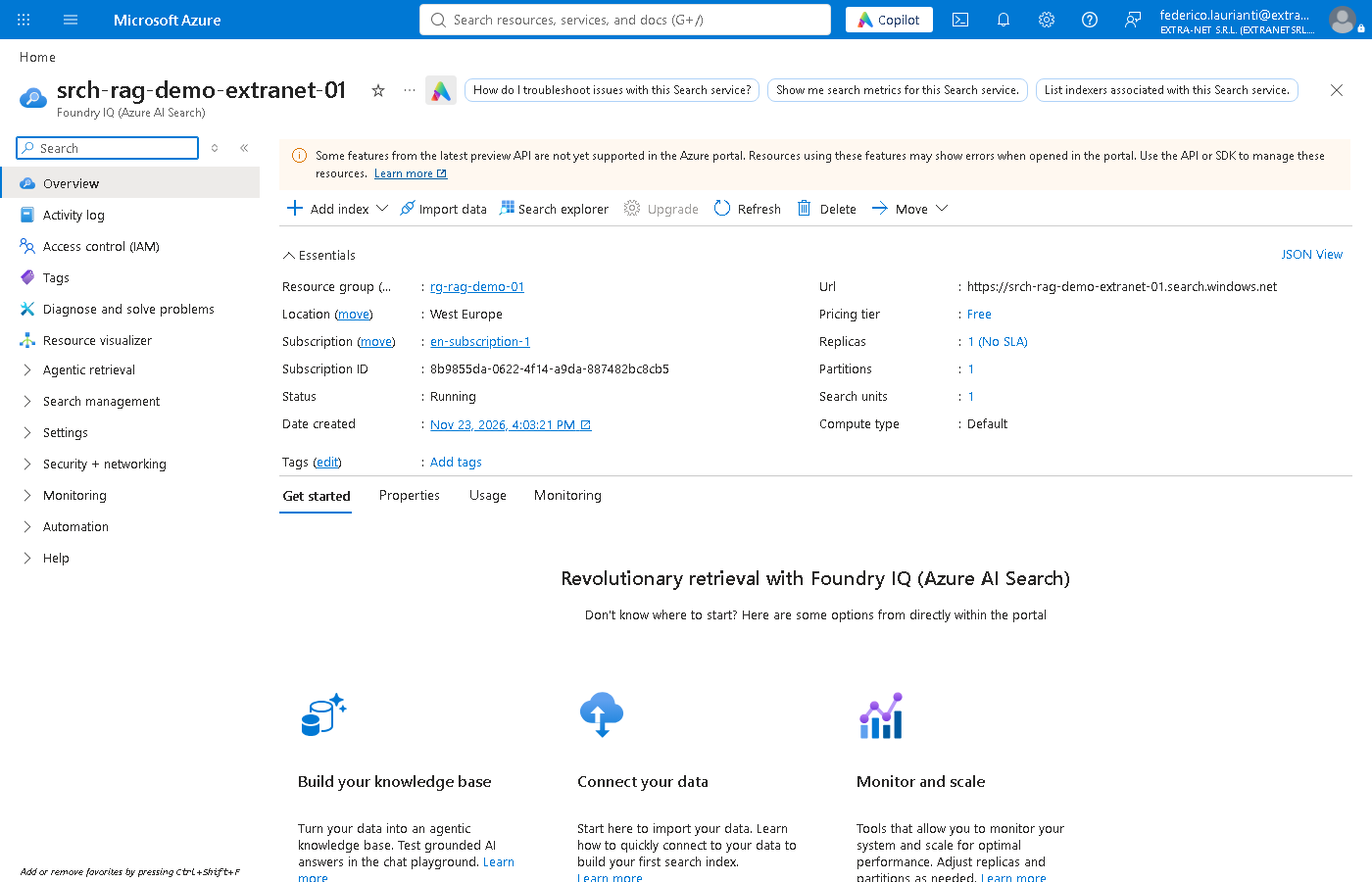
Sul portale di Azure cerca AI Search, apri Foundry IQ (Azure AI Search) e premi Create. In Basics compila:
- Resource group: Create new,
rg-rag-demo-01 - Service name: un nome tuo, unico in Azure, qui
srch-rag-demo-extranet-01 - Location: West Europe
- Pricing tier: premi Change Pricing Tier, scegli Free e premi Select
Premi Review + create e Create. Il livello Free ha 50 MB, tre indici e un solo servizio per sottoscrizione: basta per un progetto come questo.
2. Consenti l'accesso con i ruoli
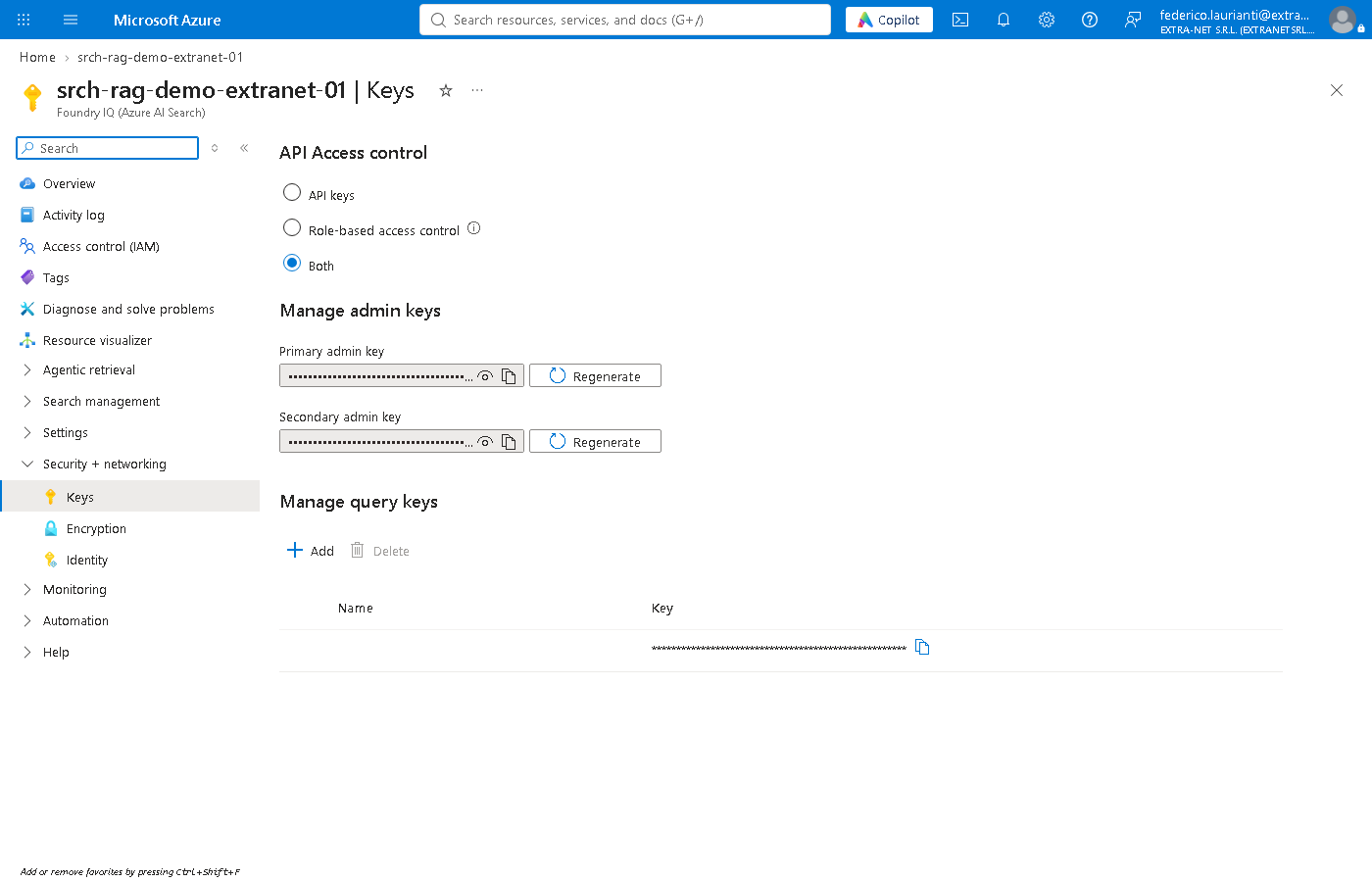
Nel servizio apri Security + networking > Keys e, in API Access control, scegli Both. Le console e la pipeline entrano con un token di Microsoft Entra; le chiavi restano per gli strumenti del portale.
3. Attiva il semantic ranker
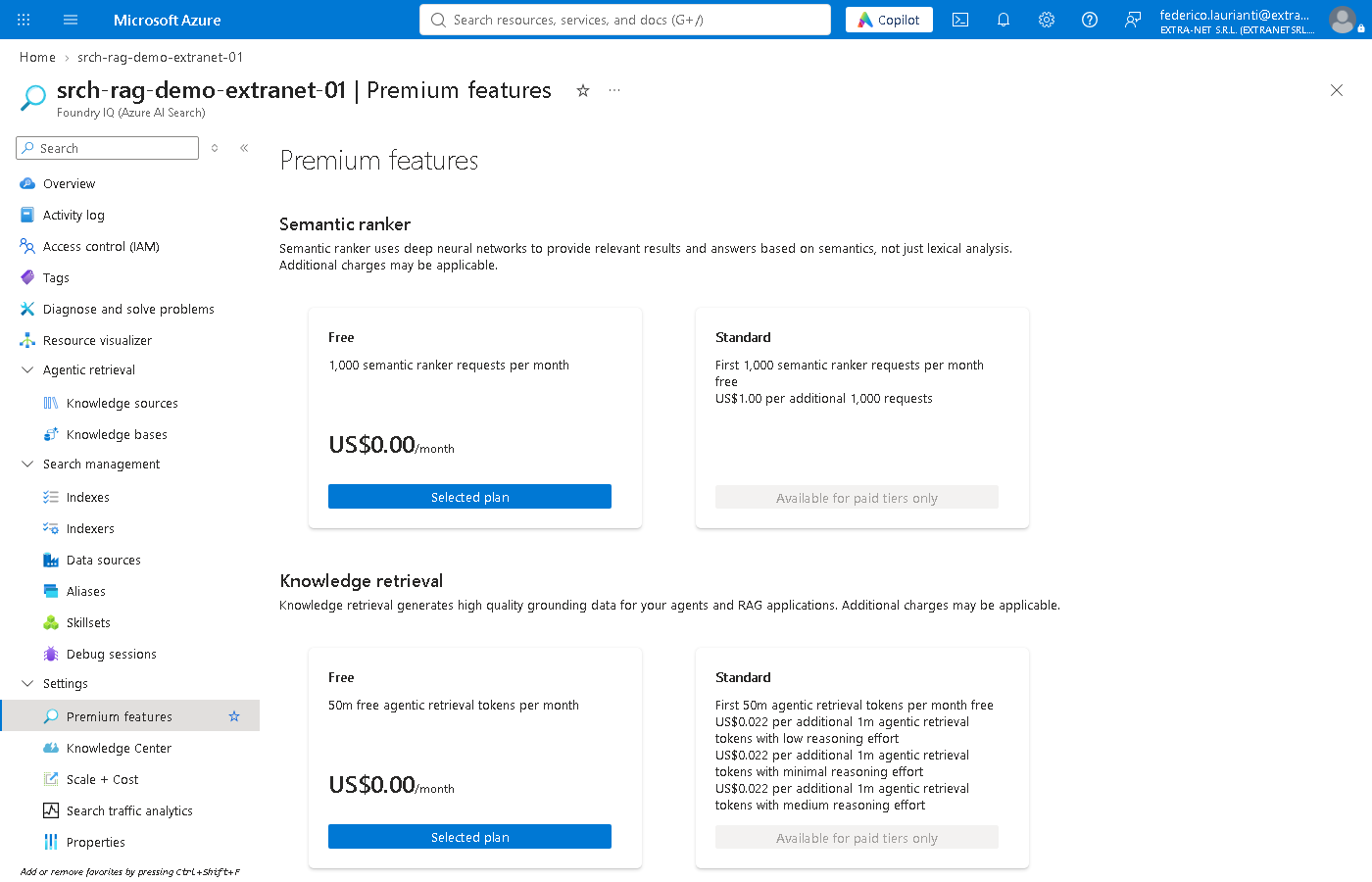
Apri Settings > Premium features e, sotto Semantic ranker, scegli il piano Free: 1.000 richieste al mese. Il ranker riordina i risultati della ricerca secondo il significato della domanda; al passo 10 si vede quando aiuta e quando no.
4. Crea la risorsa Foundry
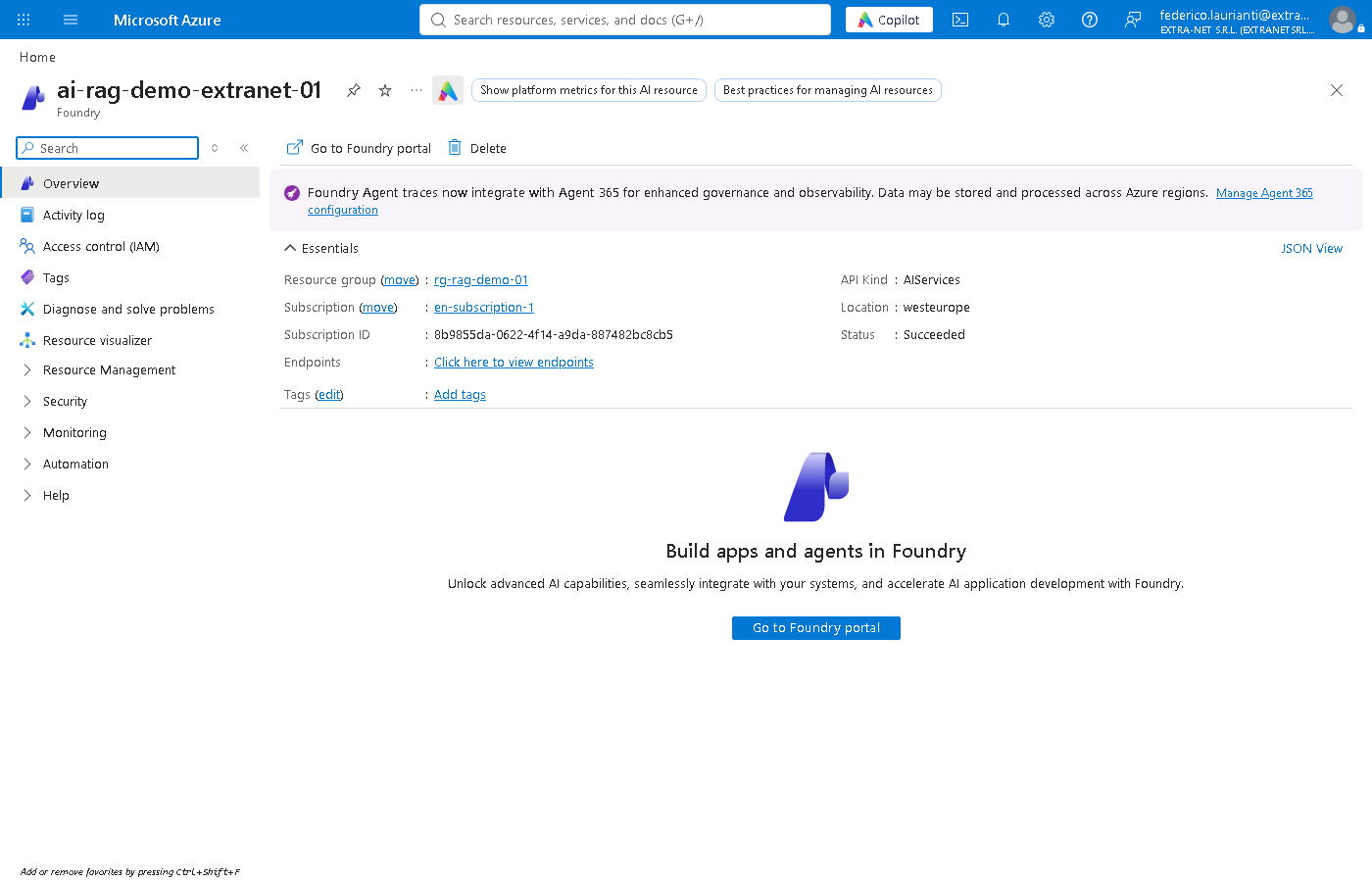
Sul portale cerca Microsoft Foundry e premi Create a Foundry resource. In Basics compila:
- Resource group:
rg-rag-demo-01 - Name: un nome tuo, unico in Azure, qui
ai-rag-demo-extranet-01 - Region: West Europe
- Application insights: None
- Default project name:
proj-rag-demo
Premi Review + create e Create. La risorsa ospita i modelli; il progetto è la cartella del portale Foundry da cui si distribuiscono.
5. Distribuisci i due modelli
Nella pagina della risorsa premi Go to Foundry portal: si apre il progetto proj-rag-demo. Nel menu di sinistra apri Models e premi Deploy a base model. Cerca text-embedding-3-small, aprilo, premi Deploy e scegli Default settings: una distribuzione Global Standard con il nome del modello. Ripeti con gpt-5.4-mini.
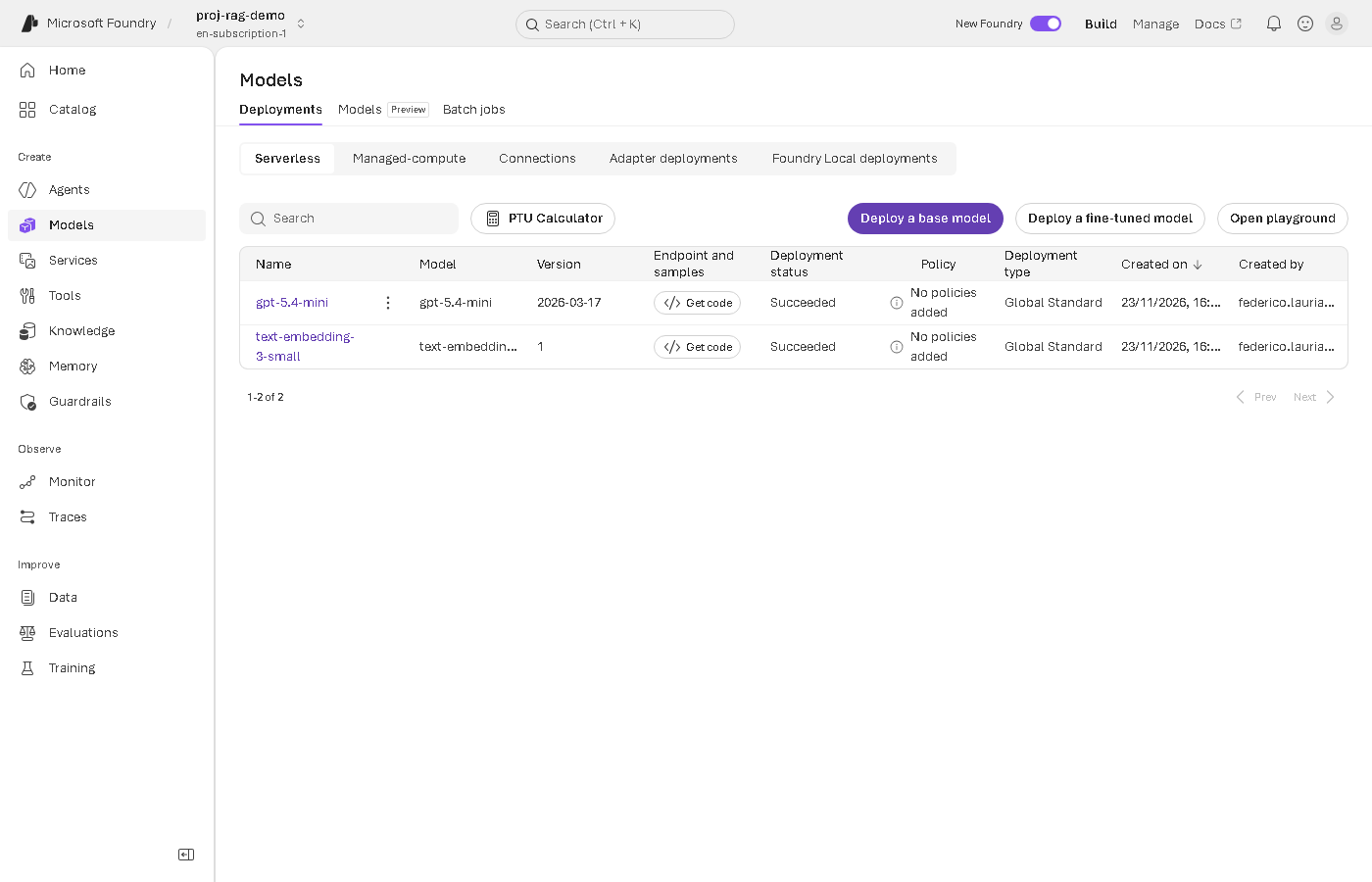
Il primo modello trasforma un testo in un vettore di 1.536 numeri, la rappresentazione con cui l'indice confronta i significati; il secondo scrive le risposte.
6. Dai i ruoli al tuo utente
Nel servizio di ricerca apri Access control (IAM) e premi Add > Add role assignment. Cerca Search Index Data Contributor, selezionalo e premi Next; in Members lascia User, group, or service principal, premi Select members, scegli il tuo utente e premi Select; poi Review + assign due volte. Ripeti con Search Service Contributor. Nella risorsa Foundry ripeti con Cognitive Services OpenAI User.
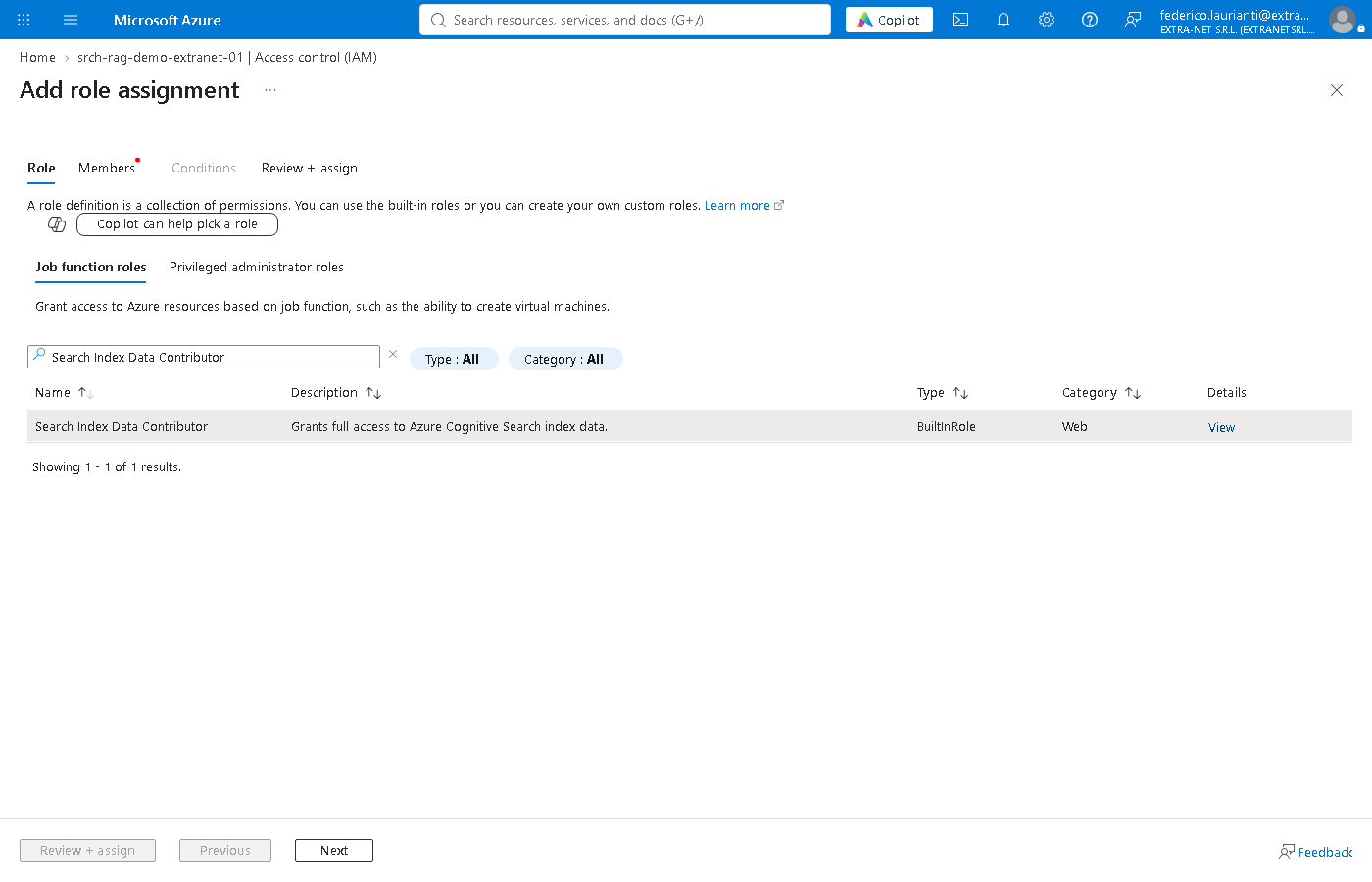
Il primo ruolo legge e scrive i documenti dell'indice, il secondo crea l'indice, il terzo chiama i modelli. I ruoli nuovi valgono dopo qualche minuto.
Le console .NET
7. Crea la soluzione
mkdir rag-tools && cd rag-tools
dotnet new sln -n RagTools
dotnet new console -n DevOpsIndex -o DevOpsIndex
dotnet new console -n DevOpsAsk -o DevOpsAsk
dotnet sln add DevOpsIndex DevOpsAsk
cd DevOpsIndex && dotnet add package Azure.Identity && dotnet add package Azure.Search.Documents && dotnet add package Azure.AI.OpenAI && cd ..
cd DevOpsAsk && dotnet add package Azure.Identity && dotnet add package Azure.Search.Documents && dotnet add package Azure.AI.OpenAI && cd ..
Nella prova le versioni erano Azure.Identity 1.21.0, Azure.Search.Documents 12.1.0 e Azure.AI.OpenAI 2.1.0. I nomi delle risorse stanno in un file alla radice, condiviso dalle due console. L'id del tenant è in Microsoft Entra ID > Overview > Tenant ID; l'endpoint della risorsa Foundry è https:// seguito dal suo nome e da .cognitiveservices.azure.com/.
{
  "tenantId": "<id del tuo tenant Microsoft Entra>",
  "devOpsOrganization": "extra-net",
  "devOpsProject": "rag-demo",
  "searchEndpoint": "https://srch-rag-demo-extranet-01.search.windows.net",
  "searchIndex": "rag-demo",
  "openAIEndpoint": "https://ai-rag-demo-extranet-01.cognitiveservices.azure.com/",
  "embeddingDeployment": "text-embedding-3-small",
  "chatDeployment": "gpt-5.4-mini"
}using System.Text.Json;
namespace RagTools;
/// <summary>
/// Names of the Azure DevOps project and of the Azure resources, read from appsettings.json
/// at the root of the repository (both consoles link the same file). No secrets: every call
/// authenticates with the signed-in user through DefaultAzureCredential.
/// </summary>
public sealed record Settings(
string TenantId,
string DevOpsOrganization,
string DevOpsProject,
string SearchEndpoint,
string SearchIndex,
string OpenAIEndpoint,
string EmbeddingDeployment,
string ChatDeployment)
{
/// <summary>Application id of Azure DevOps in Microsoft Entra: the scope of the token for dev.azure.com.</summary>
public const string DevOpsScope = "499b84ac-1321-427f-aa17-267ca6975798/.default";
public static Settings Load()
{
string path = Path.Combine(AppContext.BaseDirectory, "appsettings.json");
return JsonSerializer.Deserialize<Settings>(File.ReadAllText(path), JsonSerializerOptions.Web)
?? throw new InvalidOperationException($"{path} is empty.");
}
}In entrambi i file di progetto, DevOpsIndex.csproj e DevOpsAsk.csproj, aggiungi il collegamento ai due file condivisi:
  <ItemGroup>
    <Compile Include="../Shared/Settings.cs" Link="Settings.cs" />
    <None Include="../appsettings.json" Link="appsettings.json" CopyToOutputDirectory="PreserveNewest" />
  </ItemGroup>
8. Scrivi la console che indicizza
Quattro file nella cartella DevOpsIndex. Il primo taglia un testo in pezzi di circa 1.500 caratteri, a fine riga, con 200 caratteri di sovrapposizione perché un metodo a cavallo del taglio non si perda.
namespace DevOpsIndex;

/// <summary>Splits a text into pieces of about <see cref="Size"/> characters, cut at a line break, with an overlap.</summary>
public static class Chunker
{
    public const int Size = 1500;
    public const int Overlap = 200;

    public static IEnumerable<string> Split(string text)
    {
        text = text.Replace("\r\n", "\n").Trim();
        if (text.Length <= Size)
        {
            if (text.Length > 0)
            {
                yield return text;
            }

            yield break;
        }

        int start = 0;
        while (start < text.Length)
        {
            int end = Math.Min(start + Size, text.Length);
            if (end < text.Length)
            {
                // cut at the last line break of the window, if it is not too early
                int lineBreak = text.LastIndexOf('\n', end - 1, end - start);
                if (lineBreak > start + Size / 2)
                {
                    end = lineBreak + 1;
                }
            }

            yield return text[start..end];
            if (end >= text.Length)
            {
                yield break;
            }

            start = Math.Max(end - Overlap, start + 1);
        }
    }
}
Il secondo è il pezzo con la sua provenienza: tipo, repository, percorso, link, numero del pezzo e, dopo il passo 2 del programma, il vettore. La chiave è stabile, così lo stesso pezzo ha lo stesso id a ogni giro.
using System.Security.Cryptography;
using System.Text;
using Azure.Search.Documents.Models;

namespace DevOpsIndex;

/// <summary>One piece of text to index, with where it comes from. Kind is code, wiki or workitem.</summary>
public sealed class Chunk(string kind, string repo, string path, string title, string url, int number, string content)
{
    public string Kind { get; } = kind;
    public string Repo { get; } = repo;
    public string Path { get; } = path;
    public string Title { get; } = title;
    public string Url { get; } = url;
    public int Number { get; } = number;
    public string Content { get; } = content;
    public float[] Vector { get; set; } = [];

    /// <summary>Stable key: the same piece of the same source gets the same id at every run.</summary>
    public string Id => Convert.ToHexStringLower(SHA256.HashData(Encoding.UTF8.GetBytes($"{Kind}|{Repo}|{Path}|{Number}")));

    public SearchDocument ToDocument() => new()
    {
        ["id"] = Id,
        ["kind"] = Kind,
        ["repo"] = Repo,
        ["path"] = Path,
        ["title"] = Title,
        ["url"] = Url,
        ["chunk"] = Number,
        ["content"] = Content,
        ["vector"] = Vector,
    };
}
Il terzo legge il progetto con le API REST di Azure DevOps: i file di testo dei repository, le pagine della wiki e i work item con descrizione, criteri di accettazione e passi di riproduzione. I file dei repository hanno tre tipi: code per i sorgenti, doc per Markdown e testo, test per i progetti di test; al passo 10 si vede perché.
using System.Net;
using System.Net.Http.Headers;
using System.Net.Http.Json;
using System.Text;
using System.Text.Json;
using System.Text.RegularExpressions;
using Azure.Core;
using RagTools;

namespace DevOpsIndex;

/// <summary>Reads the text of a project from the Azure DevOps REST API: files of the repositories, wiki pages and work items.</summary>
public sealed partial class DevOpsReader(HttpClient http, string organization, string project)
{
    private const string Api = "api-version=7.1";

    /// <summary>Files read from the repositories; everything else (images, binaries) is skipped.</summary>
    private static readonly HashSet<string> TextExtensions =
    [
        ".cs", ".csproj", ".sln", ".slnx", ".props", ".targets",
        ".md", ".txt", ".json", ".yml", ".yaml", ".xml", ".sql", ".ps1", ".sh", ".http", ".razor", ".cshtml",
    ];

    private static readonly string[] TextFileNames = ["Dockerfile"];

    public static async Task<DevOpsReader> ConnectAsync(TokenCredential credential, string organization, string project)
    {
        // In the pipeline DEVOPS_TOKEN carries the token of the job itself (System.AccessToken);
        // on a workstation the signed-in user asks for one.
        string token = Environment.GetEnvironmentVariable("DEVOPS_TOKEN") is { Length: > 0 } jobToken
            ? jobToken
            : (await credential.GetTokenAsync(new TokenRequestContext([Settings.DevOpsScope]), CancellationToken.None)).Token;
        HttpClient http = new() { BaseAddress = new Uri($"https://dev.azure.com/{organization}/") };
        http.DefaultRequestHeaders.Authorization = new AuthenticationHeaderValue("Bearer", token);
        return new DevOpsReader(http, organization, project);
    }

    public async Task<List<Chunk>> ReadRepositoriesAsync()
    {
        List<Chunk> chunks = [];
        Page<Repository> repositories = (await http.GetFromJsonAsync<Page<Repository>>($"{project}/_apis/git/repositories?{Api}"))!;
        foreach (Repository repo in repositories.Value)
        {
            Page<Item> items;
            try
            {
                items = (await http.GetFromJsonAsync<Page<Item>>(
                    $"{project}/_apis/git/repositories/{repo.Id}/items?recursionLevel=Full&$format=json&{Api}"))!;
            }
            catch (HttpRequestException e) when (e.StatusCode == HttpStatusCode.NotFound)
            {
                // a repository without commits has no items yet
                Console.WriteLine($"repository {repo.Name}: empty, skipped");
                continue;
            }

            int files = 0;
            foreach (Item item in items.Value.Where(item => !item.IsFolder && IsText(item.Path)))
            {
                Item full = (await http.GetFromJsonAsync<Item>(
                    $"{project}/_apis/git/repositories/{repo.Id}/items?path={Uri.EscapeDataString(item.Path)}&includeContent=true&$format=json&{Api}"))!;
                if (string.IsNullOrWhiteSpace(full.Content) || full.Content.Length > 200_000)
                {
                    continue;
                }

                string title = $"{repo.Name}{item.Path}";
                string url = $"{repo.WebUrl}?path={Uri.EscapeDataString(item.Path)}";
                string kind = KindOf(item.Path);
                chunks.AddRange(Chunker.Split(full.Content)
                    .Select((text, number) => new Chunk(kind, repo.Name, item.Path, title, url, number, $"File {title}\n\n{text}")));
                files++;
            }

            Console.WriteLine($"repository {repo.Name}: {files} files");
        }

        return chunks;
    }

    public async Task<List<Chunk>> ReadWikiAsync()
    {
        List<Chunk> chunks = [];
        Page<Wiki> wikis = (await http.GetFromJsonAsync<Page<Wiki>>($"{project}/_apis/wiki/wikis?{Api}"))!;
        foreach (Wiki wiki in wikis.Value)
        {
            WikiPage root = (await http.GetFromJsonAsync<WikiPage>(
                $"{project}/_apis/wiki/wikis/{wiki.Id}/pages?path=/&recursionLevel=Full&{Api}"))!;
            int pages = 0;
            foreach (WikiPage page in Flatten(root).Where(page => page.Path != "/"))
            {
                WikiPage full = (await http.GetFromJsonAsync<WikiPage>(
                    $"{project}/_apis/wiki/wikis/{wiki.Id}/pages?path={Uri.EscapeDataString(page.Path)}&includeContent=true&{Api}"))!;
                if (string.IsNullOrWhiteSpace(full.Content))
                {
                    continue;
                }

                string title = page.Path.TrimStart('/');
                chunks.AddRange(Chunker.Split(full.Content)
                    .Select((text, number) => new Chunk("wiki", wiki.Name, page.Path, title, page.RemoteUrl, number, $"Wiki page {title}\n\n{text}")));
                pages++;
            }

            Console.WriteLine($"wiki {wiki.Name}: {pages} pages");
        }

        return chunks;
    }

    public async Task<List<Chunk>> ReadWorkItemsAsync()
    {
        List<Chunk> chunks = [];
        using HttpResponseMessage response = await http.PostAsJsonAsync($"{project}/_apis/wit/wiql?{Api}",
            new { query = "SELECT [System.Id] FROM WorkItems WHERE [System.TeamProject] = @project ORDER BY [System.Id]" });
        response.EnsureSuccessStatusCode();
        WiqlResult result = (await response.Content.ReadFromJsonAsync<WiqlResult>())!;
        const string fields = "System.Id,System.WorkItemType,System.Title,System.State,System.Tags,System.Description," +
                              "Microsoft.VSTS.Common.AcceptanceCriteria,Microsoft.VSTS.TCM.ReproSteps";
        foreach (int[] ids in result.WorkItems.Select(reference => reference.Id).Chunk(200))
        {
            Page<WorkItem> items = (await http.GetFromJsonAsync<Page<WorkItem>>(
                $"{project}/_apis/wit/workitems?ids={string.Join(',', ids)}&fields={fields}&{Api}"))!;
            foreach (WorkItem item in items.Value)
            {
                string type = item.Field("System.WorkItemType");
                string title = item.Field("System.Title");
                StringBuilder text = new();
                text.AppendLine($"{type} #{item.Id}: {title}");
                text.AppendLine($"State: {item.Field("System.State")}");
                if (item.Field("System.Tags") is { Length: > 0 } tags)
                {
                    text.AppendLine($"Tags: {tags}");
                }

                AppendSection(text, "Description", item.Field("System.Description"));
                AppendSection(text, "Acceptance criteria", item.Field("Microsoft.VSTS.Common.AcceptanceCriteria"));
                AppendSection(text, "Repro steps", item.Field("Microsoft.VSTS.TCM.ReproSteps"));
                string url = $"https://dev.azure.com/{organization}/{project}/_workitems/edit/{item.Id}";
                chunks.AddRange(Chunker.Split(text.ToString())
                    .Select((piece, number) => new Chunk("workitem", type, item.Id.ToString(), $"{type} #{item.Id}: {title}", url, number, piece)));
            }
        }

        Console.WriteLine($"work items: {result.WorkItems.Count}");
        return chunks;
    }

    /// <summary>Source files are "code"; prose in the repository is "doc"; test projects are "test".
    /// The question console searches "code" first, so that a rule is found where it is implemented.</summary>
    private static string KindOf(string path)
    {
        string extension = System.IO.Path.GetExtension(path).ToLowerInvariant();
        if (extension is ".md" or ".txt")
        {
            return "doc";
        }

        return path.Contains("/tests/", StringComparison.OrdinalIgnoreCase) || path.EndsWith("Tests.cs", StringComparison.Ordinal)
            ? "test"
            : "code";
    }

    private static bool IsText(string path)
    {
        string name = path[(path.LastIndexOf('/') + 1)..];
        return TextFileNames.Contains(name) || TextExtensions.Contains(System.IO.Path.GetExtension(name).ToLowerInvariant());
    }

    private static IEnumerable<WikiPage> Flatten(WikiPage page)
    {
        yield return page;
        foreach (WikiPage sub in page.SubPages ?? [])
        {
            foreach (WikiPage inner in Flatten(sub))
            {
                yield return inner;
            }
        }
    }

    private static void AppendSection(StringBuilder text, string heading, string html)
    {
        string plain = StripHtml(html);
        if (plain.Length > 0)
        {
            text.AppendLine();
            text.AppendLine($"{heading}:");
            text.AppendLine(plain);
        }
    }

    /// <summary>Work item fields are HTML: keep the text, turn block ends into line breaks.</summary>
    private static string StripHtml(string html)
    {
        if (string.IsNullOrWhiteSpace(html))
        {
            return "";
        }

        string text = BlockEnd().Replace(html, "\n");
        text = Tag().Replace(text, " ");
        text = WebUtility.HtmlDecode(text);
        text = Spaces().Replace(text, " ");
        text = BlankLines().Replace(text, "\n");
        return text.Trim();
    }

    [GeneratedRegex("</(p|div|li|tr|h[1-6])>|<br ?/?>", RegexOptions.IgnoreCase)]
    private static partial Regex BlockEnd();

    [GeneratedRegex("<[^>]+>")]
    private static partial Regex Tag();

    [GeneratedRegex("[ \t]+")]
    private static partial Regex Spaces();

    [GeneratedRegex("\\s*\n\\s*")]
    private static partial Regex BlankLines();

    // Shapes of the JSON answers of Azure DevOps, only the properties used here.
    private sealed record Page<T>(List<T> Value);

    private sealed record Repository(string Id, string Name, string WebUrl);

    private sealed record Item(string Path, bool IsFolder, string? Content);

    private sealed record Wiki(string Id, string Name);

    private sealed record WikiPage(string Path, string RemoteUrl, string? Content, List<WikiPage>? SubPages);

    private sealed record WiqlResult(List<WorkItemReference> WorkItems);

    private sealed record WorkItemReference(int Id);

    private sealed record WorkItem(int Id, Dictionary<string, JsonElement> Fields)
    {
        public string Field(string name) =>
            Fields.TryGetValue(name, out JsonElement value) && value.ValueKind == JsonValueKind.String ? value.GetString()! : "";
    }
}
Il quarto mette insieme i tre passi: legge, calcola un vettore per ogni pezzo con il modello di embedding, ricrea l'indice e carica i documenti. L'indice ha il testo per la ricerca a parole chiave, il vettore per quella per significato e una configurazione per il semantic ranker.
using Azure;
using Azure.AI.OpenAI;
using Azure.Identity;
using Azure.Search.Documents;
using Azure.Search.Documents.Indexes;
using Azure.Search.Documents.Indexes.Models;
using DevOpsIndex;
using OpenAI.Embeddings;
using RagTools;

Settings settings = Settings.Load();
DefaultAzureCredential credential = new(new DefaultAzureCredentialOptions { TenantId = settings.TenantId });

// 1. Read the project: files of the repositories, wiki pages and work items, cut into pieces.
DevOpsReader devOps = await DevOpsReader.ConnectAsync(credential, settings.DevOpsOrganization, settings.DevOpsProject);
List<Chunk> chunks = [];
chunks.AddRange(await devOps.ReadRepositoriesAsync());
chunks.AddRange(await devOps.ReadWikiAsync());
chunks.AddRange(await devOps.ReadWorkItemsAsync());
Console.WriteLine($"{chunks.Count} pieces to index: " +
    string.Join(", ", chunks.GroupBy(c => c.Kind).OrderBy(g => g.Key).Select(g => $"{g.Count()} {g.Key}")));

// 2. One embedding per piece, in batches.
AzureOpenAIClient openAI = new(new Uri(settings.OpenAIEndpoint), credential);
EmbeddingClient embeddings = openAI.GetEmbeddingClient(settings.EmbeddingDeployment);
foreach (Chunk[] batch in chunks.Chunk(16))
{
    OpenAIEmbeddingCollection result = await embeddings.GenerateEmbeddingsAsync(batch.Select(c => c.Content).ToList());
    for (int i = 0; i < batch.Length; i++)
    {
        batch[i].Vector = result[i].ToFloats().ToArray();
    }
}

Console.WriteLine("embeddings computed");

// 3. Recreate the index and upload the pieces. The text field serves the keyword part of the hybrid search,
//    the vector field the semantic part.
SearchIndexClient indexClient = new(new Uri(settings.SearchEndpoint), credential);
SearchIndex index = new(settings.SearchIndex)
{
    Fields =
    {
        new SimpleField("id", SearchFieldDataType.String) { IsKey = true },
        new SimpleField("kind", SearchFieldDataType.String) { IsFilterable = true, IsFacetable = true },
        new SimpleField("repo", SearchFieldDataType.String) { IsFilterable = true },
        new SimpleField("path", SearchFieldDataType.String),
        new SearchableField("title"),
        new SimpleField("url", SearchFieldDataType.String),
        new SimpleField("chunk", SearchFieldDataType.Int32),
        new SearchableField("content"),
        new VectorSearchField("vector", 1536, "default"),
    },
    VectorSearch = new VectorSearch
    {
        Algorithms = { new HnswAlgorithmConfiguration("hnsw") },
        Profiles = { new VectorSearchProfile("default", "hnsw") },
    },
    // The semantic ranker re-orders the candidates of the hybrid search by meaning (free plan: 1000 queries a month).
    SemanticSearch = new SemanticSearch
    {
        Configurations =
        {
            new SemanticConfiguration("default", new SemanticPrioritizedFields
            {
                TitleField = new SemanticField("title"),
                ContentFields = { new SemanticField("content") },
            }),
        },
    },
};

try
{
    await indexClient.DeleteIndexAsync(index.Name);
}
catch (RequestFailedException e) when (e.Status == 404)
{
    // first run: nothing to delete
}

await indexClient.CreateIndexAsync(index);
SearchClient search = indexClient.GetSearchClient(index.Name);
foreach (Chunk[] batch in chunks.Chunk(100))
{
    await search.UploadDocumentsAsync(batch.Select(c => c.ToDocument()));
}

Console.WriteLine($"index {index.Name} rebuilt with {chunks.Count} documents");
9. Costruisci l'indice
dotnet run --project DevOpsIndexNella prova:
repository rag-tools: 12 files
repository shipping-service: 12 files
repository orders-api: 26 files
wiki rag-demo.wiki: 7 pages
work items: 42
137 pieces to index: 54 code, 16 doc, 10 test, 15 wiki, 42 workitem
embeddings computed
index rag-demo rebuilt with 137 documents
L'indice si cancella e si ricrea a ogni giro: semplice, e i pezzi che non esistono più spariscono. Nel servizio di ricerca, Search management > Indexes mostra rag-demo con il numero dei documenti. Se la prima esecuzione risponde 403, i ruoli del passo 6 non sono ancora attivi: aspetta qualche minuto.
10. Scrivi la console che risponde
La console fa due ricerche ibride, parole chiave più vettori: la prima solo sui sorgenti, la seconda su tutto. Senza la prima, le pagine della wiki e i work item che descrivono una regola in prosa scalzavano il file che la implementa, e alla domanda «dove sta la logica?» il modello rispondeva con la documentazione. Il semantic ranker si usa solo sulla seconda: misurato su questo indice, sui sorgenti spingeva Order.cs, il file con il metodo cercato, dal primo al sesto posto, dietro ai file i cui commenti parlano della stessa regola. Al modello vanno fino a nove passaggi, cinque di codice, con l'istruzione di rispondere solo con quelli e di citarli.
using System.Text;
using Azure.AI.OpenAI;
using Azure.Identity;
using Azure.Search.Documents;
using Azure.Search.Documents.Models;
using OpenAI.Chat;
using OpenAI.Embeddings;
using RagTools;

if (args.Length == 0)
{
    Console.WriteLine("usage: dotnet run --project DevOpsAsk -- \"your question\"");
    return 1;
}

string question = string.Join(' ', args);
Settings settings = Settings.Load();
DefaultAzureCredential credential = new(new DefaultAzureCredentialOptions { TenantId = settings.TenantId });
AzureOpenAIClient openAI = new(new Uri(settings.OpenAIEndpoint), credential);

// 1. Hybrid search: the question as keywords on the text and, as a vector, against the embeddings;
//    the semantic ranker then re-orders the candidates by meaning.
EmbeddingClient embeddings = openAI.GetEmbeddingClient(settings.EmbeddingDeployment);
ReadOnlyMemory<float> vector = (await embeddings.GenerateEmbeddingAsync(question)).Value.ToFloats();
SearchClient search = new(new Uri(settings.SearchEndpoint), settings.SearchIndex, credential);

// Two searches: one on source files only, one on everything, so that code is never crowded out
// by the wiki and the work items that describe the same rule in prose. At most two pieces per file,
// so that five passages cover at least three different files.
List<SearchDocument> passages = [];
foreach ((string? filter, int keep, bool semantic) in new (string?, int, bool)[] { ("kind eq 'code'", 5, false), (null, 4, true) })
{
    SearchOptions options = new()
    {
        Size = 10,
        Filter = filter,
        Select = { "id", "kind", "title", "url", "content" },
        VectorSearch = new VectorSearchOptions
        {
            Queries = { new VectorizedQuery(vector) { KNearestNeighborsCount = 30, Fields = { "vector" } } },
        },
    };
    if (semantic)
    {
        // The semantic ranker helps with prose, but it demotes source code behind the comments that describe it:
        // measured on this index, so it is used only for the search on everything.
        options.QueryType = SearchQueryType.Semantic;
        options.SemanticSearch = new SemanticSearchOptions { SemanticConfigurationName = "default" };
    }

    SearchResults<SearchDocument> results = await search.SearchAsync<SearchDocument>(question, options);
    int kept = 0;
    await foreach (SearchResult<SearchDocument> result in results.GetResultsAsync())
    {
        SearchDocument document = result.Document;
        bool seen = passages.Any(passage => Equals(passage["id"], document["id"]));
        bool fileFull = passages.Count(passage => Equals(passage["title"], document["title"])) >= 2;
        if (seen || fileFull)
        {
            continue;
        }

        passages.Add(document);
        if (++kept == keep)
        {
            break;
        }
    }
}

if (passages.Count == 0)
{
    Console.WriteLine("Nothing found: run DevOpsIndex first.");
    return 2;
}

// 2. The model answers from the passages only and cites them by number.
StringBuilder context = new();
for (int i = 0; i < passages.Count; i++)
{
    context.AppendLine($"[{i + 1}] ({passages[i]["kind"]}) {passages[i]["title"]}");
    context.AppendLine(passages[i]["content"]?.ToString());
    context.AppendLine();
}

ChatClient chat = openAI.GetChatClient(settings.ChatDeployment);
ChatCompletion completion = await chat.CompleteChatAsync(
[
    new SystemChatMessage(
        "You answer questions about a software project using only the passages provided. " +
        "Cite the passages you use as [n]. If the passages do not contain the answer, say so. " +
        "When asked where something is implemented, answer with the path of the source file and the " +
        "class or method, taken from the passages marked (code); wiki and work items only confirm the rule. " +
        "Answer in the language of the question."),
    new UserChatMessage($"Question: {question}\n\nPassages:\n{context}"),
]);

Console.WriteLine(completion.Content[0].Text);
Console.WriteLine();
Console.WriteLine("Sources:");
for (int i = 0; i < passages.Count; i++)
{
    Console.WriteLine($"[{i + 1}] {passages[i]["kind"]}: {passages[i]["title"]}");
    Console.WriteLine($"    {passages[i]["url"]}");
}

return 0;
11. Fai le domande
dotnet run --project DevOpsAsk -- "Dove sta la logica che impedisce di annullare un ordine già spedito?"Nella prova, con le fonti citate in fondo:
La logica è nel file `orders-api/src/Orders.Domain/Order.cs`, nel metodo `Cancel()` della classe `Order` [1].
Lì viene bloccato l'annullamento quando lo stato è `Shipped` o `Delivered`, con una `DomainException` che dice di aprire un reso invece [1].

Il flusso API che espone questo comportamento è in `orders-api/src/Orders.Api/Program.cs`, nell'endpoint `POST /orders/{id:guid}/cancel`, che chiama `order.Cancel()` e trasforma l'errore in `409 Conflict` [2].

Sources:
[1] code: orders-api/src/Orders.Domain/Order.cs
    https://dev.azure.com/extra-net/rag-demo/_git/orders-api?path=%2Fsrc%2FOrders.Domain%2FOrder.cs
[2] code: orders-api/src/Orders.Api/Program.cs
    https://dev.azure.com/extra-net/rag-demo/_git/orders-api?path=%2Fsrc%2FOrders.Api%2FProgram.cs
Una domanda sulla wiki:
dotnet run --project DevOpsAsk -- "Quando si può rilasciare in produzione e chi approva?"Si può rilasciare in produzione il martedì e il giovedì, tra le 9:00 e le 11:00; mai il venerdì e mai il giorno prima di una festività. Durante i saldi di gennaio e luglio i rilasci in produzione sono sospesi, salvo correzioni di incidenti S1. [6]
L'approvazione del passaggio in produzione è del product owner, che deve approvare il rilascio nell'ambiente `prod` di Azure DevOps. [6][8]E una sui work item, in inglese: il modello ha risposto in italiano, la lingua dei work item, nonostante l'istruzione.
dotnet run --project DevOpsAsk -- "Which bugs about shipping are still open?"Tra i bug sulle spedizioni, quello ancora aperto è:
- Bug #573: [S2] 409 alla spedizione subito dopo il pagamento — State: Active [7]
Gli altri bug di spedizione presenti nei passaggi risultano chiusi:
- Bug #576 Svizzera quotata come UE — Closed [8]
- Bug #575 collo da 30,00 kg rifiutato come pallet — Closed [9]La pipeline
12. Crea la service connection
In Azure DevOps apri Project settings > Service connections e premi Create service connection. Scegli Azure Resource Manager e premi Next. Compila:
- Identity type: App registration (automatic)
- Credential: Workload identity federation
- Scope level: Subscription
- Subscription: la tua
- Resource group:
rg-rag-demo-01 - Service Connection Name:
azure-rag-demo - Grant access permission to all pipelines: spuntato
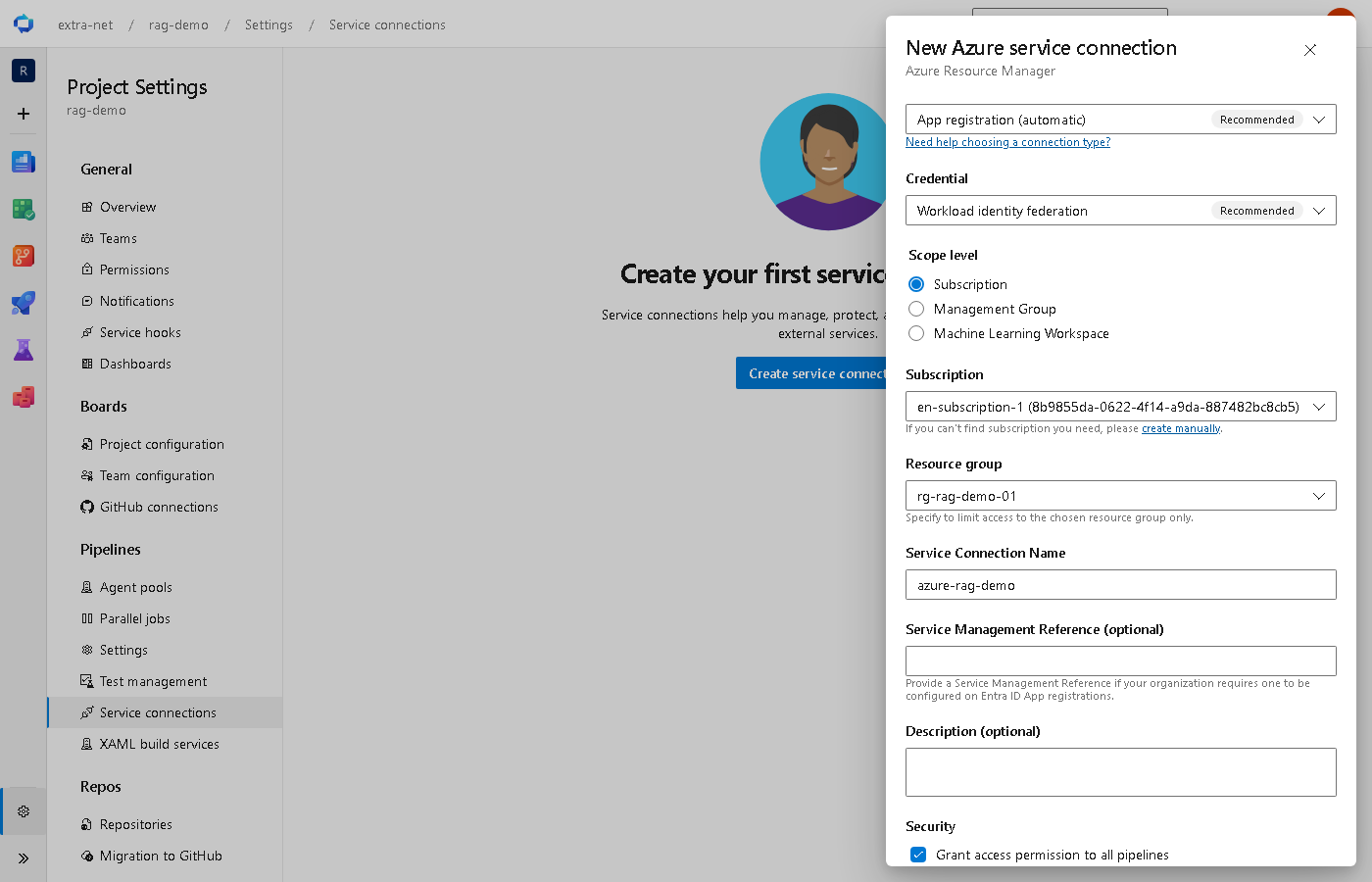
Premi Save. Azure DevOps registra in Microsoft Entra un'applicazione chiamata extra-net-rag-demo- seguito da un id, con il ruolo Contributor sul gruppo di risorse. Non c'è nessun segreto: la pipeline ottiene i token di Azure con la federazione.
13. Dai i ruoli all'identità della pipeline
Come al passo 6, ma in Select members cerca extra-net-rag-demo e scegli l'applicazione: Search Index Data Contributor e Search Service Contributor sul servizio di ricerca, Cognitive Services OpenAI User sulla risorsa Foundry.
14. Aggiungi il file della pipeline
Alla radice della soluzione:
# Rebuilds the search index: every night at 03:00 UTC and on "Run pipeline". No trigger on push.
trigger: none
pr: none

schedules:
  - cron: "0 3 * * *"
    displayName: Nightly re-index
    branches:
      include:
        - main
    always: true

# The job token can read only the repositories declared here and listed under "uses":
# the two indexed ones, the wiki and this one.
resources:
  repositories:
    - repository: orders-api
      type: git
      name: rag-demo/orders-api
    - repository: shipping-service
      type: git
      name: rag-demo/shipping-service
    - repository: wiki
      type: git
      name: rag-demo/rag-demo.wiki

pool:
  vmImage: ubuntu-latest

jobs:
  - job: reindex
    displayName: Re-index
    uses:
      repositories:
        - orders-api
        - shipping-service
        - wiki
    steps:
      - checkout: self

      - task: UseDotNet@2
        displayName: Install .NET 11
        inputs:
          version: 11.0.x

      - task: AzureCLI@2
        displayName: Re-index the project
        inputs:
          azureSubscription: azure-rag-demo
          scriptType: bash
          scriptLocation: inlineScript
          inlineScript: dotnet run --project DevOpsIndex -c Release
        env:
          DEVOPS_TOKEN: $(System.AccessToken)
always: true fa partire il giro notturno anche senza modifiche al repository, perché wiki e work item cambiano fuori da Git. Il passo AzureCLI@2 entra in Azure con la service connection, così DefaultAzureCredential trova il login; il token del job, System.AccessToken, arriva alla console nella variabile DEVOPS_TOKEN e legge solo i repository dichiarati in resources e in uses: i due indicizzati, la wiki, che è un repository anch'essa, e quello della pipeline. Un repository nuovo nel progetto va aggiunto lì.
In Azure DevOps crea il repository rag-tools (Repos > New repository) e pubblica la soluzione:
git init -b main && git add . && git commit -m "Index and ask consoles"
git remote add origin https://dev.azure.com/extra-net/rag-demo/_git/rag-tools
git push -u origin main
15. Crea la pipeline e avviala
Apri Pipelines e premi Create Pipeline > Azure Repos Git > rag-tools. Azure DevOps trova azure-pipelines.yml e mostra Review your pipeline YAML: premi Run.
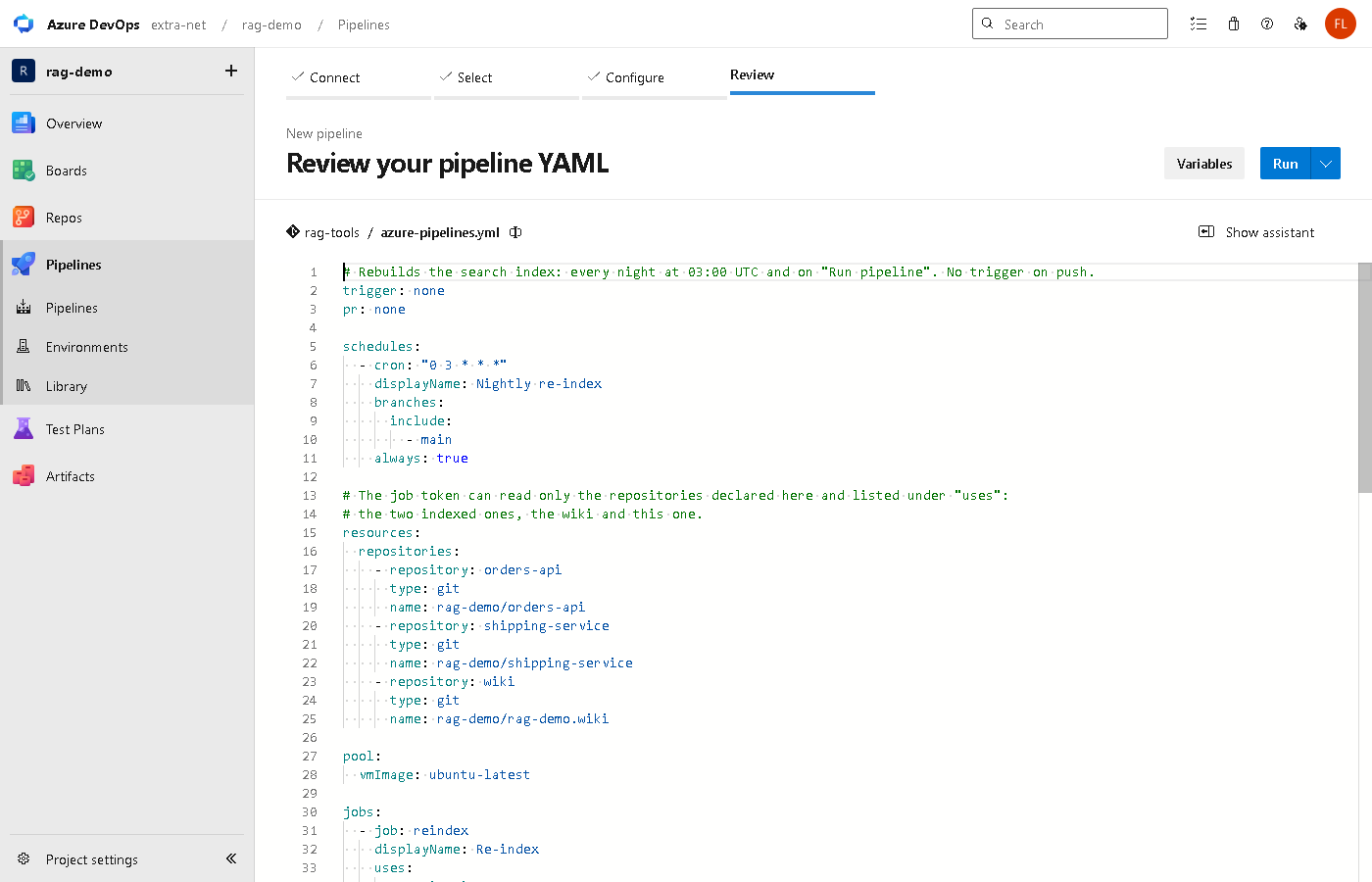
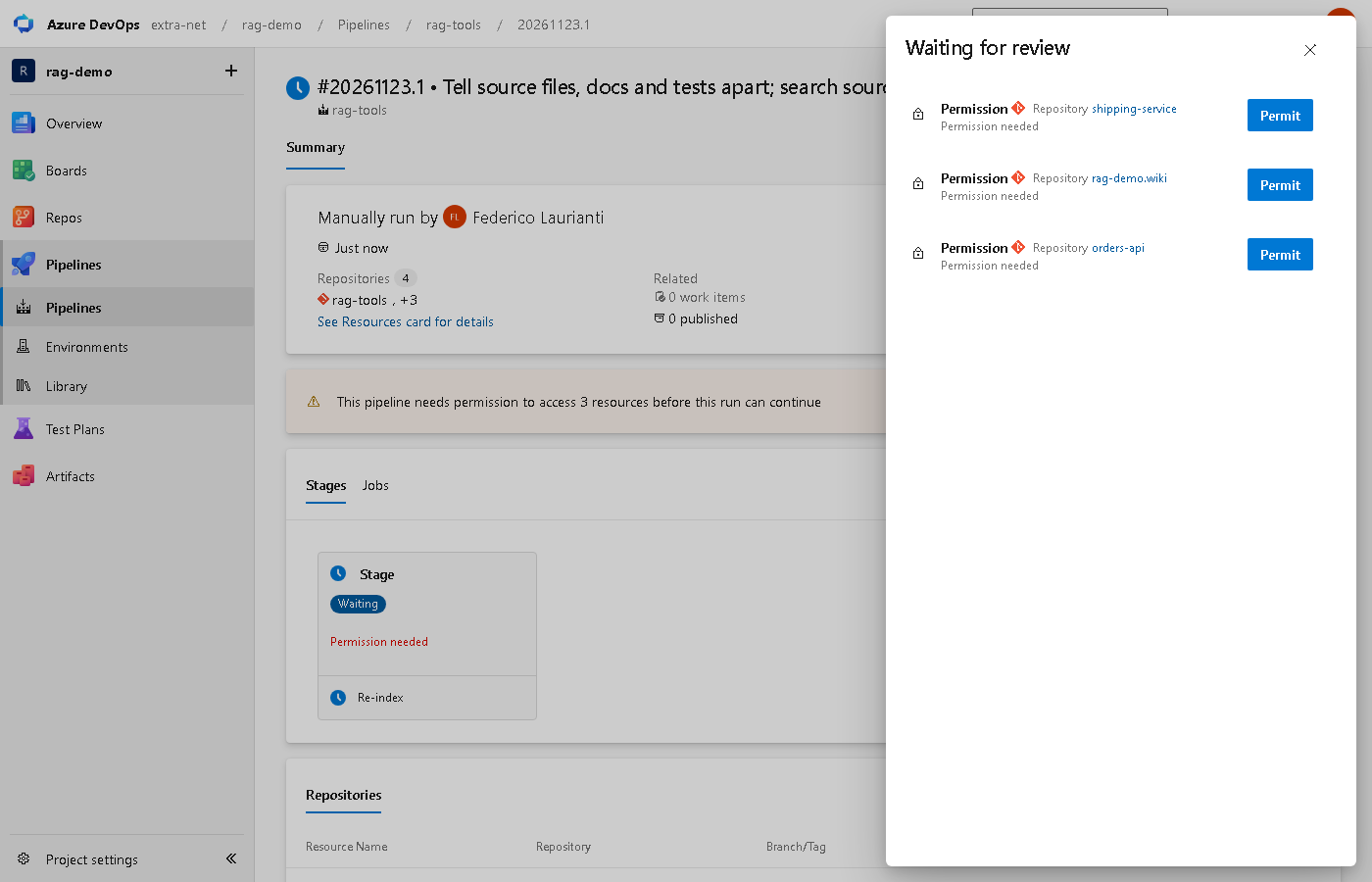
Il primo giro si ferma con This pipeline needs permission to access 3 resources before this run can continue. Premi View e, in Waiting for review, Permit per ciascuno dei tre repository, confermando ogni volta.
Il giro riparte e finisce in circa un minuto. Nel log del passo Re-index the project:
repository rag-tools: 12 files
repository shipping-service: 12 files
repository orders-api: 26 files
wiki rag-demo.wiki: 7 pages
work items: 42
137 pieces to index: 54 code, 16 doc, 10 test, 15 wiki, 42 workitem
embeddings computed
index rag-demo rebuilt with 137 documents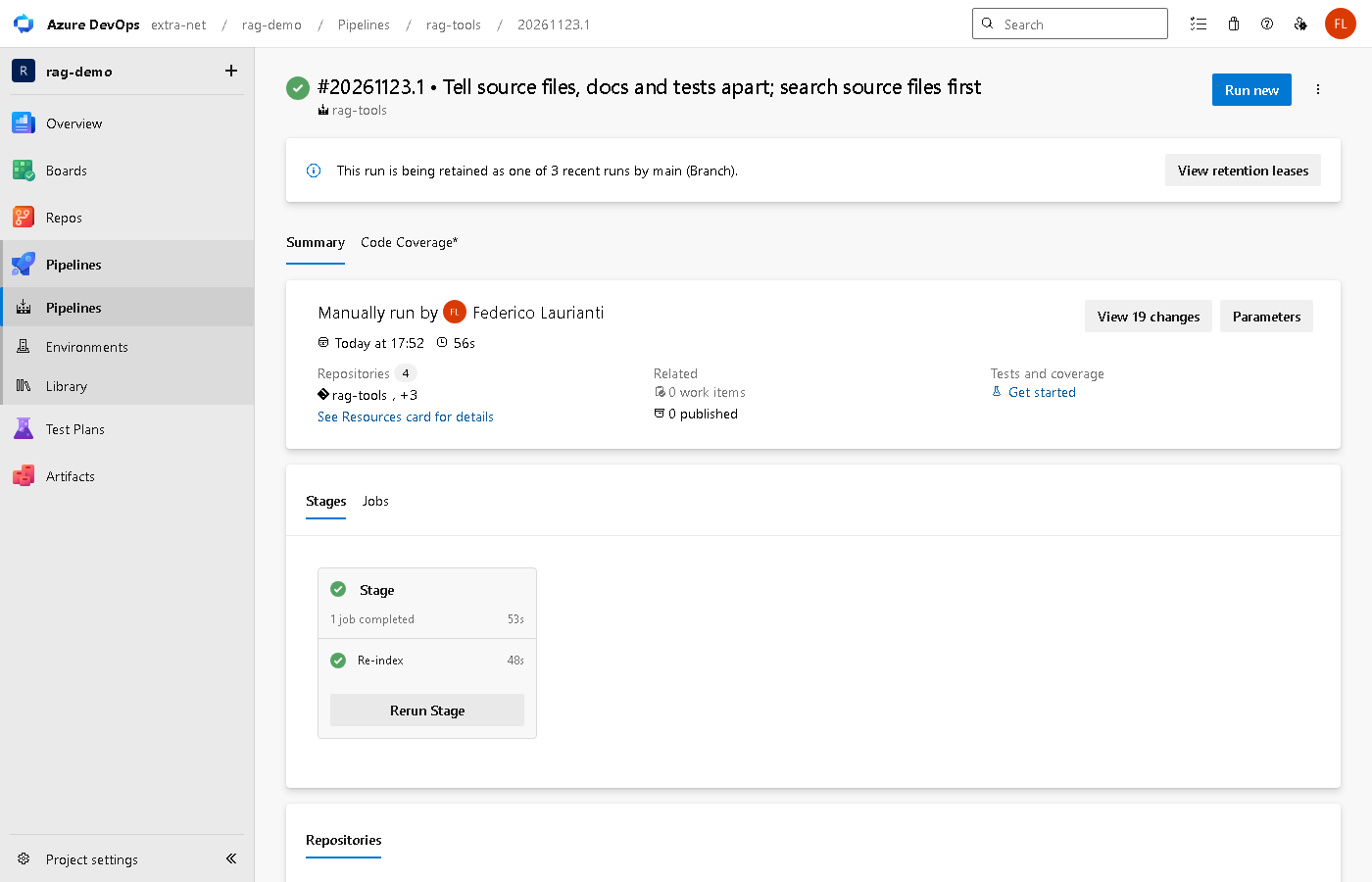
Da qui l'indice si rifà ogni notte alle 03:00 UTC e quando premi Run pipeline. Serve almeno un job parallelo hosted nell'organizzazione: quelle nuove lo chiedono dal modulo di Microsoft; qui ce n'era uno, con 1.800 minuti al mese.
La stessa ricerca senza nessun servizio in cloud è in Ricerca tutta in locale su un progetto Azure DevOps: embedding multilingue, riordino, Microsoft.Extensions.VectorData con HNSW e API in .NET. Lo stesso servizio può servire anche un motore con embedding e riordino in locale, attraverso Microsoft.Extensions.VectorData: Ricerca su un progetto Azure DevOps con Microsoft.Extensions.VectorData su Azure AI Search.
Eliminare le risorse
16. Elimina il gruppo, la pipeline e la service connection
Sul portale elimina il gruppo rg-rag-demo-01: con lui vanno il servizio di ricerca, la risorsa Foundry con le distribuzioni e le assegnazioni dei ruoli. In Azure DevOps elimina la pipeline, dal menu ... di Pipelines, e la service connection, dal menu ... di Project settings > Service connections; se in Microsoft Entra ID > App registrations resta l'applicazione extra-net-rag-demo-..., eliminala.
Nomi dei comandi, schermate e risposte rilevati il 23 novembre 2026, regione West Europe, con .NET 11.