


Procedura per cercare in un progetto Azure DevOps con la qualità di Azure AI Search, senza nessun servizio in cloud. I file dei repository, le pagine della wiki e i work item diventano una cartella di file JSON dentro un repository Git, un file per sorgente, con i pezzi di testo e i loro vettori. Un modello di embedding multilingue calcola i vettori in ONNX Runtime, dentro il processo .NET; la ricerca unisce parole chiave e significato e poi riordina i candidati con un cross-encoder, quello che in Azure fa il semantic ranker. I vettori stanno in un grafo HNSW dietro Microsoft.Extensions.VectorData, l'astrazione .NET per gli archivi vettoriali, così l'archivio si può cambiare senza riscrivere il motore. Una console stampa i passaggi trovati con i link alle pagine di Azure DevOps, una minimal API fa lo stesso per chi vuole un endpoint condiviso, una pipeline aggiorna l'indice ogni notte e committa solo i file cambiati. La risposta la scrive chi legge i passaggi, una persona o un coding agent. Tutte le licenze sono MIT o Apache 2.0.
È la variante senza cloud di Indicizzare un progetto Azure DevOps su Azure AI Search e interrogarlo da .NET, sullo stesso progetto di esempio. Lo stesso motore con l'archivio su Azure AI Search è in Ricerca su un progetto Azure DevOps con Microsoft.Extensions.VectorData su Azure AI Search.
Occorre: un progetto Azure DevOps con almeno un repository, una wiki e qualche work item. Qui è rag-demo, nell'organizzazione extra-net: due repository .NET, orders-api e shipping-service, una wiki di 7 pagine e 42 work item; il repository rag-engine è quello che si scrive in questa guida. Poi .NET 11 e l'Azure CLI con il login fatto (az login). Per l'API protetta, il permesso di registrare applicazioni in Microsoft Entra.
Durata: circa due ore; la prima compilazione scarica 250 MB di modelli.
Costo: zero. La pipeline usa i minuti gratuiti dell'organizzazione.
Il portale di Azure e Azure DevOps delle schermate sono in inglese: i nomi dei comandi sono riportati come appaiono a schermo.
I modelli
1. Crea il repository e la soluzione
In Azure DevOps apri Repos > Files, premi il nome del repository in alto e scegli New repository: nome rag-engine, senza README. Sul computer, una libreria e tre programmi:
mkdir rag-engine && cd rag-engine
dotnet new sln -n RagEngine
dotnet new classlib -n Rag.Engine -o Rag.Engine
dotnet new console -n RagIndex -o RagIndex
dotnet new console -n RagSearch -o RagSearch
dotnet new web -n RagApi -o RagApi
dotnet sln add Rag.Engine RagIndex RagSearch RagApi
dotnet new gitignore
cd Rag.Engine && rm Class1.cs
dotnet add package Azure.Identity && dotnet add package Microsoft.ML.OnnxRuntime && dotnet add package Microsoft.ML.Tokenizers
dotnet add package Microsoft.Data.Sqlite && dotnet add package Hnsw.Net && dotnet add package Microsoft.Extensions.VectorData.Abstractions
cd ..
dotnet add RagIndex reference Rag.Engine && dotnet add RagSearch reference Rag.Engine && dotnet add RagApi reference Rag.Engine
cd RagApi && dotnet add package Microsoft.Identity.Web && cd ..
Nella prova le versioni erano Azure.Identity 1.21.0, Microsoft.ML.OnnxRuntime 1.32.0, Microsoft.ML.Tokenizers 3.0.0, Microsoft.Data.Sqlite 11.0.0, Hnsw.Net 0.1.4, Microsoft.Extensions.VectorData.Abstractions 11.0.1 e Microsoft.Identity.Web 4.18.0. ONNX Runtime esegue i modelli, Microsoft.ML.Tokenizers legge il loro tokenizer, Microsoft.Data.Sqlite porta SQLite con FTS5, la ricerca a parole chiave; Hnsw.Net è un grafo HNSW scritto in C#, senza librerie native, con il suo connettore per Microsoft.Extensions.VectorData.
Alla radice i nomi del progetto e dell'archivio, condivisi dai tre programmi. L'id del tenant è in Microsoft Entra ID > Overview > Tenant ID.
{
  "tenantId": "4813d8ed-5a5c-44fd-805e-d338911fe0c1",
  "devOpsOrganization": "extra-net",
  "devOpsProject": "rag-demo",
  "store": "hnsw",
  "collection": "rag-engine"
}
E in fondo a .gitignore le cache e i modelli, che non vanno in Git:
# local caches and downloaded models
.cache/
Rag.Engine/.models/
2. Fai scaricare i modelli dalla build
Due modelli, scelti per la lingua e la licenza: multilingual-e5-small di intfloat, MIT, per gli embedding, nell'esportazione ONNX quantizzata di Xenova, 118 MB; mmarco-mMiniLMv2-L12-H384-v1 di cross-encoder, Apache 2.0, per il riordino, 119 MB. Entrambi usano il tokenizer di XLM-RoBERTa, un file SentencePiece di 5 MB. Il modello multilingue non è un dettaglio: con un modello solo inglese, nella prova, le domande in italiano non trovavano né il codice né i bug, perché la ricerca a parole chiave non passa da una lingua all'altra e quella per significato dipende dal modello.
Un file di MSBuild li scarica alla prima compilazione in Rag.Engine/.models e li copia accanto a ogni eseguibile, nella cartella models:
<Project>
  <!--
    The two ONNX models and their tokenizers, downloaded once from Hugging Face into Rag.Engine/.models
    (ignored by git) and copied next to every executable that references the library.
    Embeddings: intfloat/multilingual-e5-small (MIT), quantized export by Xenova.
    Reranking: cross-encoder/mmarco-mMiniLMv2-L12-H384-v1 (Apache 2.0), quantized export.
  -->
  <PropertyGroup>
    <RagModelsDir>$(MSBuildThisFileDirectory).models\</RagModelsDir>
  </PropertyGroup>

  <ItemGroup>
    <RagModelFile Include="embedding/model.onnx" Url="https://huggingface.co/Xenova/multilingual-e5-small/resolve/main/onnx/model_quantized.onnx" />
    <RagModelFile Include="embedding/sentencepiece.bpe.model" Url="https://huggingface.co/Xenova/multilingual-e5-small/resolve/main/sentencepiece.bpe.model" />
    <RagModelFile Include="reranker/model.onnx" Url="https://huggingface.co/cross-encoder/mmarco-mMiniLMv2-L12-H384-v1/resolve/main/onnx/model_quint8_avx2.onnx" />
    <RagModelFile Include="reranker/sentencepiece.bpe.model" Url="https://huggingface.co/cross-encoder/mmarco-mMiniLMv2-L12-H384-v1/resolve/main/sentencepiece.bpe.model" />
  </ItemGroup>

  <Target Name="AcquireRagModels" BeforeTargets="AssignTargetPaths">
    <DownloadFile Condition="!Exists('$(RagModelsDir)%(RagModelFile.Identity)')"
                  SourceUrl="%(RagModelFile.Url)"
                  DestinationFolder="$(RagModelsDir)%(RagModelFile.RelativeDir)"
                  DestinationFileName="%(RagModelFile.Filename)%(RagModelFile.Extension)" />
    <ItemGroup>
      <Content Include="$(RagModelsDir)%(RagModelFile.Identity)" Link="models\%(RagModelFile.Identity)" CopyToOutputDirectory="PreserveNewest" />
    </ItemGroup>
  </Target>
</Project>
In Rag.Engine/Rag.Engine.csproj, prima della chiusura di Project:
<Import Project="Models.targets" />3. Scrivi il tokenizer
I due modelli leggono il testo con il tokenizer di XLM-RoBERTa: un modello SentencePiece più quattro token speciali. Microsoft.ML.Tokenizers legge il file SentencePiece; il vocabolario di Hugging Face però mette davanti <s>, <pad>, </s> e <unk>, quindi ogni id va spostato di uno. Nella prova gli id prodotti così sono risultati identici a quelli del tokenizer di riferimento di Hugging Face sulle stesse frasi.
using Microsoft.ML.Tokenizers;
namespace Rag.Engine;
/// <summary>
/// The tokenizer of the XLM-RoBERTa family, used by both models: a SentencePiece model plus the
/// four special tokens of the Hugging Face vocabulary. Every SentencePiece id is shifted by one,
/// because the Hugging Face vocabulary puts <s>, <pad>, </s> and <unk> first.
/// </summary>
public sealed class XlmRobertaTokenizer
{
public const int BeginningOfSentence = 0;
public const int Padding = 1;
public const int EndOfSentence = 2;
private const int Shift = 1;
private readonly SentencePieceTokenizer _model;
public XlmRobertaTokenizer(string modelFile)
{
using FileStream stream = File.OpenRead(modelFile);
_model = SentencePieceTokenizer.Create(stream, addBeginningOfSentence: false, addEndOfSentence: false);
}
/// <summary>Ids of one text: <s> text </s>, cut to <paramref name="maxTokens"/>.</summary>
public int[] Encode(string text, int maxTokens)
{
List<int> ids = Pieces(text, maxTokens - 2);
return [BeginningOfSentence, .. ids, EndOfSentence];
}
/// <summary>Ids of a pair, as the cross-encoder expects: <s> first </s></s> second </s>; the second text is the one cut.</summary>
public int[] EncodePair(string first, string second, int maxTokens)
{
List<int> a = Pieces(first, maxTokens / 2);
List<int> b = Pieces(second, maxTokens - a.Count - 4);
return [BeginningOfSentence, .. a, EndOfSentence, EndOfSentence, .. b, EndOfSentence];
}
private List<int> Pieces(string text, int max)
{
IReadOnlyList<int> raw = _model.EncodeToIds(text);
return raw.Take(Math.Max(max, 0)).Select(id => id + Shift).ToList();
}
}4. Scrivi l'embedding
Il modello vuole un prefisso che dice cos'è il testo, query: per le domande e passage: per i pezzi; restituisce un vettore per token, e il vettore del testo è la media, normalizzata a lunghezza uno. L'esportazione ONNX chiede anche i token_type_ids di BERT, tutti zero: il codice li aggiunge se il modello li elenca tra gli input.
using Microsoft.ML.OnnxRuntime;
using Microsoft.ML.OnnxRuntime.Tensors;

namespace Rag.Engine;

/// <summary>
/// multilingual-e5-small in ONNX Runtime, inside the process: a text in, a vector of 384 numbers out.
/// The model wants a prefix that says what the text is: "query: " for questions, "passage: " for the
/// pieces of the index. Mean pooling over the tokens, then the vector is normalized to length one.
/// </summary>
public sealed class Embedder : IDisposable
{
    public const string ModelName = "multilingual-e5-small";
    public const int Dimensions = 384;
    private const int MaxTokens = 512;

    private readonly InferenceSession _session;
    private readonly XlmRobertaTokenizer _tokenizer;

    public Embedder(string modelsFolder)
    {
        string folder = Path.Combine(modelsFolder, "embedding");
        _session = new InferenceSession(Path.Combine(folder, "model.onnx"));
        _tokenizer = new XlmRobertaTokenizer(Path.Combine(folder, "sentencepiece.bpe.model"));
    }

    public float[] EmbedQuery(string text) => Embed("query: " + text);

    public float[] EmbedPassage(string text) => Embed("passage: " + text);

    private float[] Embed(string text)
    {
        int[] ids = _tokenizer.Encode(text, MaxTokens);
        DenseTensor<long> inputIds = new([1, ids.Length]);
        DenseTensor<long> mask = new([1, ids.Length]);
        for (int i = 0; i < ids.Length; i++)
        {
            inputIds[0, i] = ids[i];
            mask[0, i] = 1;
        }

        List<NamedOnnxValue> inputs =
        [
            NamedOnnxValue.CreateFromTensor("input_ids", inputIds),
            NamedOnnxValue.CreateFromTensor("attention_mask", mask),
        ];
        if (_session.InputMetadata.ContainsKey("token_type_ids"))
        {
            // some exports keep the segment ids of BERT: one segment, all zeros
            inputs.Add(NamedOnnxValue.CreateFromTensor("token_type_ids", new DenseTensor<long>([1, ids.Length])));
        }

        using IDisposableReadOnlyCollection<DisposableNamedOnnxValue> output = _session.Run(inputs);
        Tensor<float> hidden = output[0].AsTensor<float>();   // [1, tokens, 384]
        float[] vector = new float[Dimensions];
        for (int t = 0; t < ids.Length; t++)
        {
            for (int d = 0; d < Dimensions; d++)
            {
                vector[d] += hidden[0, t, d];
            }
        }

        float norm = MathF.Sqrt(vector.Sum(v => v * v));
        for (int d = 0; d < Dimensions; d++)
        {
            vector[d] /= norm;
        }

        return vector;
    }

    public void Dispose() => _session.Dispose();
}
5. Scrivi il riordino
Il cross-encoder legge domanda e passaggio insieme e dà un punteggio: più preciso del confronto tra vettori, ma troppo lento per tutto l'indice, quindi lavora solo sui candidati della ricerca ibrida.
using Microsoft.ML.OnnxRuntime;
using Microsoft.ML.OnnxRuntime.Tensors;

namespace Rag.Engine;

/// <summary>
/// mmarco-mMiniLMv2 in ONNX Runtime: a cross-encoder that reads the question and a passage together
/// and gives one score. Slower than comparing vectors, so it runs only on the candidates of the hybrid
/// search; it is what the semantic ranker does in Azure AI Search.
/// </summary>
public sealed class Reranker : IDisposable
{
    private const int MaxTokens = 512;

    private readonly InferenceSession _session;
    private readonly XlmRobertaTokenizer _tokenizer;

    public Reranker(string modelsFolder)
    {
        string folder = Path.Combine(modelsFolder, "reranker");
        _session = new InferenceSession(Path.Combine(folder, "model.onnx"));
        _tokenizer = new XlmRobertaTokenizer(Path.Combine(folder, "sentencepiece.bpe.model"));
    }

    public float Score(string question, string passage)
    {
        int[] ids = _tokenizer.EncodePair(question, passage, MaxTokens);
        DenseTensor<long> inputIds = new([1, ids.Length]);
        DenseTensor<long> mask = new([1, ids.Length]);
        for (int i = 0; i < ids.Length; i++)
        {
            inputIds[0, i] = ids[i];
            mask[0, i] = 1;
        }

        List<NamedOnnxValue> inputs =
        [
            NamedOnnxValue.CreateFromTensor("input_ids", inputIds),
            NamedOnnxValue.CreateFromTensor("attention_mask", mask),
        ];
        if (_session.InputMetadata.ContainsKey("token_type_ids"))
        {
            // some exports keep the segment ids of BERT: one segment, all zeros
            inputs.Add(NamedOnnxValue.CreateFromTensor("token_type_ids", new DenseTensor<long>([1, ids.Length])));
        }

        using IDisposableReadOnlyCollection<DisposableNamedOnnxValue> output = _session.Run(inputs);
        return output[0].AsTensor<float>()[0, 0];   // logits [1, 1]
    }

    public void Dispose() => _session.Dispose();
}
L'indice
6. Scrivi la lettura da Azure DevOps
Le impostazioni lette da appsettings.json; la variabile d'ambiente RAG_STORE vince su store.
using System.Text.Json;

namespace Rag.Engine;

/// <summary>
/// Names of the Azure DevOps project and the choice of the vector store, read from appsettings.json at the
/// root of the repository. Store is "hnsw", in the process; the RAG_STORE environment variable overrides it.
/// </summary>
public sealed record Settings(
    string TenantId,
    string DevOpsOrganization,
    string DevOpsProject,
    string Store = "hnsw",
    string Collection = "rag-engine")
{
    /// <summary>Application id of Azure DevOps in Microsoft Entra: the scope of the token for dev.azure.com.</summary>
    public const string DevOpsScope = "499b84ac-1321-427f-aa17-267ca6975798/.default";

    public static Settings Load(string root)
    {
        string path = Path.Combine(root, "appsettings.json");
        Settings settings = JsonSerializer.Deserialize<Settings>(File.ReadAllText(path), JsonSerializerOptions.Web)
            ?? throw new InvalidOperationException($"{path} is empty.");
        string? store = Environment.GetEnvironmentVariable("RAG_STORE");
        return string.IsNullOrEmpty(store) ? settings : settings with { Store = store };
    }
}
Il pezzo di testo con la sua provenienza, e il taglio in pezzi di circa 1.500 caratteri, a fine riga, con 200 caratteri di sovrapposizione:
namespace Rag.Engine;

/// <summary>One piece of text to index, with where it comes from. Kind is code, doc, test, wiki or workitem.</summary>
public sealed record Chunk(string Kind, string Repo, string Path, string Title, string Url, int Number, string Content);namespace Rag.Engine;
/// <summary>Splits a text into pieces of about <see cref="Size"/> characters, cut at a line break, with an overlap.</summary>
public static class Chunker
{
public const int Size = 1500;
public const int Overlap = 200;
public static IEnumerable<string> Split(string text)
{
text = text.Replace("\r\n", "\n").Trim();
if (text.Length <= Size)
{
if (text.Length > 0)
{
yield return text;
}
yield break;
}
int start = 0;
while (start < text.Length)
{
int end = Math.Min(start + Size, text.Length);
if (end < text.Length)
{
// cut at the last line break of the window, if it is not too early
int lineBreak = text.LastIndexOf('\n', end - 1, end - start);
if (lineBreak > start + Size / 2)
{
end = lineBreak + 1;
}
}
yield return text[start..end];
if (end >= text.Length)
{
yield break;
}
start = Math.Max(end - Overlap, start + 1);
}
}
}La lettura con le API REST: i file di testo dei repository, le pagine della wiki e i work item, con il login dell'Azure CLI sul computer e con il token del job nella pipeline. Ogni pezzo ha un tipo: code per i sorgenti, doc per i testi nei repository, test per i test, wiki e workitem; la ricerca lo usa per cercare prima nei sorgenti. Salta la cartella index/, che è l'indice stesso, non un contenuto.
using System.Net;
using System.Net.Http.Headers;
using System.Net.Http.Json;
using System.Text;
using System.Text.Json;
using System.Text.RegularExpressions;
using Azure.Core;

namespace Rag.Engine;

/// <summary>Reads the text of a project from the Azure DevOps REST API: files of the repositories, wiki pages and work items.</summary>
public sealed partial class DevOpsReader(HttpClient http, string organization, string project, TextWriter log)
{
    private const string Api = "api-version=7.1";

    /// <summary>Files read from the repositories; everything else (images, binaries) is skipped.</summary>
    private static readonly HashSet<string> TextExtensions =
    [
        ".cs", ".csproj", ".sln", ".slnx", ".props", ".targets",
        ".md", ".txt", ".json", ".yml", ".yaml", ".xml", ".sql", ".ps1", ".sh", ".http", ".razor", ".cshtml",
    ];

    private static readonly string[] TextFileNames = ["Dockerfile"];

    /// <summary>The folder where this very index is committed: it is not content, it is the index.</summary>
    private const string IndexFolder = "/" + IndexFiles.Folder + "/";

    public static async Task<DevOpsReader> ConnectAsync(TokenCredential credential, string organization, string project, TextWriter log)
    {
        // In the pipeline DEVOPS_TOKEN carries the token of the job itself (System.AccessToken);
        // on a workstation the signed-in user asks for one.
        string token = Environment.GetEnvironmentVariable("DEVOPS_TOKEN") is { Length: > 0 } jobToken
            ? jobToken
            : (await credential.GetTokenAsync(new TokenRequestContext([Settings.DevOpsScope]), CancellationToken.None)).Token;
        HttpClient http = new() { BaseAddress = new Uri($"https://dev.azure.com/{organization}/") };
        http.DefaultRequestHeaders.Authorization = new AuthenticationHeaderValue("Bearer", token);
        return new DevOpsReader(http, organization, project, log);
    }

    public async Task<List<Chunk>> ReadRepositoriesAsync()
    {
        List<Chunk> chunks = [];
        Page<Repository> repositories = (await http.GetFromJsonAsync<Page<Repository>>($"{project}/_apis/git/repositories?{Api}"))!;
        foreach (Repository repo in repositories.Value)
        {
            Page<Item> items;
            try
            {
                items = (await http.GetFromJsonAsync<Page<Item>>(
                    $"{project}/_apis/git/repositories/{repo.Id}/items?recursionLevel=Full&$format=json&{Api}"))!;
            }
            catch (HttpRequestException e) when (e.StatusCode == HttpStatusCode.NotFound)
            {
                // a repository without commits has no items yet
                log.WriteLine($"repository {repo.Name}: empty, skipped");
                continue;
            }

            int files = 0;
            foreach (Item item in items.Value.Where(item => !item.IsFolder && IsText(item.Path) && !item.Path.StartsWith(IndexFolder, StringComparison.Ordinal)))
            {
                Item full = (await http.GetFromJsonAsync<Item>(
                    $"{project}/_apis/git/repositories/{repo.Id}/items?path={Uri.EscapeDataString(item.Path)}&includeContent=true&$format=json&{Api}"))!;
                if (string.IsNullOrWhiteSpace(full.Content) || full.Content.Length > 200_000)
                {
                    continue;
                }

                string title = $"{repo.Name}{item.Path}";
                string url = $"{repo.WebUrl}?path={Uri.EscapeDataString(item.Path)}";
                string kind = KindOf(item.Path);
                chunks.AddRange(Chunker.Split(full.Content)
                    .Select((text, number) => new Chunk(kind, repo.Name, item.Path, title, url, number, $"File {title}\n\n{text}")));
                files++;
            }

            log.WriteLine($"repository {repo.Name}: {files} files");
        }

        return chunks;
    }

    public async Task<List<Chunk>> ReadWikiAsync()
    {
        List<Chunk> chunks = [];
        Page<Wiki> wikis = (await http.GetFromJsonAsync<Page<Wiki>>($"{project}/_apis/wiki/wikis?{Api}"))!;
        foreach (Wiki wiki in wikis.Value)
        {
            WikiPage root = (await http.GetFromJsonAsync<WikiPage>(
                $"{project}/_apis/wiki/wikis/{wiki.Id}/pages?path=/&recursionLevel=Full&{Api}"))!;
            int pages = 0;
            foreach (WikiPage page in Flatten(root).Where(page => page.Path != "/"))
            {
                WikiPage full = (await http.GetFromJsonAsync<WikiPage>(
                    $"{project}/_apis/wiki/wikis/{wiki.Id}/pages?path={Uri.EscapeDataString(page.Path)}&includeContent=true&{Api}"))!;
                if (string.IsNullOrWhiteSpace(full.Content))
                {
                    continue;
                }

                string title = page.Path.TrimStart('/');
                chunks.AddRange(Chunker.Split(full.Content)
                    .Select((text, number) => new Chunk("wiki", wiki.Name, page.Path, title, page.RemoteUrl, number, $"Wiki page {title}\n\n{text}")));
                pages++;
            }

            log.WriteLine($"wiki {wiki.Name}: {pages} pages");
        }

        return chunks;
    }

    public async Task<List<Chunk>> ReadWorkItemsAsync()
    {
        List<Chunk> chunks = [];
        using HttpResponseMessage response = await http.PostAsJsonAsync($"{project}/_apis/wit/wiql?{Api}",
            new { query = "SELECT [System.Id] FROM WorkItems WHERE [System.TeamProject] = @project ORDER BY [System.Id]" });
        response.EnsureSuccessStatusCode();
        WiqlResult result = (await response.Content.ReadFromJsonAsync<WiqlResult>())!;
        const string fields = "System.Id,System.WorkItemType,System.Title,System.State,System.Tags,System.Description," +
                              "Microsoft.VSTS.Common.AcceptanceCriteria,Microsoft.VSTS.TCM.ReproSteps";
        foreach (int[] ids in result.WorkItems.Select(reference => reference.Id).Chunk(200))
        {
            Page<WorkItem> items = (await http.GetFromJsonAsync<Page<WorkItem>>(
                $"{project}/_apis/wit/workitems?ids={string.Join(',', ids)}&fields={fields}&{Api}"))!;
            foreach (WorkItem item in items.Value)
            {
                string type = item.Field("System.WorkItemType");
                string title = item.Field("System.Title");
                StringBuilder text = new();
                text.AppendLine($"{type} #{item.Id}: {title}");
                text.AppendLine($"State: {item.Field("System.State")}");
                if (item.Field("System.Tags") is { Length: > 0 } tags)
                {
                    text.AppendLine($"Tags: {tags}");
                }

                AppendSection(text, "Description", item.Field("System.Description"));
                AppendSection(text, "Acceptance criteria", item.Field("Microsoft.VSTS.Common.AcceptanceCriteria"));
                AppendSection(text, "Repro steps", item.Field("Microsoft.VSTS.TCM.ReproSteps"));
                string url = $"https://dev.azure.com/{organization}/{project}/_workitems/edit/{item.Id}";
                chunks.AddRange(Chunker.Split(text.ToString())
                    .Select((piece, number) => new Chunk("workitem", type, "/" + item.Id, $"{type} #{item.Id}: {title}", url, number, piece)));
            }
        }

        log.WriteLine($"work items: {result.WorkItems.Count}");
        return chunks;
    }

    /// <summary>Source files are "code"; prose in the repository is "doc"; test projects are "test".</summary>
    private static string KindOf(string path)
    {
        string extension = System.IO.Path.GetExtension(path).ToLowerInvariant();
        if (extension is ".md" or ".txt")
        {
            return "doc";
        }

        return path.Contains("/tests/", StringComparison.OrdinalIgnoreCase) || path.EndsWith("Tests.cs", StringComparison.Ordinal)
            ? "test"
            : "code";
    }

    private static bool IsText(string path)
    {
        string name = path[(path.LastIndexOf('/') + 1)..];
        return TextFileNames.Contains(name) || TextExtensions.Contains(System.IO.Path.GetExtension(name).ToLowerInvariant());
    }

    private static IEnumerable<WikiPage> Flatten(WikiPage page)
    {
        yield return page;
        foreach (WikiPage sub in page.SubPages ?? [])
        {
            foreach (WikiPage inner in Flatten(sub))
            {
                yield return inner;
            }
        }
    }

    private static void AppendSection(StringBuilder text, string heading, string html)
    {
        string plain = StripHtml(html);
        if (plain.Length > 0)
        {
            text.AppendLine();
            text.AppendLine($"{heading}:");
            text.AppendLine(plain);
        }
    }

    /// <summary>Work item fields are HTML: keep the text, turn block ends into line breaks.</summary>
    private static string StripHtml(string html)
    {
        if (string.IsNullOrWhiteSpace(html))
        {
            return "";
        }

        string text = BlockEnd().Replace(html, "\n");
        text = Tag().Replace(text, " ");
        text = WebUtility.HtmlDecode(text);
        text = Spaces().Replace(text, " ");
        text = BlankLines().Replace(text, "\n");
        return text.Trim();
    }

    [GeneratedRegex("</(p|div|li|tr|h[1-6])>|<br ?/?>", RegexOptions.IgnoreCase)]
    private static partial Regex BlockEnd();

    [GeneratedRegex("<[^>]+>")]
    private static partial Regex Tag();

    [GeneratedRegex("[ \t]+")]
    private static partial Regex Spaces();

    [GeneratedRegex("\\s*\n\\s*")]
    private static partial Regex BlankLines();

    // Shapes of the JSON answers of Azure DevOps, only the properties used here.
    private sealed record Page<T>(List<T> Value);

    private sealed record Repository(string Id, string Name, string WebUrl);

    private sealed record Item(string Path, bool IsFolder, string? Content);

    private sealed record Wiki(string Id, string Name);

    private sealed record WikiPage(string Path, string RemoteUrl, string? Content, List<WikiPage>? SubPages);

    private sealed record WiqlResult(List<WorkItemReference> WorkItems);

    private sealed record WorkItemReference(int Id);

    private sealed record WorkItem(int Id, Dictionary<string, JsonElement> Fields)
    {
        public string Field(string name) =>
            Fields.TryGetValue(name, out JsonElement value) && value.ValueKind == JsonValueKind.String ? value.GetString()! : "";
    }
}
7. Scrivi il formato dell'indice
Un file JSON per sorgente, in index/{tipo}/{repository}/{percorso}.json, con i pezzi e i vettori in base64. Base64 pesa un terzo in più del binario, ma resta testo: Git lo versiona, un diff lo mostra, e chi clona il repository cerca senza indicizzare. Il file porta il nome del modello, così un cambio di modello rifà i vettori. La radice del repository è la cartella con il file della soluzione, cercata risalendo dall'eseguibile.
using System.Runtime.InteropServices;
using System.Text.Json;
using System.Text.Json.Serialization;

namespace Rag.Engine;

/// <summary>
/// One indexed source (a file, a wiki page or a work item) as stored in the repository: a JSON file
/// under index/, readable in a diff, with the vectors in base64. The repository holds only these files;
/// the SQLite database and the HNSW graph are local caches rebuilt from them.
/// </summary>
public sealed record IndexedSource(string Kind, string Repo, string Path, string Title, string Url, string Model, List<IndexedChunk> Chunks);

public sealed record IndexedChunk(int Number, string Text, string Vector)
{
    public static string Encode(float[] vector) => Convert.ToBase64String(MemoryMarshal.AsBytes(vector.AsSpan()));

    public float[] Decode() => MemoryMarshal.Cast<byte, float>(Convert.FromBase64String(Vector)).ToArray();
}

public static class IndexFiles
{
    public const string Folder = "index";

    public static readonly JsonSerializerOptions Json = new()
    {
        PropertyNamingPolicy = JsonNamingPolicy.CamelCase,
        WriteIndented = true,
        Encoder = System.Text.Encodings.Web.JavaScriptEncoder.UnsafeRelaxedJsonEscaping,
        DefaultIgnoreCondition = JsonIgnoreCondition.Never,
    };

    /// <summary>Root of the repository: the folder that holds the solution file, searched upwards from the executable.</summary>
    public static string Root()
    {
        string? dir = AppContext.BaseDirectory;
        while (dir is not null && Directory.GetFiles(dir, "*.sln*").Length == 0)
        {
            dir = System.IO.Path.GetDirectoryName(dir);
        }

        return dir ?? throw new InvalidOperationException("no solution file found above " + AppContext.BaseDirectory);
    }

    /// <summary>index/{kind}/{repo}/{path}.json, with the characters a file name cannot hold replaced.</summary>
    public static string PathFor(string root, string kind, string repo, string path)
    {
        string safe = string.Join('/', path.Split('/', StringSplitOptions.RemoveEmptyEntries).Select(Sanitize));
        return System.IO.Path.Combine(root, Folder, Sanitize(kind), Sanitize(repo), safe + ".json");
    }

    private static string Sanitize(string segment)
    {
        char[] invalid = System.IO.Path.GetInvalidFileNameChars();
        return new string(segment.Select(c => invalid.Contains(c) ? '_' : c).ToArray());
    }

    public static IEnumerable<string> All(string root)
    {
        string folder = System.IO.Path.Combine(root, Folder);
        return Directory.Exists(folder) ? Directory.EnumerateFiles(folder, "*.json", SearchOption.AllDirectories) : [];
    }

    public static IndexedSource Read(string file) =>
        JsonSerializer.Deserialize<IndexedSource>(File.ReadAllText(file), Json) ?? throw new InvalidOperationException(file + " is empty.");

    public static void Write(string file, IndexedSource source)
    {
        Directory.CreateDirectory(System.IO.Path.GetDirectoryName(file)!);
        File.WriteAllText(file, JsonSerializer.Serialize(source, Json) + "\n");
    }
}
L'archivio
8. Scrivi il record e l'interfaccia
Microsoft.Extensions.VectorData ha tre pezzi. Gli attributi [VectorStoreKey], [VectorStoreData] e [VectorStoreVector] sulle proprietà di una classe dicono all'archivio qual è la chiave, quali campi filtrare o cercare per parole, dov'è il vettore e quanto è lungo. VectorStoreCollection<TKey, TRecord> è la collezione: EnsureCollectionExistsAsync, UpsertAsync, DeleteAsync, GetAsync, SearchAsync con un filtro LINQ. Ogni archivio ha il suo connettore, un pacchetto NuGet con un VectorStore che dà le collezioni. Quello che l'astrazione non copre resta nella libreria: la ricerca per parole in un archivio che ha solo vettori, la fusione delle due liste, il riordino, perché nemmeno Microsoft.Extensions.AI ha ancora un'astrazione per i reranker, le due passate e il limite per sorgente.
Il record è un pezzo come lo vede l'archivio. La chiave è l'hash SHA-256 di tipo, repository, percorso e numero del pezzo: lo stesso pezzo della stessa sorgente ha la stessa chiave a ogni giro, quindi un Upsert sostituisce e un Delete toglie quello giusto. Kind è indicizzato per il filtro della prima passata, Text per le parole, Vector ha le 384 dimensioni del modello e la distanza del coseno.
using System.Security.Cryptography;
using System.Text;
using Microsoft.Extensions.VectorData;

namespace Rag.Engine.Store;

/// <summary>
/// One piece as the vector store sees it, through Microsoft.Extensions.VectorData: a key, the data
/// fields and one vector. The same class works with every connector; the attributes tell each store
/// what to index.
/// </summary>
public sealed class PieceRecord
{
    [VectorStoreKey]
    public string Id { get; set; } = "";

    [VectorStoreData(IsIndexed = true)]
    public string Kind { get; set; } = "";

    [VectorStoreData]
    public string Repo { get; set; } = "";

    [VectorStoreData]
    public string Path { get; set; } = "";

    [VectorStoreData]
    public string Title { get; set; } = "";

    [VectorStoreData]
    public string Url { get; set; } = "";

    [VectorStoreData]
    public int Number { get; set; }

    [VectorStoreData(IsFullTextIndexed = true)]
    public string Text { get; set; } = "";

    [VectorStoreVector(Embedder.Dimensions, DistanceFunction = DistanceFunction.CosineSimilarity)]
    public ReadOnlyMemory<float> Vector { get; set; }

    /// <summary>Stable key: the same piece of the same source gets the same id at every run.</summary>
    public static string IdFor(string kind, string repo, string path, int number) =>
        Convert.ToHexStringLower(SHA256.HashData(Encoding.UTF8.GetBytes($"{kind}|{repo}|{path}|{number}")));

    /// <summary>The records of one file of index/.</summary>
    public static IEnumerable<PieceRecord> From(IndexedSource source) =>
        source.Chunks.Select(chunk => new PieceRecord
        {
            Id = IdFor(source.Kind, source.Repo, source.Path, chunk.Number),
            Kind = source.Kind,
            Repo = source.Repo,
            Path = source.Path,
            Title = source.Title,
            Url = source.Url,
            Number = chunk.Number,
            Text = chunk.Text,
            Vector = chunk.Decode(),
        });

    /// <summary>All the records of index/.</summary>
    public static IEnumerable<PieceRecord> FromIndex(string root) =>
        IndexFiles.All(root).Select(IndexFiles.Read).SelectMany(From);
}
L'interfaccia è quella che serve al motore e nient'altro: preparare l'archivio, scrivere e cancellare i pezzi, dare i candidati per una domanda, parole e vettore insieme, con il filtro per tipo.
namespace Rag.Engine.Store;

/// <summary>
/// Where the pieces live for searching. The source of truth stays index/ in the repository; a store is
/// a projection of it that answers "which pieces fit this question", by keywords and by vector together.
/// </summary>
public interface IPassageStore : IDisposable
{
    string Name { get; }

    /// <summary>Creates the collection, or the local caches, if they are missing or stale.</summary>
    Task EnsureAsync();

    Task UpsertAsync(IReadOnlyList<PieceRecord> records);

    Task DeleteAsync(IReadOnlyList<string> ids);

    /// <summary>The best candidates for a question, keywords and vector merged, optionally of one kind.</summary>
    Task<List<PieceRecord>> CandidatesAsync(string question, ReadOnlyMemory<float> vector, string? kind, int top);
}
9. Scrivi l'archivio in processo
HNSW, Hierarchical Navigable Small World, è un grafo in cui ogni vettore è collegato ai suoi vicini più simili, su più livelli: la ricerca entra dal livello più rado e scende saltando di vicino in vicino verso i più simili alla domanda, senza confrontarla con tutti i vettori. Con qualche centinaio di pezzi il guadagno non si vede; con centinaia di migliaia è la differenza tra millisecondi e secondi.
L'archivio tiene i vettori nella collezione del connettore di Hnsw.Net, che li salva e li ricarica da un file con Save e Load, e le parole in una tabella SQLite FTS5; le due liste si fondono con il reciprocal rank fusion. Entrambi vivono in .cache/ e si ricostruiscono da index/ quando un file lì è più nuovo. FTS5 vuole una chiave intera: la tabella chunk tiene accanto all'id la riga rowno che la chiave testuale non può dare.
using System.Diagnostics;
using System.Text.RegularExpressions;
using HnswNet;
using Microsoft.Data.Sqlite;
using Microsoft.Extensions.VectorData;

namespace Rag.Engine.Store;

/// <summary>
/// The in-process store: the vectors in the HNSW collection of Hnsw.Net, through Microsoft.Extensions.VectorData,
/// and the keywords in a SQLite FTS5 table, merged by reciprocal rank fusion. Both live in .cache/ and are
/// rebuilt from index/ when a file there is newer; the collection is saved to a file by the provider.
/// </summary>
public sealed class HnswStore : IPassageStore
{
    private readonly string _root;
    private readonly string _dbFile;
    private readonly string _graphFile;
    private readonly HnswCollection<string, PieceRecord> _collection;
    private readonly TextWriter _log;
    private SqliteConnection? _db;

    public HnswStore(string root, string collection, TextWriter? log = null)
    {
        _root = root;
        _log = log ?? TextWriter.Null;
        string cache = Path.Combine(root, ".cache");
        Directory.CreateDirectory(cache);
        _dbFile = Path.Combine(cache, "keywords.db");
        _graphFile = Path.Combine(cache, "vectors.hnsw");
        HnswVectorStore store = new(new HnswVectorStoreOptions { Seed = 42 });
        _collection = (HnswCollection<string, PieceRecord>)store.GetCollection<string, PieceRecord>(collection);
    }

    public string Name => "hnsw";

    public async Task EnsureAsync()
    {
        List<string> files = IndexFiles.All(_root).ToList();
        DateTime newest = files.Count == 0 ? DateTime.MinValue : files.Max(File.GetLastWriteTimeUtc);
        bool fresh = File.Exists(_dbFile) && File.Exists(_graphFile)
            && File.GetLastWriteTimeUtc(_dbFile) >= newest && File.GetLastWriteTimeUtc(_graphFile) >= newest;
        await _collection.EnsureCollectionExistsAsync();
        if (fresh)
        {
            using FileStream stream = File.OpenRead(_graphFile);
            _collection.Load(stream);
            Open();
            return;
        }

        // Only when .cache/ is missing or older than index/: afterwards the store starts at once.
        // With an empty index/ (the very first indexing) there is nothing to tell.
        Stopwatch clock = Stopwatch.StartNew();
        TextWriter log = files.Count == 0 ? TextWriter.Null : _log;
        log.WriteLine($"index/ changed: rebuilding .cache/ from {files.Count} files, once");
        File.Delete(_dbFile);
        File.Delete(_graphFile);
        Open();
        Execute("CREATE TABLE chunk (id TEXT PRIMARY KEY, rowno INTEGER UNIQUE, kind TEXT, title TEXT, text TEXT)");
        Execute("CREATE VIRTUAL TABLE chunk_fts USING fts5(title, text, content='chunk', content_rowid='rowno')");
        List<PieceRecord> records = files.Select(IndexFiles.Read).SelectMany(PieceRecord.From).ToList();
        log.WriteLine($"  read {records.Count} pieces ({clock.Elapsed.TotalSeconds:0} s)");
        WriteKeywords(records);
        log.WriteLine($"  keywords ready ({clock.Elapsed.TotalSeconds:0} s)");
        int done = 0;
        foreach (PieceRecord[] batch in records.Chunk(2000))
        {
            await _collection.UpsertAsync(batch);
            done += batch.Length;
            log.WriteLine($"  graph: {done}/{records.Count} pieces ({clock.Elapsed.TotalSeconds:0} s)");
        }

        Save();
        log.WriteLine($".cache/ ready: {records.Count} pieces in {clock.Elapsed.TotalSeconds:0} s");
    }

    public async Task UpsertAsync(IReadOnlyList<PieceRecord> records)
    {
        if (records.Count == 0)
        {
            return;
        }

        WriteKeywords(records);
        await _collection.UpsertAsync(records);
        Save();
    }

    private void WriteKeywords(IReadOnlyList<PieceRecord> records)
    {
        using (SqliteTransaction transaction = _db!.BeginTransaction())
        {
            foreach (PieceRecord record in records)
            {
                using SqliteCommand insert = _db.CreateCommand();
                insert.CommandText = "INSERT OR REPLACE INTO chunk (id, rowno, kind, title, text) VALUES ($id, " +
                                     "COALESCE((SELECT rowno FROM chunk WHERE id = $id), (SELECT COALESCE(MAX(rowno), 0) + 1 FROM chunk)), $kind, $title, $text)";
                insert.Parameters.AddWithValue("$id", record.Id);
                insert.Parameters.AddWithValue("$kind", record.Kind);
                insert.Parameters.AddWithValue("$title", record.Title);
                insert.Parameters.AddWithValue("$text", record.Text);
                insert.ExecuteNonQuery();
            }

            Execute("INSERT INTO chunk_fts(chunk_fts) VALUES ('rebuild')");
            transaction.Commit();
        }
    }

    public async Task DeleteAsync(IReadOnlyList<string> ids)
    {
        if (ids.Count == 0)
        {
            return;
        }

        foreach (string id in ids)
        {
            using SqliteCommand delete = _db!.CreateCommand();
            delete.CommandText = "DELETE FROM chunk WHERE id = $id";
            delete.Parameters.AddWithValue("$id", id);
            delete.ExecuteNonQuery();
        }

        Execute("INSERT INTO chunk_fts(chunk_fts) VALUES ('rebuild')");
        await _collection.DeleteAsync(ids);
        Save();
    }

    public async Task<List<PieceRecord>> CandidatesAsync(string question, ReadOnlyMemory<float> vector, string? kind, int top)
    {
        List<string> keywords = KeywordRanking(question, kind, top);
        VectorSearchOptions<PieceRecord> options = new();
        if (kind is not null)
        {
            options.Filter = r => r.Kind == kind;
        }

        List<string> vectors = [];
        await foreach (VectorSearchResult<PieceRecord> hit in _collection.SearchAsync(vector, top, options))
        {
            vectors.Add(hit.Record.Id);
        }

        List<string> fused = Fuse(keywords, vectors).Take(top).ToList();
        Dictionary<string, PieceRecord> records = [];
        await foreach (PieceRecord record in _collection.GetAsync(fused))
        {
            records[record.Id] = record;
        }

        return fused.Where(records.ContainsKey).Select(id => records[id]).ToList();
    }

    // Keywords: every word of the question, any of them, ranked by BM25 (FTS5 returns lower is better).
    private List<string> KeywordRanking(string question, string? kind, int top)
    {
        string[] words = Regex.Matches(question, @"[\p{L}\p{N}_]{2,}").Select(m => m.Value).Distinct().ToArray();
        if (words.Length == 0)
        {
            return [];
        }

        using SqliteCommand command = _db!.CreateCommand();
        command.CommandText = "SELECT c.id FROM chunk_fts f JOIN chunk c ON c.rowno = f.rowid WHERE chunk_fts MATCH $q" +
                              (kind is null ? "" : " AND c.kind = $kind") + $" ORDER BY bm25(chunk_fts) LIMIT {top}";
        command.Parameters.AddWithValue("$q", string.Join(" OR ", words.Select(w => $"\"{w}\"")));
        if (kind is not null)
        {
            command.Parameters.AddWithValue("$kind", kind);
        }

        List<string> ids = [];
        using SqliteDataReader reader = command.ExecuteReader();
        while (reader.Read())
        {
            ids.Add(reader.GetString(0));
        }

        return ids;
    }

    // Reciprocal rank fusion: a piece high in either list comes first, one high in both comes before them all.
    private static IEnumerable<string> Fuse(List<string> keywords, List<string> vectors)
    {
        Dictionary<string, double> score = [];
        foreach (List<string> ranking in new[] { keywords, vectors })
        {
            for (int rank = 0; rank < ranking.Count; rank++)
            {
                score[ranking[rank]] = score.GetValueOrDefault(ranking[rank]) + 1.0 / (60 + rank);
            }
        }

        return score.OrderByDescending(s => s.Value).Select(s => s.Key);
    }

    private void Open()
    {
        _db = new SqliteConnection($"Data Source={_dbFile}");
        _db.Open();
    }

    private void Execute(string sql)
    {
        using SqliteCommand command = _db!.CreateCommand();
        command.CommandText = sql;
        command.ExecuteNonQuery();
    }

    private void Save()
    {
        using FileStream stream = File.Create(_graphFile);
        _collection.Save(stream);
    }

    public void Dispose()
    {
        _db?.Dispose();
        _collection.Dispose();
    }
}
La ricostruzione dice a che punto è, riga per riga: chi costruisce l'archivio gli passa un TextWriter, e la console usa lo standard error per non sporcare l'output --json. Nella prova, con un indice di 22.578 pezzi, ha impiegato 30 secondi, quasi tutti per il grafo, e la ricerca successiva tre secondi e mezzo.
La fabbrica costruisce l'archivio dal nome nelle impostazioni: oggi ce n'è uno, e un altro si aggiunge qui senza toccare il motore.
using Azure.Core;

namespace Rag.Engine.Store;

/// <summary>The store named in the settings. Each one is a Microsoft.Extensions.VectorData collection of PieceRecord.</summary>
public static class StoreFactory
{
    public static IPassageStore Create(Settings settings, string root, TokenCredential credential, TextWriter? log = null) => settings.Store switch
    {
        "hnsw" => new HnswStore(root, settings.Collection, log),
        _ => throw new InvalidOperationException($"unknown store '{settings.Store}': use hnsw"),
    };
}
Indicizzazione e ricerca
10. Scrivi l'indicizzazione e costruisci l'indice
L'indicizzazione legge il progetto, raggruppa i pezzi per sorgente e per ciascuna confronta il testo con il file già in index/. Se è uguale non tocca nulla; altrimenti calcola i vettori e riscrive il file. Alla fine elimina i file delle sorgenti sparite e manda all'archivio le stesse differenze: i pezzi nuovi o riscritti con Upsert, quelli spariti con Delete. Così un commit contiene solo ciò che è cambiato davvero. index/ resta la fonte di verità, e RagIndex --sync ricarica tutto in un archivio nuovo o rimasto indietro.
using Azure.Core;
using Rag.Engine.Store;

namespace Rag.Engine;

/// <summary>
/// Reads the project from Azure DevOps and keeps the folder index/ of the repository up to date:
/// one JSON file per source, rewritten only when its text changed, so that a commit holds only what changed.
/// Then it sends the same changes to the store, which is a projection of index/.
/// </summary>
public static class IndexBuilder
{
    public static async Task<string> RunAsync(string root, Settings settings, TokenCredential credential, IPassageStore store, string modelsFolder, TextWriter log)
    {
        DevOpsReader devOps = await DevOpsReader.ConnectAsync(credential, settings.DevOpsOrganization, settings.DevOpsProject, log);
        List<Chunk> chunks = [];
        chunks.AddRange(await devOps.ReadRepositoriesAsync());
        chunks.AddRange(await devOps.ReadWikiAsync());
        chunks.AddRange(await devOps.ReadWorkItemsAsync());
        log.WriteLine($"{chunks.Count} pieces read: " +
            string.Join(", ", chunks.GroupBy(c => c.Kind).OrderBy(g => g.Key).Select(g => $"{g.Count()} {g.Key}")));

        // the store first: a local cache that is missing or stale is rebuilt from index/ as it is now, then it gets the changes
        await store.EnsureAsync();
        using Embedder embedder = new(modelsFolder);
        HashSet<string> written = [];
        List<PieceRecord> changed = [];
        List<string> removed = [];
        int unchanged = 0, updated = 0, created = 0;
        foreach (IGrouping<(string Kind, string Repo, string Path), Chunk> source in chunks.GroupBy(c => (c.Kind, c.Repo, c.Path)))
        {
            string file = IndexFiles.PathFor(root, source.Key.Kind, source.Key.Repo, source.Key.Path);
            written.Add(Path.GetFullPath(file));
            List<Chunk> pieces = source.OrderBy(c => c.Number).ToList();

            if (File.Exists(file))
            {
                IndexedSource existing = IndexFiles.Read(file);
                bool same = existing.Model == Embedder.ModelName
                    && existing.Chunks.Count == pieces.Count
                    && existing.Chunks.Zip(pieces).All(pair => pair.First.Text == pair.Second.Content);
                if (same)
                {
                    unchanged++;
                    continue;
                }

                // pieces beyond the new count disappear from the store too
                removed.AddRange(existing.Chunks.Skip(pieces.Count).Select(c => PieceRecord.IdFor(existing.Kind, existing.Repo, existing.Path, c.Number)));
                updated++;
            }
            else
            {
                created++;
            }

            Chunk first = pieces[0];
            List<IndexedChunk> indexed = pieces
                .Select(piece => new IndexedChunk(piece.Number, piece.Content, IndexedChunk.Encode(embedder.EmbedPassage(piece.Content))))
                .ToList();
            IndexedSource fresh = new(first.Kind, first.Repo, first.Path, first.Title, first.Url, Embedder.ModelName, indexed);
            IndexFiles.Write(file, fresh);
            changed.AddRange(PieceRecord.From(fresh));
        }

        int stale = 0;
        foreach (string file in IndexFiles.All(root).Where(file => !written.Contains(Path.GetFullPath(file))).ToList())
        {
            IndexedSource gone = IndexFiles.Read(file);
            removed.AddRange(gone.Chunks.Select(c => PieceRecord.IdFor(gone.Kind, gone.Repo, gone.Path, c.Number)));
            File.Delete(file);
            stale++;
        }

        string summary = $"index/: {created} new, {updated} updated, {unchanged} unchanged, {stale} removed";
        log.WriteLine(summary);

        await store.DeleteAsync(removed);
        await store.UpsertAsync(changed);
        log.WriteLine($"store {store.Name}: {changed.Count} pieces upserted, {removed.Count} deleted");
        return summary;
    }

    /// <summary>Sends the whole of index/ to the store: for a new store, or one that fell behind.</summary>
    public static async Task SyncAsync(string root, IPassageStore store, TextWriter log)
    {
        await store.EnsureAsync();
        List<PieceRecord> records = PieceRecord.FromIndex(root).ToList();
        await store.UpsertAsync(records);
        log.WriteLine($"store {store.Name}: {records.Count} pieces upserted from index/");
    }
}using Azure.Identity;
using Rag.Engine;
using Rag.Engine.Store;
// Updates index/ of this repository from Azure DevOps and the configured store with it.
// With --sync it only sends the whole of index/ to the store, for a store that is new or fell behind.
string root = IndexFiles.Root();
Settings settings = Settings.Load(root);
DefaultAzureCredential credential = new(new DefaultAzureCredentialOptions { TenantId = settings.TenantId });
using IPassageStore store = StoreFactory.Create(settings, root, credential, Console.Out);
if (args.Contains("--sync"))
{
await IndexBuilder.SyncAsync(root, store, Console.Out);
}
else
{
await IndexBuilder.RunAsync(root, settings, credential, store, Path.Combine(AppContext.BaseDirectory, "models"), Console.Out);
}dotnet run --project RagIndexNella prova, dopo la compilazione che scarica i modelli:
229 pieces read: 141 code, 21 doc, 10 test, 15 wiki, 42 workitem
index/: 142 new, 0 updated, 0 unchanged, 0 removed
store hnsw: 229 pieces upserted, 0 deleted
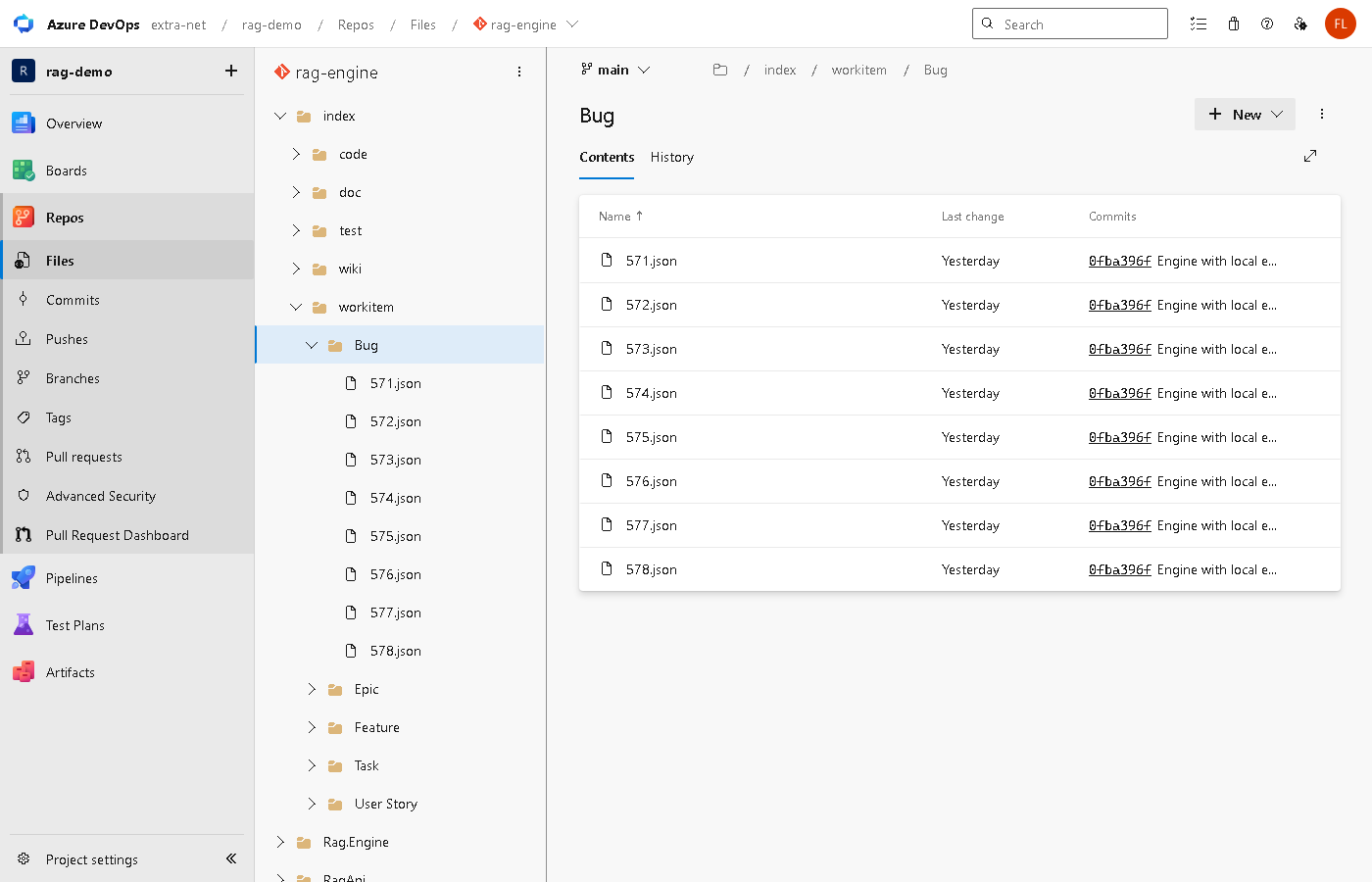
Diciassette secondi, calcolo dei vettori compreso. Lanciato di nuovo subito dopo, index/ non cambia e l'archivio non riceve nulla. Un file per sorgente, per esempio index/workitem/Bug/573.json:
11. Scrivi il motore
Il motore non sa cosa c'è sotto l'archivio. La ricerca è in due passate, prima sui sorgenti e poi su tutto: per ciascuna chiede all'archivio cinquanta candidati, passa i primi venti al cross-encoder e tiene i migliori, al massimo due per sorgente. CreateAsync prepara l'archivio prima della prima domanda.
using Rag.Engine.Store;

namespace Rag.Engine;

/// <summary>One passage found, with where it comes from and the score of the reranker.</summary>
public sealed record Passage(string Id, string Kind, string Title, string Url, string Path, string Text, float Score);

/// <summary>
/// The search: the store gives the candidates, keywords and vector together, and the cross-encoder
/// re-orders them. Two passes, source files first and then everything, at most two passages per source.
/// </summary>
public sealed class SearchEngine : IDisposable
{
    private const int Candidates = 50;
    private const int Reranked = 20;

    private readonly IPassageStore _store;
    private readonly Embedder _embedder;
    private readonly Reranker _reranker;

    private SearchEngine(IPassageStore store, string modelsFolder)
    {
        _store = store;
        _embedder = new Embedder(modelsFolder);
        _reranker = new Reranker(modelsFolder);
    }

    public static async Task<SearchEngine> CreateAsync(IPassageStore store, string modelsFolder)
    {
        await store.EnsureAsync();
        return new SearchEngine(store, modelsFolder);
    }

    public string StoreName => _store.Name;

    public async Task<List<Passage>> SearchAsync(string question, int codePassages = 5, int otherPassages = 4)
    {
        float[] query = _embedder.EmbedQuery(question);
        List<Passage> passages = [];
        foreach ((string? kind, int keep) in new (string?, int)[] { ("code", codePassages), (null, otherPassages) })
        {
            List<PieceRecord> candidates = await _store.CandidatesAsync(question, query, kind, Candidates);
            IEnumerable<Passage> ranked = candidates
                .Take(Reranked)
                .Select(r => new Passage(r.Id, r.Kind, r.Title, r.Url, r.Path, r.Text, _reranker.Score(question, r.Text)))
                .OrderByDescending(p => p.Score);
            int kept = 0;
            foreach (Passage passage in ranked)
            {
                if (passages.Any(p => p.Id == passage.Id) || passages.Count(p => p.Title == passage.Title) >= 2)
                {
                    continue;
                }

                passages.Add(passage);
                if (++kept == keep)
                {
                    break;
                }
            }
        }

        return passages;
    }

    public void Dispose()
    {
        _embedder.Dispose();
        _reranker.Dispose();
        _store.Dispose();
    }
}
12. Scrivi la console che cerca e fai le domande
using System.Text.Json;
using Azure.Identity;
using Rag.Engine;
using Rag.Engine.Store;

// Prints the passages for a question; the answer is up to whoever reads them, a person or a coding agent.
bool json = args.Contains("--json");
string question = string.Join(' ', args.Where(a => a != "--json"));
if (question.Length == 0)
{
    Console.WriteLine("usage: dotnet run --project RagSearch -- [--json] \"your question\"");
    return 1;
}

string root = IndexFiles.Root();
Settings settings = Settings.Load(root);
DefaultAzureCredential credential = new(new DefaultAzureCredentialOptions { TenantId = settings.TenantId });
using SearchEngine engine = await SearchEngine.CreateAsync(StoreFactory.Create(settings, root, credential, Console.Error), Path.Combine(AppContext.BaseDirectory, "models"));
List<Passage> passages = await engine.SearchAsync(question);
if (json)
{
    Console.WriteLine(JsonSerializer.Serialize(passages, new JsonSerializerOptions { WriteIndented = true, PropertyNamingPolicy = JsonNamingPolicy.CamelCase }));
    return 0;
}

Console.Error.WriteLine($"store: {engine.StoreName}");
for (int i = 0; i < passages.Count; i++)
{
    Console.WriteLine($"[{i + 1}] {passages[i].Kind}: {passages[i].Title}  (score {passages[i].Score:0.00})");
    Console.WriteLine($"    {passages[i].Url}");
    Console.WriteLine();
    Console.WriteLine(passages[i].Text);
    Console.WriteLine();
}

return 0;
dotnet run --project RagSearch -- "Dove sta la logica che impedisce di annullare un ordine già spedito?"La console non scrive una risposta: stampa i passaggi, ciascuno con tipo, titolo, link e testo. Nella prova, i titoli con il punteggio del riordino:
[1] code: orders-api/src/Orders.Domain/OrderStatus.cs  (score -2.34)
[2] code: orders-api/src/Orders.Domain/Order.cs  (score -4.09)
[3] code: orders-api/src/Orders.Api/appsettings.Development.json  (score -4.14)
[4] code: orders-api/src/Orders.Api/Program.cs  (score -4.37)
[5] code: orders-api/src/Orders.Api/Program.cs  (score -4.52)
[6] workitem: User Story #541: Annullamento solo prima della spedizione  (score -0.43)
[7] workitem: Epic #558: Resi  (score -3.07)
[8] wiki: Runbook incidenti  (score -3.51)
[9] wiki: Glossario  (score -4.40)
Il secondo passaggio è Order.cs, il file con il metodo Cancel(), e la user story 541 è la prima tra i work item. Con "Quali bug sulle spedizioni sono ancora aperti?" i bug delle spedizioni sono in fila, con il 573, l'unico aperto, davanti; con "Quando si può rilasciare in produzione e chi approva?" la pagina «Processo di rilascio» è la prima della seconda passata, con punteggio positivo. Una domanda dura tra tre e cinque secondi, quasi tutti per caricare i due modelli: l'API del passo 14 li carica una volta sola. Con --json escono gli stessi passaggi in JSON, per chi li integra o li passa a un coding agent.
L'API
13. Registra l'applicazione in Microsoft Entra
Se l'API la chiama solo chi sta sullo stesso computer, o un gateway che controlla già chi entra, salta questo passo: la variante senza Microsoft Entra è alla fine del passo 14.
Sul portale cerca App registrations e premi New registration: Name rag-engine-api, Supported account types Accounts in this organizational directory only, Register. Poi, nell'applicazione, Expose an API:
- Application ID URI: premi Add e accetta
api://seguito dall'id dell'applicazione - Add a scope: Scope name
user_impersonation, Who can consent Admins and users, display name e descrizione a piacere, Add scope - Add a client application: Client ID
04b07795-8ddb-461a-bbee-02f9e1bf7b46, cioè l'Azure CLI, con lo scope spuntato
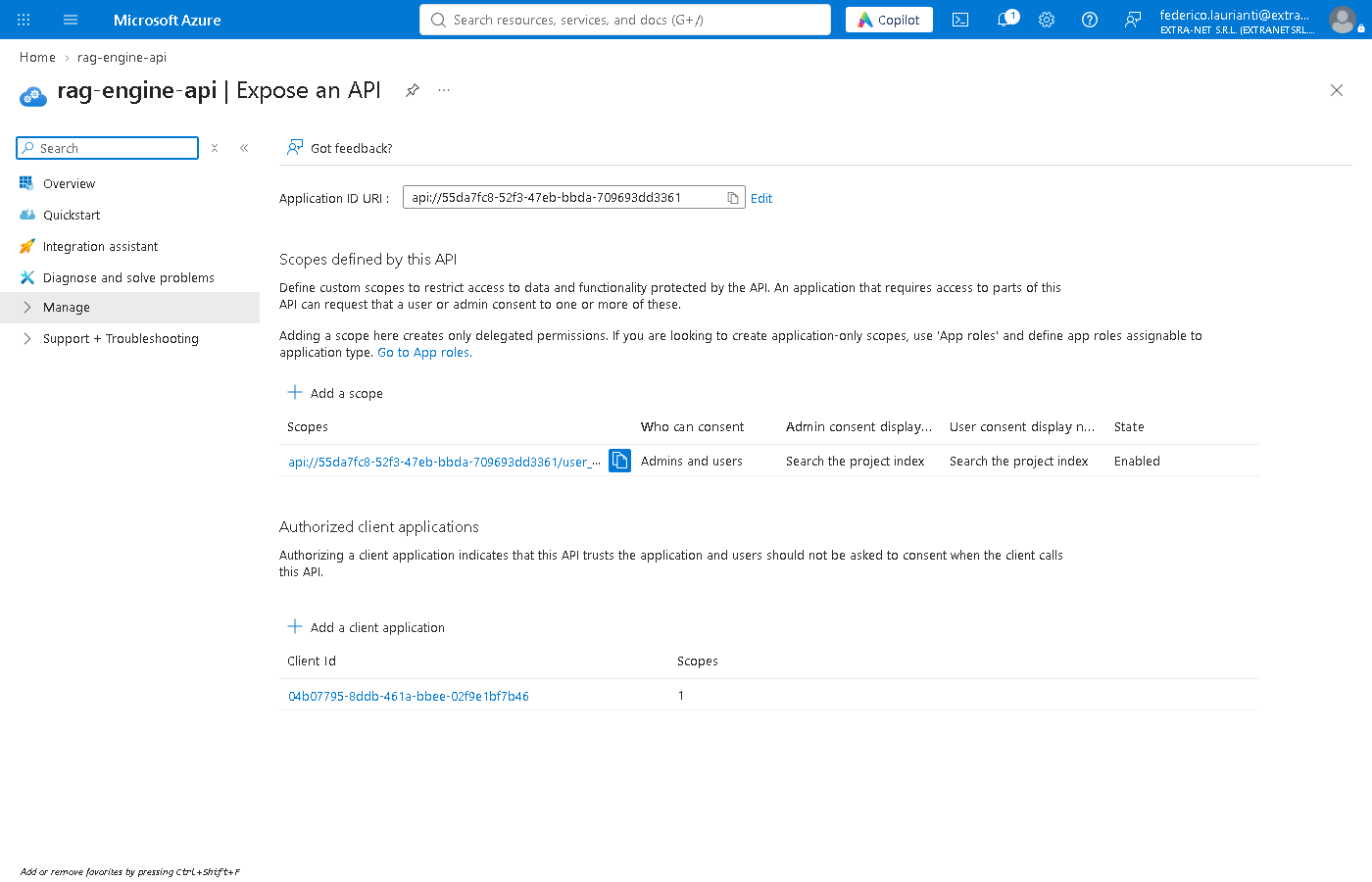
L'ultima voce permette a chi ha fatto az login di chiedere un token per questa API senza altri consensi. Nella prova la registrazione è stata fatta con le API di Microsoft Graph: la pre-autorizzazione dell'Azure CLI va salvata in una seconda modifica, dopo lo scope, altrimenti Graph risponde che lo scope non esiste.
14. Scrivi l'API
In RagApi/appsettings.json aggiungi la sezione con tenant e id dell'applicazione:
  "AzureAd": {
    "Instance": "https://login.microsoftonline.com/",
    "TenantId": "<id del tuo tenant Microsoft Entra>",
    "ClientId": "<application (client) ID di rag-engine-api>"
  }
Un solo motore, creato all'avvio e condiviso da tutte le richieste: i modelli si caricano una volta.
using Azure.Identity;
using Microsoft.AspNetCore.Authentication.JwtBearer;
using Microsoft.Identity.Web;
using Rag.Engine;
using Rag.Engine.Store;

// The same search as the console, behind an HTTP endpoint protected by Microsoft Entra: callers need a
// token for this application with the user_impersonation scope. One engine, shared by every request.
var builder = WebApplication.CreateBuilder(args);
builder.Services.AddAuthentication(JwtBearerDefaults.AuthenticationScheme)
    .AddMicrosoftIdentityWebApi(builder.Configuration.GetSection("AzureAd"));
builder.Services.AddAuthorizationBuilder()
    .AddPolicy("search", policy => policy.RequireAuthenticatedUser().RequireClaim("http://schemas.microsoft.com/identity/claims/scope", "user_impersonation"));

string root = IndexFiles.Root();
Settings settings = Settings.Load(root);
DefaultAzureCredential credential = new(new DefaultAzureCredentialOptions { TenantId = settings.TenantId });
SearchEngine engine = await SearchEngine.CreateAsync(StoreFactory.Create(settings, root, credential, Console.Error), Path.Combine(AppContext.BaseDirectory, "models"));
builder.Services.AddSingleton(engine);

var app = builder.Build();
app.UseAuthentication();
app.UseAuthorization();

app.MapGet("/health", (SearchEngine engine) => Results.Ok(new { status = "ok", store = engine.StoreName }));
app.MapGet("/search", async (string q, SearchEngine engine) => string.IsNullOrWhiteSpace(q)
        ? Results.BadRequest("q is required")
        : Results.Ok(await engine.SearchAsync(q)))
    .RequireAuthorization("search");

app.Run();
Avvia l'API e chiamala, senza token e con il token dell'utente dell'Azure CLI:
dotnet run --project RagApi --urls http://localhost:5090curl -s http://localhost:5090/health
curl -s -o /dev/null -w "%{http_code}\n" "http://localhost:5090/search?q=test"
TOKEN=$(az account get-access-token --resource api://<application (client) ID> --query accessToken -o tsv)
curl -s -H "Authorization: Bearer $TOKEN" --get --data-urlencode "q=Quando si può rilasciare in produzione e chi approva?" http://localhost:5090/searchNella prova: {"status":"ok","store":"hnsw"}, poi 401 senza token, poi con il token 200 e gli stessi passaggi della console in JSON, con «Processo di rilascio» in testa alla seconda passata. Su Windows, da Git Bash, curl manda le lettere accentate in Latin-1, può diventa pu%F2, e la domanda arriva storpiata: i passaggi cambiano. Da PowerShell, Invoke-RestMethod con la domanda in -Body @{ q = "..." } la manda in UTF-8. L'API è un processo qualunque: in un container, su un server, su Kubernetes; il clone del repository con index/ e i modelli sono tutto ciò che le serve.
Variante senza Microsoft Entra
Senza registrazione e senza token: l'API risponde a chiunque raggiunga la porta, quindi va tenuta su localhost o dietro un gateway che controlla chi entra. Togli il pacchetto di Microsoft Entra e non aggiungere la sezione AzureAd in RagApi/appsettings.json:
cd RagApi && dotnet remove package Microsoft.Identity.Web && cd ..using Azure.Identity;
using Rag.Engine;
using Rag.Engine.Store;
// The same search as the console, behind an HTTP endpoint with no authentication: run it only where
// the callers are trusted, on localhost or behind a gateway that checks them. One engine, shared by every request.
var builder = WebApplication.CreateBuilder(args);
string root = IndexFiles.Root();
Settings settings = Settings.Load(root);
DefaultAzureCredential credential = new(new DefaultAzureCredentialOptions { TenantId = settings.TenantId });
SearchEngine engine = await SearchEngine.CreateAsync(StoreFactory.Create(settings, root, credential, Console.Error), Path.Combine(AppContext.BaseDirectory, "models"));
builder.Services.AddSingleton(engine);
var app = builder.Build();
app.MapGet("/health", (SearchEngine engine) => Results.Ok(new { status = "ok", store = engine.StoreName }));
app.MapGet("/search", async (string q, SearchEngine engine) => string.IsNullOrWhiteSpace(q)
? Results.BadRequest("q is required")
: Results.Ok(await engine.SearchAsync(q)));
app.Run();La credenziale serve solo a un archivio su Azure; con quello in processo non chiede nulla.
dotnet run --project RagApi --urls http://localhost:5090
curl -s http://localhost:5090/health
curl -s --get --data-urlencode "q=Quando si può rilasciare in produzione e chi approva?" http://localhost:5090/search
Nella prova l'API ascoltava solo su 127.0.0.1 e [::1], rispondeva 200 senza token e dava gli stessi passaggi della console.
La pipeline
15. Permetti alla pipeline di scrivere nel repository
Pubblica il repository, index/ compreso: chi lo clona cerca senza indicizzare.
git add .
git commit -m "Search engine over the rag-demo project"
git remote add origin https://dev.azure.com/extra-net/rag-demo/_git/rag-engine
git push -u origin main
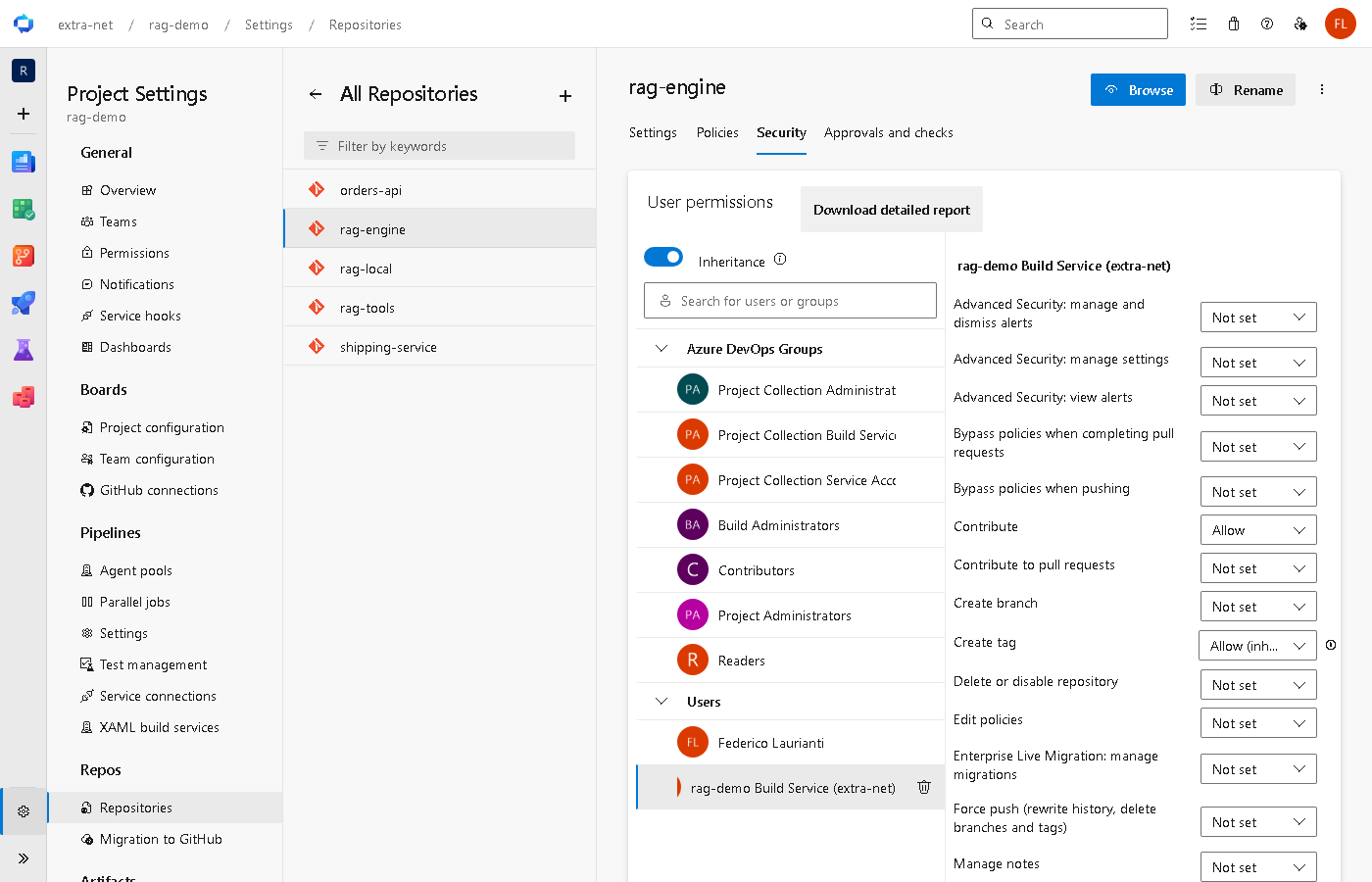
La pipeline committa l'indice con l'identità del job, che per impostazione predefinita legge soltanto. Apri Project settings > Repositories, scegli rag-engine e la scheda Security; nella casella Search for users or groups cerca rag-demo Build Service, scegli l'identità e porta Contribute ad Allow.
16. Aggiungi la pipeline e avviala
Alla radice della soluzione:
# Keeps index/ up to date: every night at 04:00 UTC and on "Run pipeline". Commits only what changed.
trigger: none
pr: none

schedules:
  - cron: "0 4 * * *"
    displayName: Nightly index
    branches:
      include:
        - main
    always: true

# The job token can read only the repositories declared here and listed under "uses".
resources:
  repositories:
    - repository: orders-api
      type: git
      name: rag-demo/orders-api
    - repository: shipping-service
      type: git
      name: rag-demo/shipping-service
    - repository: rag-tools
      type: git
      name: rag-demo/rag-tools
    - repository: rag-local
      type: git
      name: rag-demo/rag-local
    - repository: wiki
      type: git
      name: rag-demo/rag-demo.wiki

pool:
  vmImage: ubuntu-latest

jobs:
  - job: index
    displayName: Index
    uses:
      repositories:
        - orders-api
        - shipping-service
        - rag-tools
        - rag-local
        - wiki
    steps:
      - checkout: self
        persistCredentials: true

      - task: UseDotNet@2
        displayName: Install .NET 11
        inputs:
          version: 11.0.x

      - script: dotnet run --project RagIndex -c Release
        displayName: Update index/
        env:
          DEVOPS_TOKEN: $(System.AccessToken)

      - script: |
          git config user.name "rag-engine pipeline"
          git config user.email "pipeline@rag-engine"
          git add index
          if git diff --cached --quiet; then
            echo "index/ unchanged: nothing to commit"
          else
            git commit -m "Index update $(date -u +%Y-%m-%d)"
            git push origin HEAD:main
          fi
        displayName: Commit the changes
persistCredentials: true lascia il token del job al git push finale; always: true fa partire il giro notturno anche senza modifiche, perché wiki e work item cambiano fuori da Git. Il token legge solo i repository dichiarati in resources e in uses: quelli da indicizzare, la wiki, che è un repository anch'essa, e il proprio. Committa il file e pubblicalo con git push.
Apri Pipelines e premi Create Pipeline > Azure Repos Git > rag-engine; in Review your pipeline YAML premi Run. Il primo giro si ferma con This pipeline needs permission to access 5 resources before this run can continue: premi View e Permit per ciascun repository, confermando ogni volta.
Il giro riparte e in poco più di un minuto il log del passo Update index/ mostra la cache ricostruita sull'agent e poi le sorgenti cambiate; il passo Commit the changes fa il commit e il push. Nella prova, il giro dopo una modifica al codice del motore:
229 pieces read: 141 code, 21 doc, 10 test, 15 wiki, 42 workitem
index/ changed: rebuilding .cache/ from 142 files, once
  read 228 pieces (0 s)
  keywords ready (0 s)
  graph: 228/228 pieces (1 s)
.cache/ ready: 228 pieces in 1 s
index/: 0 new, 5 updated, 137 unchanged, 0 removed
store hnsw: 12 pieces upserted, 0 deleted
Cinque sorgenti riscritte, i file del motore stesso, e un commit con quei cinque file.
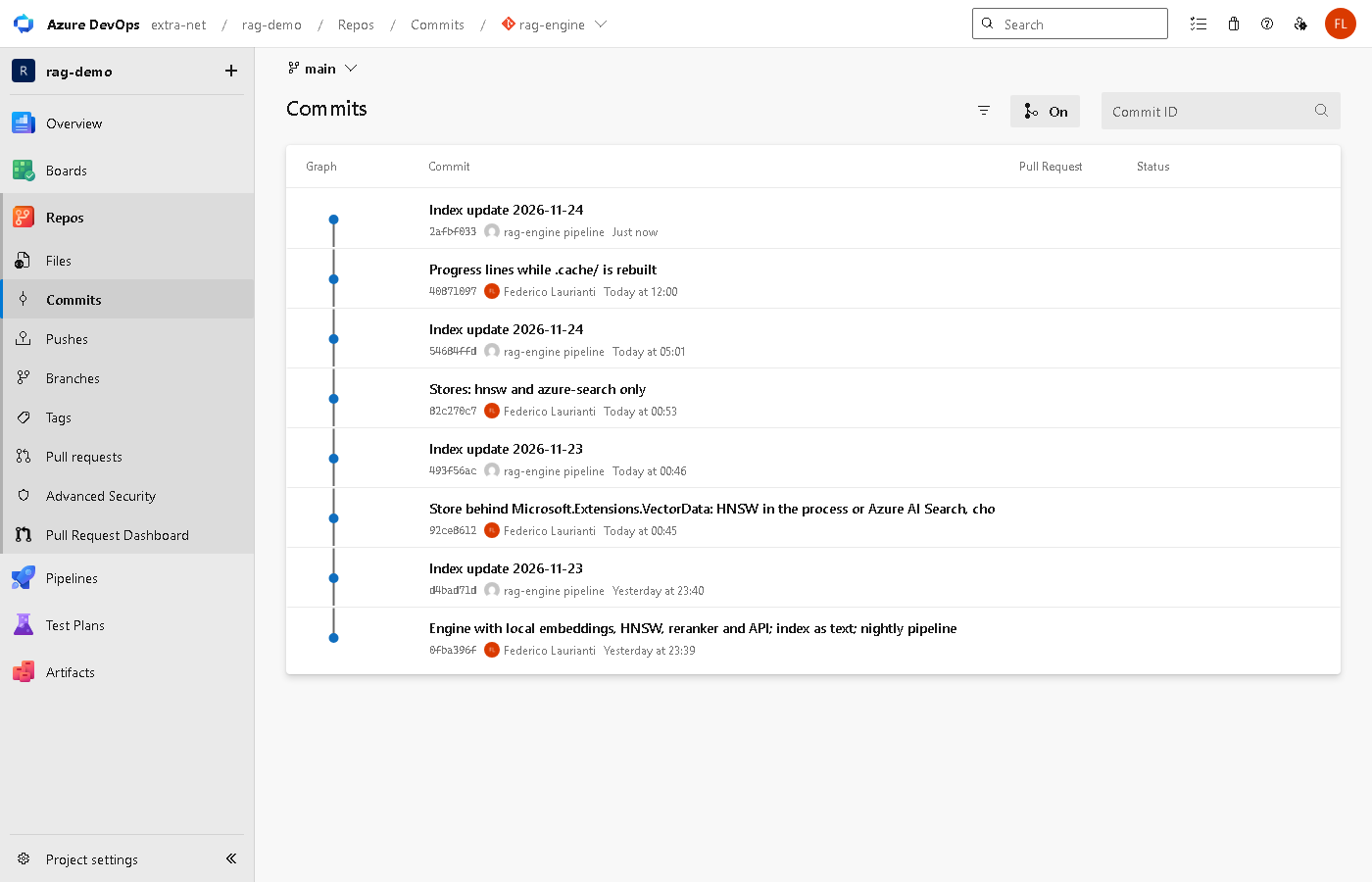
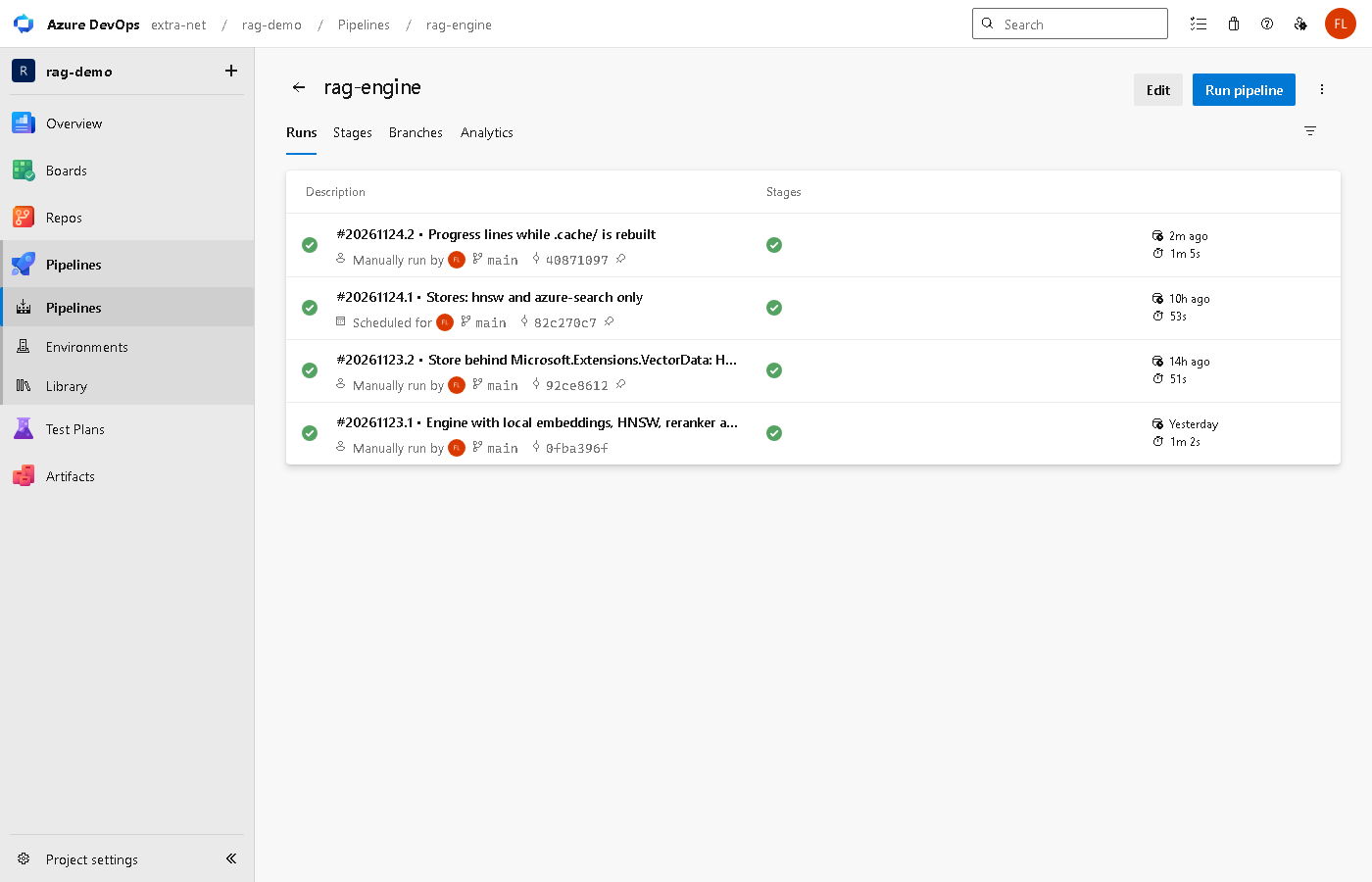
Da qui l'indice si aggiorna ogni notte alle 04:00 UTC e quando premi Run pipeline; chi cerca fa git pull e lancia la console, che ricostruisce la cache da sola.
Eliminare le risorse
17. Elimina repository, pipeline e applicazione
Niente su Azure, a parte la registrazione se l'hai fatta: in Microsoft Entra ID > App registrations elimina rag-engine-api. In Azure DevOps elimina la pipeline, dal menu ... di Pipelines, e il repository rag-engine, da Project settings > Repositories > menu ... > Delete.
Nomi dei comandi, schermate e risposte rilevati il 23 e il 24 novembre 2026, con .NET 11.