


Procedure to question an Azure DevOps project the way you question someone who knows it: "where is the logic that stops a shipped order from being cancelled?", "when do we release to production and who approves?", "which bugs about shipping are still open?". The files of the repositories, the wiki pages and the work items go into an Azure AI Search index; a .NET console takes the question, finds the right passages and hands them to a model that answers citing them, with the links to the pages in Azure DevOps. A pipeline rebuilds the index every night. No keys: every call uses the identity of whoever makes it.
You need: an Azure DevOps project with at least one repository, a wiki and some work items. Here it is rag-demo, in the extra-net organization: two .NET repositories, orders-api and shipping-service, a 7-page wiki and 42 work items; the third repository, rag-tools, is the one written in this guide. Then .NET 11, the Azure CLI signed in (az login) and the Owner role on the subscription, to assign roles.
Time: about an hour and a half.
Cost: zero at rest. Azure AI Search on the Free tier and the semantic ranker on the free plan cost nothing; the Foundry resource charges only the tokens: the Azure price list for West Europe shows, for gpt-5.4-mini, 0.67 euro per million input tokens and 4.04 per million output tokens. A question costs less than half a cent, re-indexing the sample project less than a cent. The pipeline uses the free minutes of the organization.
The Azure portal, the Foundry portal and Azure DevOps in the screenshots are in English: command names are written as they appear on screen.
The resources on Azure
1. Create the Azure AI Search service
On the Azure portal search for AI Search, open Foundry IQ (Azure AI Search) and press Create. In Basics fill in:
- Resource group: Create new,
rg-rag-demo-01 - Service name: a name of your own, unique in Azure, here
srch-rag-demo-extranet-01 - Location: West Europe
- Pricing tier: press Change Pricing Tier, choose Free and press Select
Press Review + create and Create. The Free tier has 50 MB, three indexes and one service per subscription: enough for a project like this one.
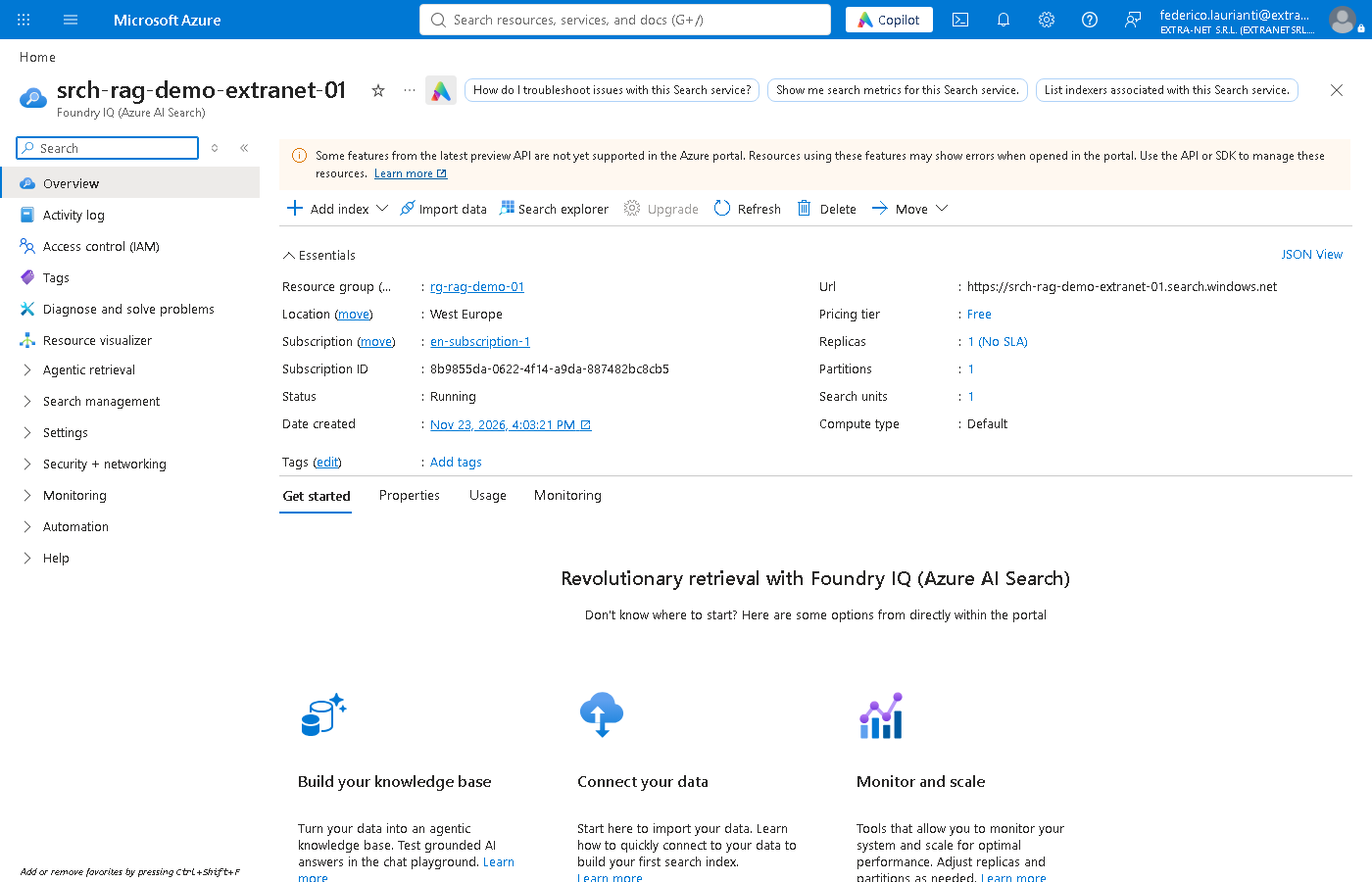
2. Allow access with roles
In the service open Security + networking > Keys and, in API Access control, choose Both. The consoles and the pipeline come in with a Microsoft Entra token; the keys stay for the tools of the portal.
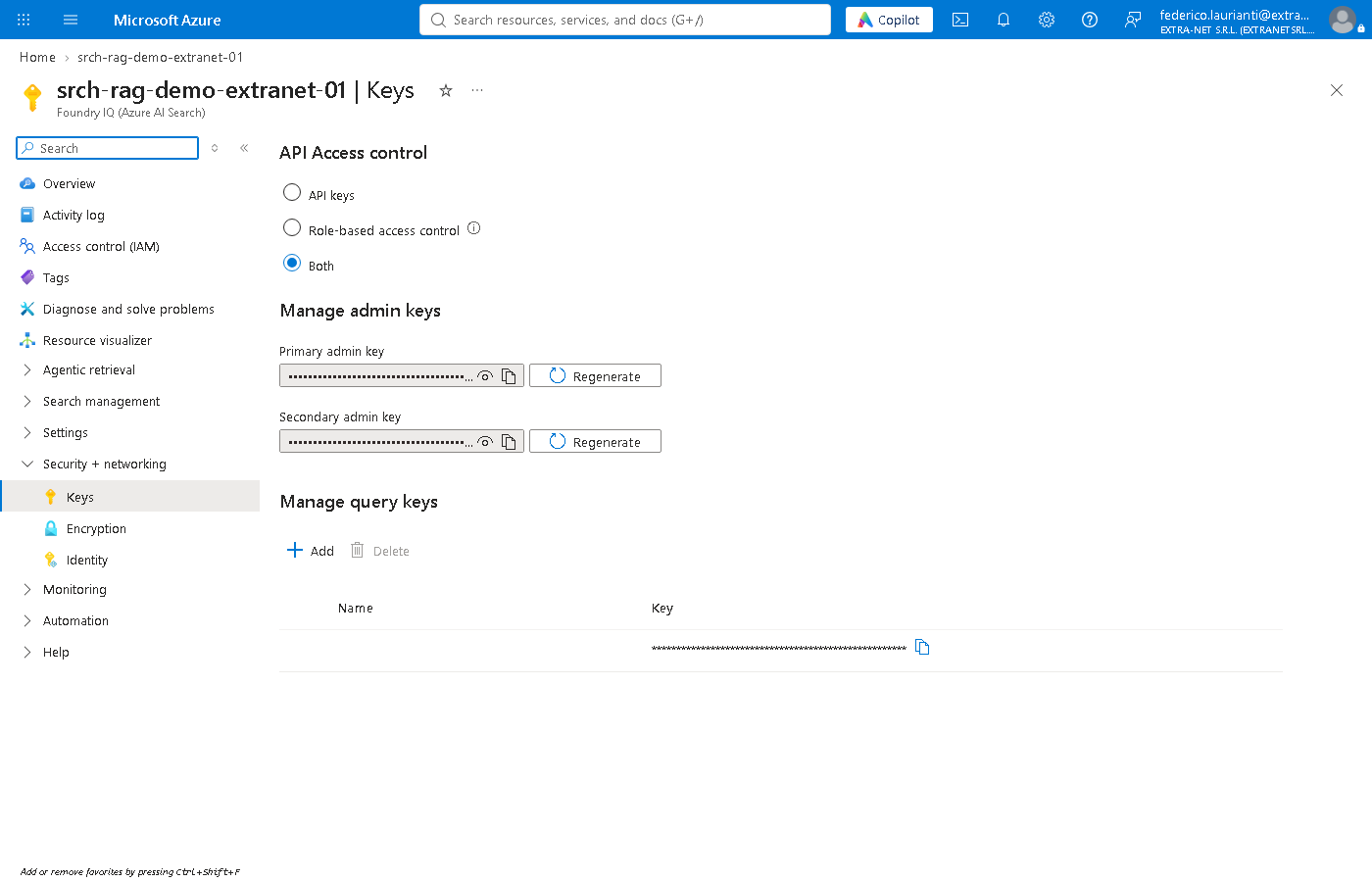
3. Turn on the semantic ranker
Open Settings > Premium features and, under Semantic ranker, choose the Free plan: 1,000 requests a month. The ranker re-orders the results of a search by the meaning of the question; step 10 shows when it helps and when it does not.
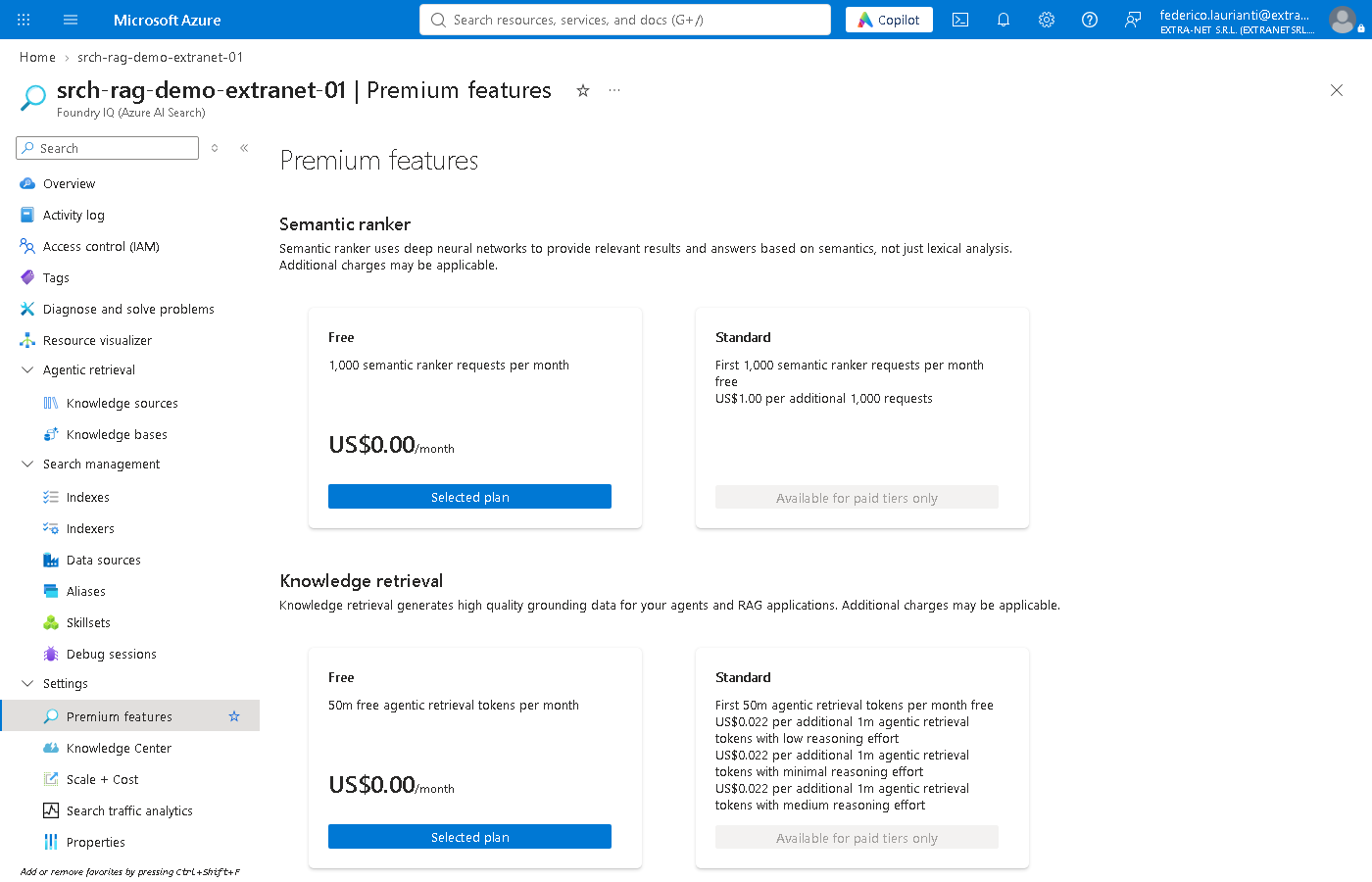
4. Create the Foundry resource
On the portal search for Microsoft Foundry and press Create a Foundry resource. In Basics fill in:
- Resource group:
rg-rag-demo-01 - Name: a name of your own, unique in Azure, here
ai-rag-demo-extranet-01 - Region: West Europe
- Application insights: None
- Default project name:
proj-rag-demo
Press Review + create and Create. The resource hosts the models; the project is the folder of the Foundry portal from which they are deployed.
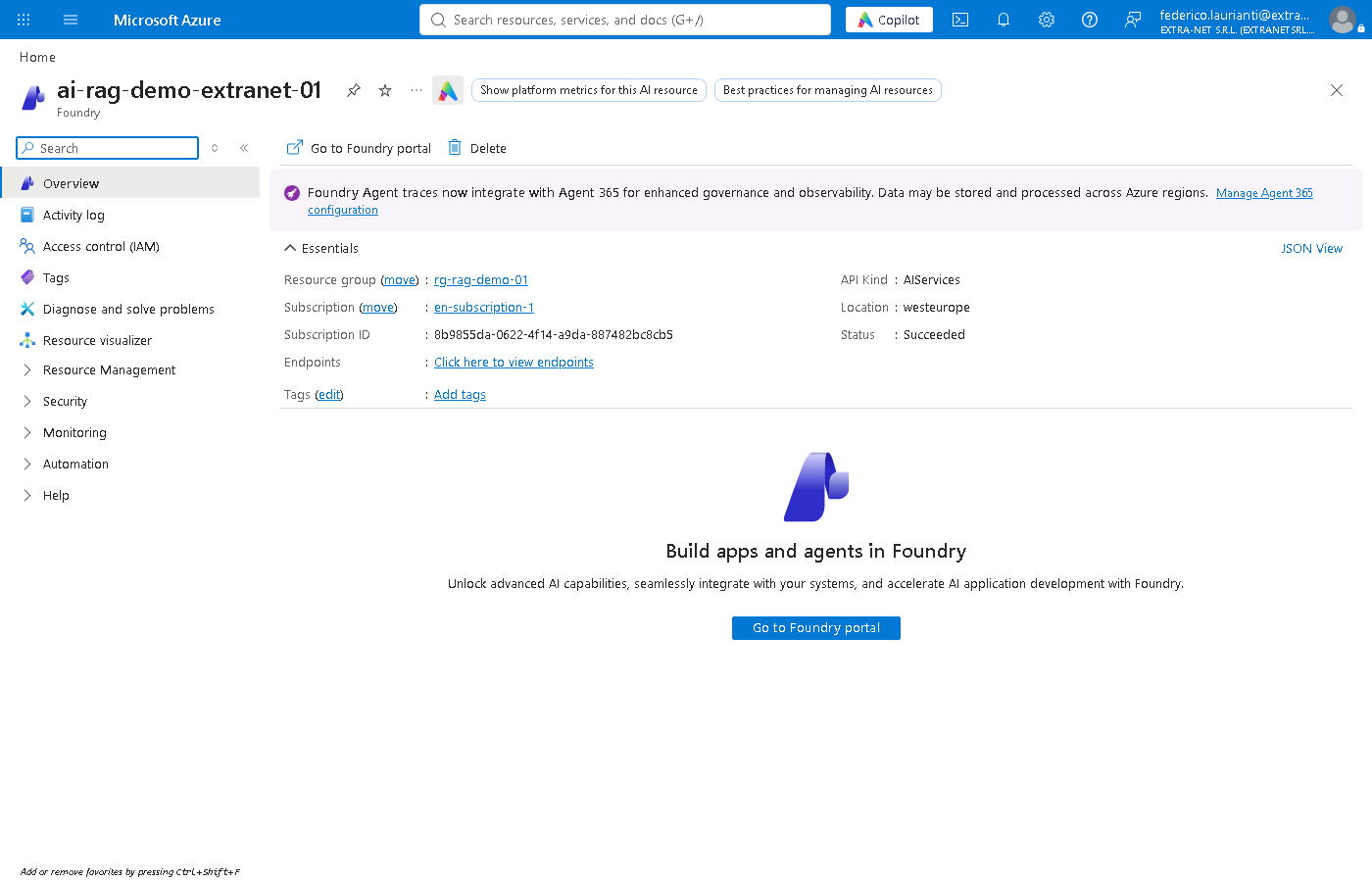
5. Deploy the two models
In the page of the resource press Go to Foundry portal: the proj-rag-demo project opens. In the left menu open Models and press Deploy a base model. Search for text-embedding-3-small, open it, press Deploy and choose Default settings: a Global Standard deployment with the name of the model. Repeat with gpt-5.4-mini.
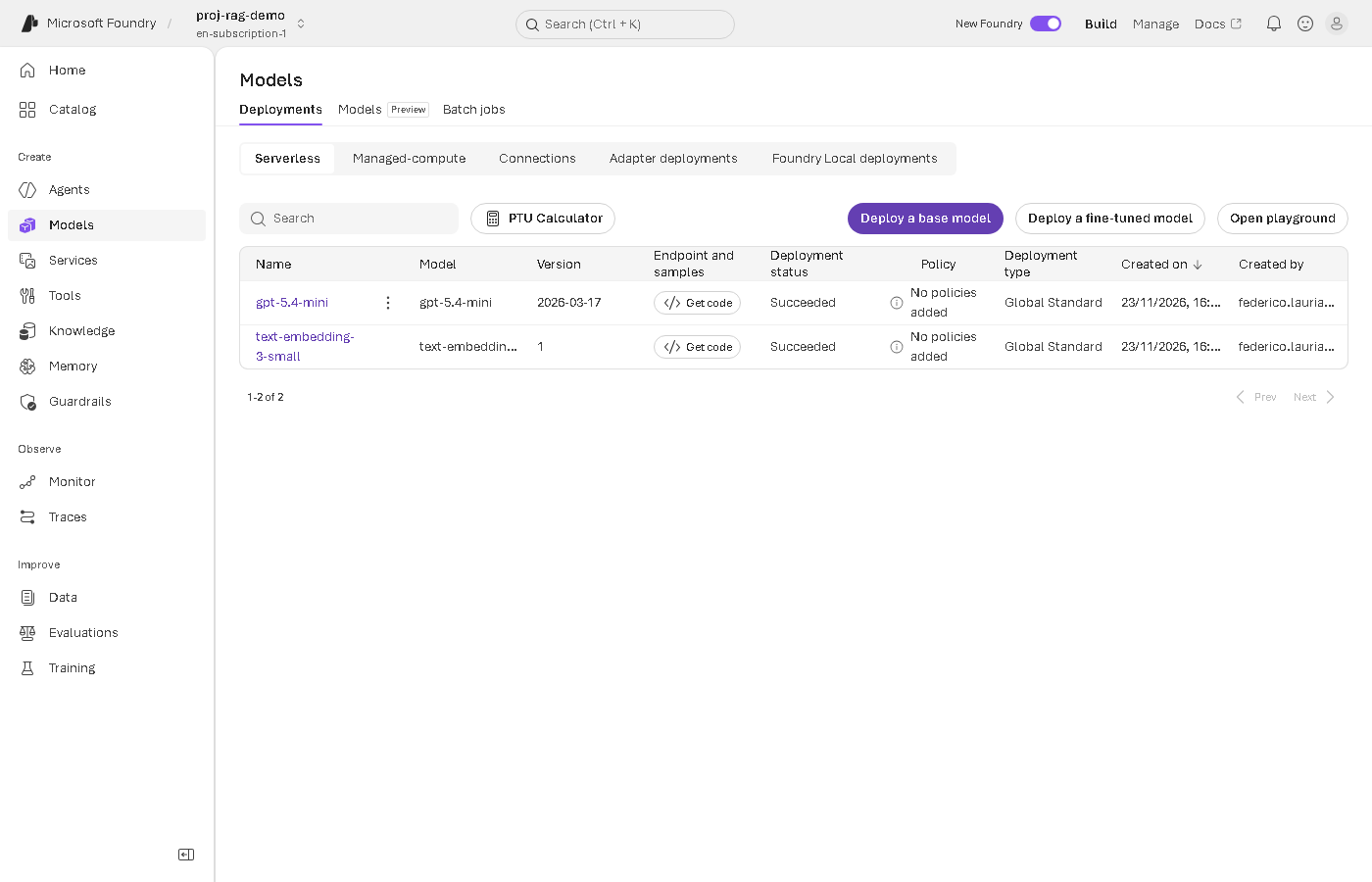
The first model turns a text into a vector of 1,536 numbers, the representation the index uses to compare meanings; the second writes the answers.
6. Give the roles to your user
In the search service open Access control (IAM) and press Add > Add role assignment. Search for Search Index Data Contributor, select it and press Next; in Members leave User, group, or service principal, press Select members, choose your user and press Select; then Review + assign twice. Repeat with Search Service Contributor. In the Foundry resource repeat with Cognitive Services OpenAI User.
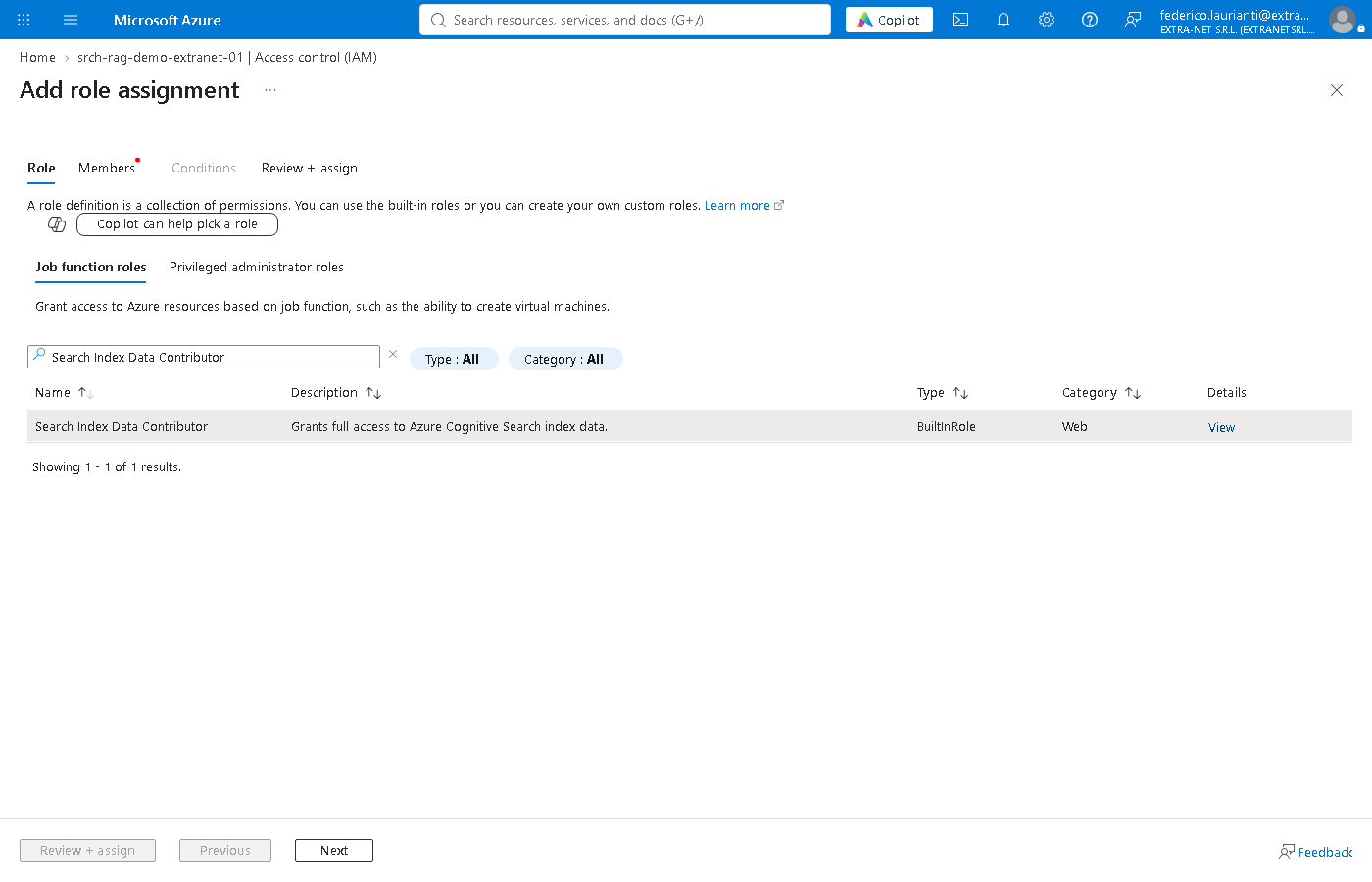
The first role reads and writes the documents of the index, the second creates the index, the third calls the models. New roles take effect after a few minutes.
The .NET consoles
7. Create the solution
mkdir rag-tools && cd rag-tools
dotnet new sln -n RagTools
dotnet new console -n DevOpsIndex -o DevOpsIndex
dotnet new console -n DevOpsAsk -o DevOpsAsk
dotnet sln add DevOpsIndex DevOpsAsk
cd DevOpsIndex && dotnet add package Azure.Identity && dotnet add package Azure.Search.Documents && dotnet add package Azure.AI.OpenAI && cd ..
cd DevOpsAsk && dotnet add package Azure.Identity && dotnet add package Azure.Search.Documents && dotnet add package Azure.AI.OpenAI && cd ..
In the test the versions were Azure.Identity 1.21.0, Azure.Search.Documents 12.1.0 and Azure.AI.OpenAI 2.1.0. The names of the resources live in one file at the root, shared by the two consoles. The tenant id is in Microsoft Entra ID > Overview > Tenant ID; the endpoint of the Foundry resource is https:// followed by its name and by .cognitiveservices.azure.com/.
{
  "tenantId": "<id of your Microsoft Entra tenant>",
  "devOpsOrganization": "extra-net",
  "devOpsProject": "rag-demo",
  "searchEndpoint": "https://srch-rag-demo-extranet-01.search.windows.net",
  "searchIndex": "rag-demo",
  "openAIEndpoint": "https://ai-rag-demo-extranet-01.cognitiveservices.azure.com/",
  "embeddingDeployment": "text-embedding-3-small",
  "chatDeployment": "gpt-5.4-mini"
}using System.Text.Json;
namespace RagTools;
/// <summary>
/// Names of the Azure DevOps project and of the Azure resources, read from appsettings.json
/// at the root of the repository (both consoles link the same file). No secrets: every call
/// authenticates with the signed-in user through DefaultAzureCredential.
/// </summary>
public sealed record Settings(
string TenantId,
string DevOpsOrganization,
string DevOpsProject,
string SearchEndpoint,
string SearchIndex,
string OpenAIEndpoint,
string EmbeddingDeployment,
string ChatDeployment)
{
/// <summary>Application id of Azure DevOps in Microsoft Entra: the scope of the token for dev.azure.com.</summary>
public const string DevOpsScope = "499b84ac-1321-427f-aa17-267ca6975798/.default";
public static Settings Load()
{
string path = Path.Combine(AppContext.BaseDirectory, "appsettings.json");
return JsonSerializer.Deserialize<Settings>(File.ReadAllText(path), JsonSerializerOptions.Web)
?? throw new InvalidOperationException($"{path} is empty.");
}
}In both project files, DevOpsIndex.csproj and DevOpsAsk.csproj, add the link to the two shared files:
  <ItemGroup>
    <Compile Include="../Shared/Settings.cs" Link="Settings.cs" />
    <None Include="../appsettings.json" Link="appsettings.json" CopyToOutputDirectory="PreserveNewest" />
  </ItemGroup>
8. Write the console that indexes
Four files in the DevOpsIndex folder. The first cuts a text into pieces of about 1,500 characters, at a line break, with 200 characters of overlap so that a method across the cut is not lost.
namespace DevOpsIndex;

/// <summary>Splits a text into pieces of about <see cref="Size"/> characters, cut at a line break, with an overlap.</summary>
public static class Chunker
{
    public const int Size = 1500;
    public const int Overlap = 200;

    public static IEnumerable<string> Split(string text)
    {
        text = text.Replace("\r\n", "\n").Trim();
        if (text.Length <= Size)
        {
            if (text.Length > 0)
            {
                yield return text;
            }

            yield break;
        }

        int start = 0;
        while (start < text.Length)
        {
            int end = Math.Min(start + Size, text.Length);
            if (end < text.Length)
            {
                // cut at the last line break of the window, if it is not too early
                int lineBreak = text.LastIndexOf('\n', end - 1, end - start);
                if (lineBreak > start + Size / 2)
                {
                    end = lineBreak + 1;
                }
            }

            yield return text[start..end];
            if (end >= text.Length)
            {
                yield break;
            }

            start = Math.Max(end - Overlap, start + 1);
        }
    }
}
The second is the piece with where it comes from: kind, repository, path, link, number of the piece and, after step 2 of the program, the vector. The key is stable, so the same piece gets the same id at every run.
using System.Security.Cryptography;
using System.Text;
using Azure.Search.Documents.Models;

namespace DevOpsIndex;

/// <summary>One piece of text to index, with where it comes from. Kind is code, wiki or workitem.</summary>
public sealed class Chunk(string kind, string repo, string path, string title, string url, int number, string content)
{
    public string Kind { get; } = kind;
    public string Repo { get; } = repo;
    public string Path { get; } = path;
    public string Title { get; } = title;
    public string Url { get; } = url;
    public int Number { get; } = number;
    public string Content { get; } = content;
    public float[] Vector { get; set; } = [];

    /// <summary>Stable key: the same piece of the same source gets the same id at every run.</summary>
    public string Id => Convert.ToHexStringLower(SHA256.HashData(Encoding.UTF8.GetBytes($"{Kind}|{Repo}|{Path}|{Number}")));

    public SearchDocument ToDocument() => new()
    {
        ["id"] = Id,
        ["kind"] = Kind,
        ["repo"] = Repo,
        ["path"] = Path,
        ["title"] = Title,
        ["url"] = Url,
        ["chunk"] = Number,
        ["content"] = Content,
        ["vector"] = Vector,
    };
}
The third reads the project through the Azure DevOps REST API: the text files of the repositories, the wiki pages and the work items with description, acceptance criteria and repro steps. The files of the repositories have three kinds: code for source files, doc for Markdown and text, test for the test projects; step 10 shows why.
using System.Net;
using System.Net.Http.Headers;
using System.Net.Http.Json;
using System.Text;
using System.Text.Json;
using System.Text.RegularExpressions;
using Azure.Core;
using RagTools;

namespace DevOpsIndex;

/// <summary>Reads the text of a project from the Azure DevOps REST API: files of the repositories, wiki pages and work items.</summary>
public sealed partial class DevOpsReader(HttpClient http, string organization, string project)
{
    private const string Api = "api-version=7.1";

    /// <summary>Files read from the repositories; everything else (images, binaries) is skipped.</summary>
    private static readonly HashSet<string> TextExtensions =
    [
        ".cs", ".csproj", ".sln", ".slnx", ".props", ".targets",
        ".md", ".txt", ".json", ".yml", ".yaml", ".xml", ".sql", ".ps1", ".sh", ".http", ".razor", ".cshtml",
    ];

    private static readonly string[] TextFileNames = ["Dockerfile"];

    public static async Task<DevOpsReader> ConnectAsync(TokenCredential credential, string organization, string project)
    {
        // In the pipeline DEVOPS_TOKEN carries the token of the job itself (System.AccessToken);
        // on a workstation the signed-in user asks for one.
        string token = Environment.GetEnvironmentVariable("DEVOPS_TOKEN") is { Length: > 0 } jobToken
            ? jobToken
            : (await credential.GetTokenAsync(new TokenRequestContext([Settings.DevOpsScope]), CancellationToken.None)).Token;
        HttpClient http = new() { BaseAddress = new Uri($"https://dev.azure.com/{organization}/") };
        http.DefaultRequestHeaders.Authorization = new AuthenticationHeaderValue("Bearer", token);
        return new DevOpsReader(http, organization, project);
    }

    public async Task<List<Chunk>> ReadRepositoriesAsync()
    {
        List<Chunk> chunks = [];
        Page<Repository> repositories = (await http.GetFromJsonAsync<Page<Repository>>($"{project}/_apis/git/repositories?{Api}"))!;
        foreach (Repository repo in repositories.Value)
        {
            Page<Item> items;
            try
            {
                items = (await http.GetFromJsonAsync<Page<Item>>(
                    $"{project}/_apis/git/repositories/{repo.Id}/items?recursionLevel=Full&$format=json&{Api}"))!;
            }
            catch (HttpRequestException e) when (e.StatusCode == HttpStatusCode.NotFound)
            {
                // a repository without commits has no items yet
                Console.WriteLine($"repository {repo.Name}: empty, skipped");
                continue;
            }

            int files = 0;
            foreach (Item item in items.Value.Where(item => !item.IsFolder && IsText(item.Path)))
            {
                Item full = (await http.GetFromJsonAsync<Item>(
                    $"{project}/_apis/git/repositories/{repo.Id}/items?path={Uri.EscapeDataString(item.Path)}&includeContent=true&$format=json&{Api}"))!;
                if (string.IsNullOrWhiteSpace(full.Content) || full.Content.Length > 200_000)
                {
                    continue;
                }

                string title = $"{repo.Name}{item.Path}";
                string url = $"{repo.WebUrl}?path={Uri.EscapeDataString(item.Path)}";
                string kind = KindOf(item.Path);
                chunks.AddRange(Chunker.Split(full.Content)
                    .Select((text, number) => new Chunk(kind, repo.Name, item.Path, title, url, number, $"File {title}\n\n{text}")));
                files++;
            }

            Console.WriteLine($"repository {repo.Name}: {files} files");
        }

        return chunks;
    }

    public async Task<List<Chunk>> ReadWikiAsync()
    {
        List<Chunk> chunks = [];
        Page<Wiki> wikis = (await http.GetFromJsonAsync<Page<Wiki>>($"{project}/_apis/wiki/wikis?{Api}"))!;
        foreach (Wiki wiki in wikis.Value)
        {
            WikiPage root = (await http.GetFromJsonAsync<WikiPage>(
                $"{project}/_apis/wiki/wikis/{wiki.Id}/pages?path=/&recursionLevel=Full&{Api}"))!;
            int pages = 0;
            foreach (WikiPage page in Flatten(root).Where(page => page.Path != "/"))
            {
                WikiPage full = (await http.GetFromJsonAsync<WikiPage>(
                    $"{project}/_apis/wiki/wikis/{wiki.Id}/pages?path={Uri.EscapeDataString(page.Path)}&includeContent=true&{Api}"))!;
                if (string.IsNullOrWhiteSpace(full.Content))
                {
                    continue;
                }

                string title = page.Path.TrimStart('/');
                chunks.AddRange(Chunker.Split(full.Content)
                    .Select((text, number) => new Chunk("wiki", wiki.Name, page.Path, title, page.RemoteUrl, number, $"Wiki page {title}\n\n{text}")));
                pages++;
            }

            Console.WriteLine($"wiki {wiki.Name}: {pages} pages");
        }

        return chunks;
    }

    public async Task<List<Chunk>> ReadWorkItemsAsync()
    {
        List<Chunk> chunks = [];
        using HttpResponseMessage response = await http.PostAsJsonAsync($"{project}/_apis/wit/wiql?{Api}",
            new { query = "SELECT [System.Id] FROM WorkItems WHERE [System.TeamProject] = @project ORDER BY [System.Id]" });
        response.EnsureSuccessStatusCode();
        WiqlResult result = (await response.Content.ReadFromJsonAsync<WiqlResult>())!;
        const string fields = "System.Id,System.WorkItemType,System.Title,System.State,System.Tags,System.Description," +
                              "Microsoft.VSTS.Common.AcceptanceCriteria,Microsoft.VSTS.TCM.ReproSteps";
        foreach (int[] ids in result.WorkItems.Select(reference => reference.Id).Chunk(200))
        {
            Page<WorkItem> items = (await http.GetFromJsonAsync<Page<WorkItem>>(
                $"{project}/_apis/wit/workitems?ids={string.Join(',', ids)}&fields={fields}&{Api}"))!;
            foreach (WorkItem item in items.Value)
            {
                string type = item.Field("System.WorkItemType");
                string title = item.Field("System.Title");
                StringBuilder text = new();
                text.AppendLine($"{type} #{item.Id}: {title}");
                text.AppendLine($"State: {item.Field("System.State")}");
                if (item.Field("System.Tags") is { Length: > 0 } tags)
                {
                    text.AppendLine($"Tags: {tags}");
                }

                AppendSection(text, "Description", item.Field("System.Description"));
                AppendSection(text, "Acceptance criteria", item.Field("Microsoft.VSTS.Common.AcceptanceCriteria"));
                AppendSection(text, "Repro steps", item.Field("Microsoft.VSTS.TCM.ReproSteps"));
                string url = $"https://dev.azure.com/{organization}/{project}/_workitems/edit/{item.Id}";
                chunks.AddRange(Chunker.Split(text.ToString())
                    .Select((piece, number) => new Chunk("workitem", type, item.Id.ToString(), $"{type} #{item.Id}: {title}", url, number, piece)));
            }
        }

        Console.WriteLine($"work items: {result.WorkItems.Count}");
        return chunks;
    }

    /// <summary>Source files are "code"; prose in the repository is "doc"; test projects are "test".
    /// The question console searches "code" first, so that a rule is found where it is implemented.</summary>
    private static string KindOf(string path)
    {
        string extension = System.IO.Path.GetExtension(path).ToLowerInvariant();
        if (extension is ".md" or ".txt")
        {
            return "doc";
        }

        return path.Contains("/tests/", StringComparison.OrdinalIgnoreCase) || path.EndsWith("Tests.cs", StringComparison.Ordinal)
            ? "test"
            : "code";
    }

    private static bool IsText(string path)
    {
        string name = path[(path.LastIndexOf('/') + 1)..];
        return TextFileNames.Contains(name) || TextExtensions.Contains(System.IO.Path.GetExtension(name).ToLowerInvariant());
    }

    private static IEnumerable<WikiPage> Flatten(WikiPage page)
    {
        yield return page;
        foreach (WikiPage sub in page.SubPages ?? [])
        {
            foreach (WikiPage inner in Flatten(sub))
            {
                yield return inner;
            }
        }
    }

    private static void AppendSection(StringBuilder text, string heading, string html)
    {
        string plain = StripHtml(html);
        if (plain.Length > 0)
        {
            text.AppendLine();
            text.AppendLine($"{heading}:");
            text.AppendLine(plain);
        }
    }

    /// <summary>Work item fields are HTML: keep the text, turn block ends into line breaks.</summary>
    private static string StripHtml(string html)
    {
        if (string.IsNullOrWhiteSpace(html))
        {
            return "";
        }

        string text = BlockEnd().Replace(html, "\n");
        text = Tag().Replace(text, " ");
        text = WebUtility.HtmlDecode(text);
        text = Spaces().Replace(text, " ");
        text = BlankLines().Replace(text, "\n");
        return text.Trim();
    }

    [GeneratedRegex("</(p|div|li|tr|h[1-6])>|<br ?/?>", RegexOptions.IgnoreCase)]
    private static partial Regex BlockEnd();

    [GeneratedRegex("<[^>]+>")]
    private static partial Regex Tag();

    [GeneratedRegex("[ \t]+")]
    private static partial Regex Spaces();

    [GeneratedRegex("\\s*\n\\s*")]
    private static partial Regex BlankLines();

    // Shapes of the JSON answers of Azure DevOps, only the properties used here.
    private sealed record Page<T>(List<T> Value);

    private sealed record Repository(string Id, string Name, string WebUrl);

    private sealed record Item(string Path, bool IsFolder, string? Content);

    private sealed record Wiki(string Id, string Name);

    private sealed record WikiPage(string Path, string RemoteUrl, string? Content, List<WikiPage>? SubPages);

    private sealed record WiqlResult(List<WorkItemReference> WorkItems);

    private sealed record WorkItemReference(int Id);

    private sealed record WorkItem(int Id, Dictionary<string, JsonElement> Fields)
    {
        public string Field(string name) =>
            Fields.TryGetValue(name, out JsonElement value) && value.ValueKind == JsonValueKind.String ? value.GetString()! : "";
    }
}
The fourth puts the three steps together: it reads, computes a vector for every piece with the embedding model, recreates the index and uploads the documents. The index has the text for the keyword search, the vector for the search by meaning and a configuration for the semantic ranker.
using Azure;
using Azure.AI.OpenAI;
using Azure.Identity;
using Azure.Search.Documents;
using Azure.Search.Documents.Indexes;
using Azure.Search.Documents.Indexes.Models;
using DevOpsIndex;
using OpenAI.Embeddings;
using RagTools;

Settings settings = Settings.Load();
DefaultAzureCredential credential = new(new DefaultAzureCredentialOptions { TenantId = settings.TenantId });

// 1. Read the project: files of the repositories, wiki pages and work items, cut into pieces.
DevOpsReader devOps = await DevOpsReader.ConnectAsync(credential, settings.DevOpsOrganization, settings.DevOpsProject);
List<Chunk> chunks = [];
chunks.AddRange(await devOps.ReadRepositoriesAsync());
chunks.AddRange(await devOps.ReadWikiAsync());
chunks.AddRange(await devOps.ReadWorkItemsAsync());
Console.WriteLine($"{chunks.Count} pieces to index: " +
    string.Join(", ", chunks.GroupBy(c => c.Kind).OrderBy(g => g.Key).Select(g => $"{g.Count()} {g.Key}")));

// 2. One embedding per piece, in batches.
AzureOpenAIClient openAI = new(new Uri(settings.OpenAIEndpoint), credential);
EmbeddingClient embeddings = openAI.GetEmbeddingClient(settings.EmbeddingDeployment);
foreach (Chunk[] batch in chunks.Chunk(16))
{
    OpenAIEmbeddingCollection result = await embeddings.GenerateEmbeddingsAsync(batch.Select(c => c.Content).ToList());
    for (int i = 0; i < batch.Length; i++)
    {
        batch[i].Vector = result[i].ToFloats().ToArray();
    }
}

Console.WriteLine("embeddings computed");

// 3. Recreate the index and upload the pieces. The text field serves the keyword part of the hybrid search,
//    the vector field the semantic part.
SearchIndexClient indexClient = new(new Uri(settings.SearchEndpoint), credential);
SearchIndex index = new(settings.SearchIndex)
{
    Fields =
    {
        new SimpleField("id", SearchFieldDataType.String) { IsKey = true },
        new SimpleField("kind", SearchFieldDataType.String) { IsFilterable = true, IsFacetable = true },
        new SimpleField("repo", SearchFieldDataType.String) { IsFilterable = true },
        new SimpleField("path", SearchFieldDataType.String),
        new SearchableField("title"),
        new SimpleField("url", SearchFieldDataType.String),
        new SimpleField("chunk", SearchFieldDataType.Int32),
        new SearchableField("content"),
        new VectorSearchField("vector", 1536, "default"),
    },
    VectorSearch = new VectorSearch
    {
        Algorithms = { new HnswAlgorithmConfiguration("hnsw") },
        Profiles = { new VectorSearchProfile("default", "hnsw") },
    },
    // The semantic ranker re-orders the candidates of the hybrid search by meaning (free plan: 1000 queries a month).
    SemanticSearch = new SemanticSearch
    {
        Configurations =
        {
            new SemanticConfiguration("default", new SemanticPrioritizedFields
            {
                TitleField = new SemanticField("title"),
                ContentFields = { new SemanticField("content") },
            }),
        },
    },
};

try
{
    await indexClient.DeleteIndexAsync(index.Name);
}
catch (RequestFailedException e) when (e.Status == 404)
{
    // first run: nothing to delete
}

await indexClient.CreateIndexAsync(index);
SearchClient search = indexClient.GetSearchClient(index.Name);
foreach (Chunk[] batch in chunks.Chunk(100))
{
    await search.UploadDocumentsAsync(batch.Select(c => c.ToDocument()));
}

Console.WriteLine($"index {index.Name} rebuilt with {chunks.Count} documents");
9. Build the index
dotnet run --project DevOpsIndexIn the test:
repository rag-tools: 12 files
repository shipping-service: 12 files
repository orders-api: 26 files
wiki rag-demo.wiki: 7 pages
work items: 42
137 pieces to index: 54 code, 16 doc, 10 test, 15 wiki, 42 workitem
embeddings computed
index rag-demo rebuilt with 137 documents
The index is deleted and recreated at every run: simple, and the pieces that no longer exist disappear. In the search service, Search management > Indexes shows rag-demo with the number of documents. If the first run answers 403, the roles of step 6 are not active yet: wait a few minutes.
10. Write the console that answers
The console runs two hybrid searches, keywords plus vectors: the first on source files only, the second on everything. Without the first, the wiki pages and the work items that describe a rule in prose crowded out the file that implements it, and to "where is the logic?" the model answered with the documentation. The semantic ranker is used only on the second: measured on this index, on source files it pushed Order.cs, the file with the method being looked for, from first to sixth place, behind the files whose comments talk about the same rule. The model gets up to nine passages, five of them code, with the instruction to answer only from them and to cite them.
using System.Text;
using Azure.AI.OpenAI;
using Azure.Identity;
using Azure.Search.Documents;
using Azure.Search.Documents.Models;
using OpenAI.Chat;
using OpenAI.Embeddings;
using RagTools;

if (args.Length == 0)
{
    Console.WriteLine("usage: dotnet run --project DevOpsAsk -- \"your question\"");
    return 1;
}

string question = string.Join(' ', args);
Settings settings = Settings.Load();
DefaultAzureCredential credential = new(new DefaultAzureCredentialOptions { TenantId = settings.TenantId });
AzureOpenAIClient openAI = new(new Uri(settings.OpenAIEndpoint), credential);

// 1. Hybrid search: the question as keywords on the text and, as a vector, against the embeddings;
//    the semantic ranker then re-orders the candidates by meaning.
EmbeddingClient embeddings = openAI.GetEmbeddingClient(settings.EmbeddingDeployment);
ReadOnlyMemory<float> vector = (await embeddings.GenerateEmbeddingAsync(question)).Value.ToFloats();
SearchClient search = new(new Uri(settings.SearchEndpoint), settings.SearchIndex, credential);

// Two searches: one on source files only, one on everything, so that code is never crowded out
// by the wiki and the work items that describe the same rule in prose. At most two pieces per file,
// so that five passages cover at least three different files.
List<SearchDocument> passages = [];
foreach ((string? filter, int keep, bool semantic) in new (string?, int, bool)[] { ("kind eq 'code'", 5, false), (null, 4, true) })
{
    SearchOptions options = new()
    {
        Size = 10,
        Filter = filter,
        Select = { "id", "kind", "title", "url", "content" },
        VectorSearch = new VectorSearchOptions
        {
            Queries = { new VectorizedQuery(vector) { KNearestNeighborsCount = 30, Fields = { "vector" } } },
        },
    };
    if (semantic)
    {
        // The semantic ranker helps with prose, but it demotes source code behind the comments that describe it:
        // measured on this index, so it is used only for the search on everything.
        options.QueryType = SearchQueryType.Semantic;
        options.SemanticSearch = new SemanticSearchOptions { SemanticConfigurationName = "default" };
    }

    SearchResults<SearchDocument> results = await search.SearchAsync<SearchDocument>(question, options);
    int kept = 0;
    await foreach (SearchResult<SearchDocument> result in results.GetResultsAsync())
    {
        SearchDocument document = result.Document;
        bool seen = passages.Any(passage => Equals(passage["id"], document["id"]));
        bool fileFull = passages.Count(passage => Equals(passage["title"], document["title"])) >= 2;
        if (seen || fileFull)
        {
            continue;
        }

        passages.Add(document);
        if (++kept == keep)
        {
            break;
        }
    }
}

if (passages.Count == 0)
{
    Console.WriteLine("Nothing found: run DevOpsIndex first.");
    return 2;
}

// 2. The model answers from the passages only and cites them by number.
StringBuilder context = new();
for (int i = 0; i < passages.Count; i++)
{
    context.AppendLine($"[{i + 1}] ({passages[i]["kind"]}) {passages[i]["title"]}");
    context.AppendLine(passages[i]["content"]?.ToString());
    context.AppendLine();
}

ChatClient chat = openAI.GetChatClient(settings.ChatDeployment);
ChatCompletion completion = await chat.CompleteChatAsync(
[
    new SystemChatMessage(
        "You answer questions about a software project using only the passages provided. " +
        "Cite the passages you use as [n]. If the passages do not contain the answer, say so. " +
        "When asked where something is implemented, answer with the path of the source file and the " +
        "class or method, taken from the passages marked (code); wiki and work items only confirm the rule. " +
        "Answer in the language of the question."),
    new UserChatMessage($"Question: {question}\n\nPassages:\n{context}"),
]);

Console.WriteLine(completion.Content[0].Text);
Console.WriteLine();
Console.WriteLine("Sources:");
for (int i = 0; i < passages.Count; i++)
{
    Console.WriteLine($"[{i + 1}] {passages[i]["kind"]}: {passages[i]["title"]}");
    Console.WriteLine($"    {passages[i]["url"]}");
}

return 0;
11. Ask the questions
dotnet run --project DevOpsAsk -- "Dove sta la logica che impedisce di annullare un ordine già spedito?"In the test, with the sources cited at the end (the question asks where the logic that stops a shipped order from being cancelled is):
La logica è nel file `orders-api/src/Orders.Domain/Order.cs`, nel metodo `Cancel()` della classe `Order` [1].
Lì viene bloccato l'annullamento quando lo stato è `Shipped` o `Delivered`, con una `DomainException` che dice di aprire un reso invece [1].

Il flusso API che espone questo comportamento è in `orders-api/src/Orders.Api/Program.cs`, nell'endpoint `POST /orders/{id:guid}/cancel`, che chiama `order.Cancel()` e trasforma l'errore in `409 Conflict` [2].

Sources:
[1] code: orders-api/src/Orders.Domain/Order.cs
    https://dev.azure.com/extra-net/rag-demo/_git/orders-api?path=%2Fsrc%2FOrders.Domain%2FOrder.cs
[2] code: orders-api/src/Orders.Api/Program.cs
    https://dev.azure.com/extra-net/rag-demo/_git/orders-api?path=%2Fsrc%2FOrders.Api%2FProgram.cs
A question about the wiki, on when a release to production is allowed and who approves it:
dotnet run --project DevOpsAsk -- "Quando si può rilasciare in produzione e chi approva?"Si può rilasciare in produzione il martedì e il giovedì, tra le 9:00 e le 11:00; mai il venerdì e mai il giorno prima di una festività. Durante i saldi di gennaio e luglio i rilasci in produzione sono sospesi, salvo correzioni di incidenti S1. [6]
L'approvazione del passaggio in produzione è del product owner, che deve approvare il rilascio nell'ambiente `prod` di Azure DevOps. [6][8]And one about the work items, in English: the model answered in Italian, the language of the work items, despite the instruction.
dotnet run --project DevOpsAsk -- "Which bugs about shipping are still open?"Tra i bug sulle spedizioni, quello ancora aperto è:
- Bug #573: [S2] 409 alla spedizione subito dopo il pagamento — State: Active [7]
Gli altri bug di spedizione presenti nei passaggi risultano chiusi:
- Bug #576 Svizzera quotata come UE — Closed [8]
- Bug #575 collo da 30,00 kg rifiutato come pallet — Closed [9]The pipeline
12. Create the service connection
In Azure DevOps open Project settings > Service connections and press Create service connection. Choose Azure Resource Manager and press Next. Fill in:
- Identity type: App registration (automatic)
- Credential: Workload identity federation
- Scope level: Subscription
- Subscription: yours
- Resource group:
rg-rag-demo-01 - Service Connection Name:
azure-rag-demo - Grant access permission to all pipelines: ticked
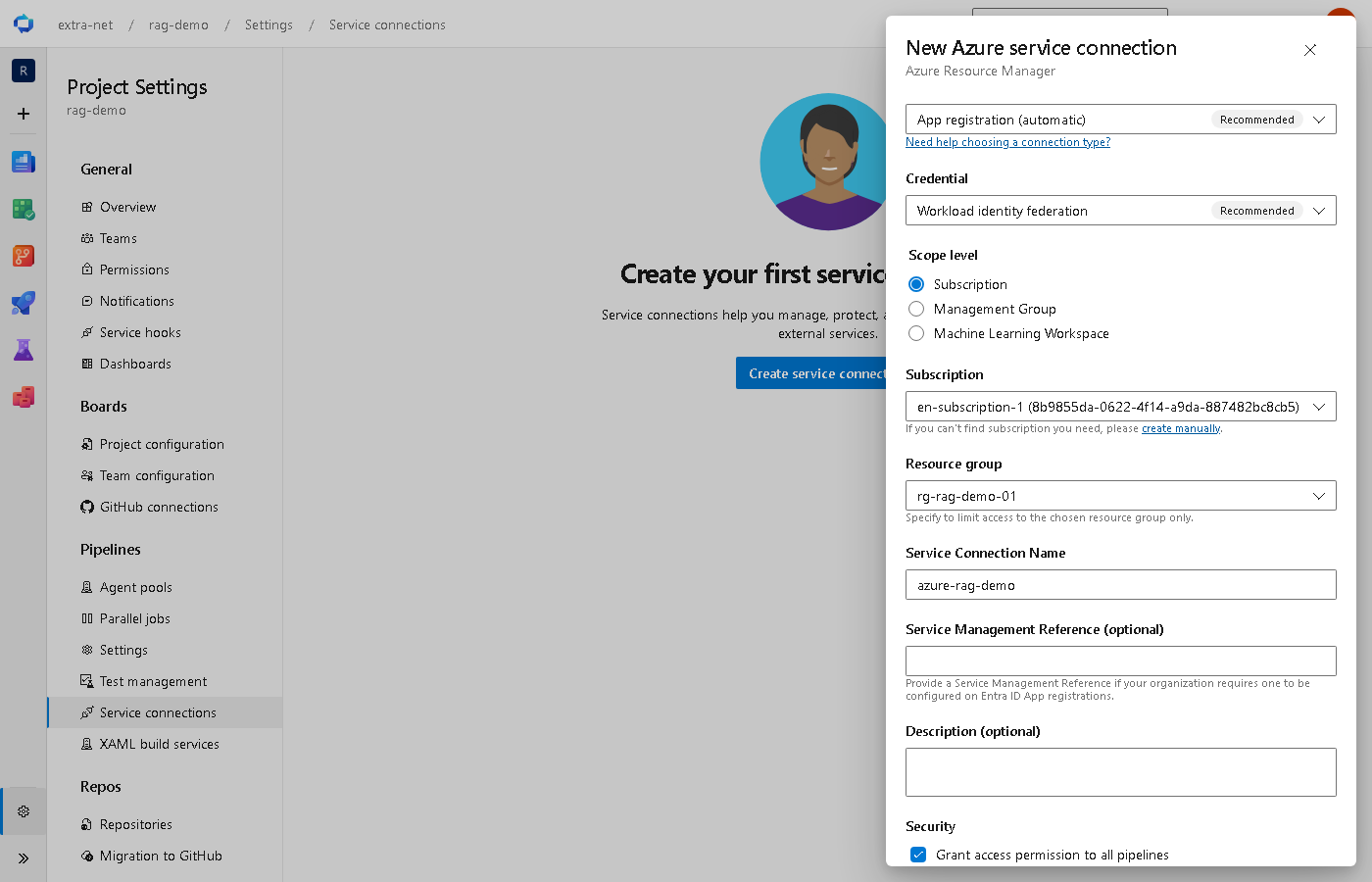
Press Save. Azure DevOps registers in Microsoft Entra an application named extra-net-rag-demo- followed by an id, with the Contributor role on the resource group. There is no secret: the pipeline gets its Azure tokens through the federation.
13. Give the roles to the identity of the pipeline
As in step 6, but in Select members search for extra-net-rag-demo and choose the application: Search Index Data Contributor and Search Service Contributor on the search service, Cognitive Services OpenAI User on the Foundry resource.
14. Add the pipeline file
At the root of the solution:
# Rebuilds the search index: every night at 03:00 UTC and on "Run pipeline". No trigger on push.
trigger: none
pr: none

schedules:
  - cron: "0 3 * * *"
    displayName: Nightly re-index
    branches:
      include:
        - main
    always: true

# The job token can read only the repositories declared here and listed under "uses":
# the two indexed ones, the wiki and this one.
resources:
  repositories:
    - repository: orders-api
      type: git
      name: rag-demo/orders-api
    - repository: shipping-service
      type: git
      name: rag-demo/shipping-service
    - repository: wiki
      type: git
      name: rag-demo/rag-demo.wiki

pool:
  vmImage: ubuntu-latest

jobs:
  - job: reindex
    displayName: Re-index
    uses:
      repositories:
        - orders-api
        - shipping-service
        - wiki
    steps:
      - checkout: self

      - task: UseDotNet@2
        displayName: Install .NET 11
        inputs:
          version: 11.0.x

      - task: AzureCLI@2
        displayName: Re-index the project
        inputs:
          azureSubscription: azure-rag-demo
          scriptType: bash
          scriptLocation: inlineScript
          inlineScript: dotnet run --project DevOpsIndex -c Release
        env:
          DEVOPS_TOKEN: $(System.AccessToken)
always: true starts the nightly run even without changes to the repository, because the wiki and the work items change outside Git. The AzureCLI@2 step signs in to Azure with the service connection, so DefaultAzureCredential finds the login; the token of the job, System.AccessToken, reaches the console in the DEVOPS_TOKEN variable and can read only the repositories declared under resources and uses: the two indexed ones, the wiki, which is a repository too, and the one of the pipeline. A new repository in the project has to be added there.
In Azure DevOps create the rag-tools repository (Repos > New repository) and publish the solution:
git init -b main && git add . && git commit -m "Index and ask consoles"
git remote add origin https://dev.azure.com/extra-net/rag-demo/_git/rag-tools
git push -u origin main
15. Create the pipeline and run it
Open Pipelines and press Create Pipeline > Azure Repos Git > rag-tools. Azure DevOps finds azure-pipelines.yml and shows Review your pipeline YAML: press Run.
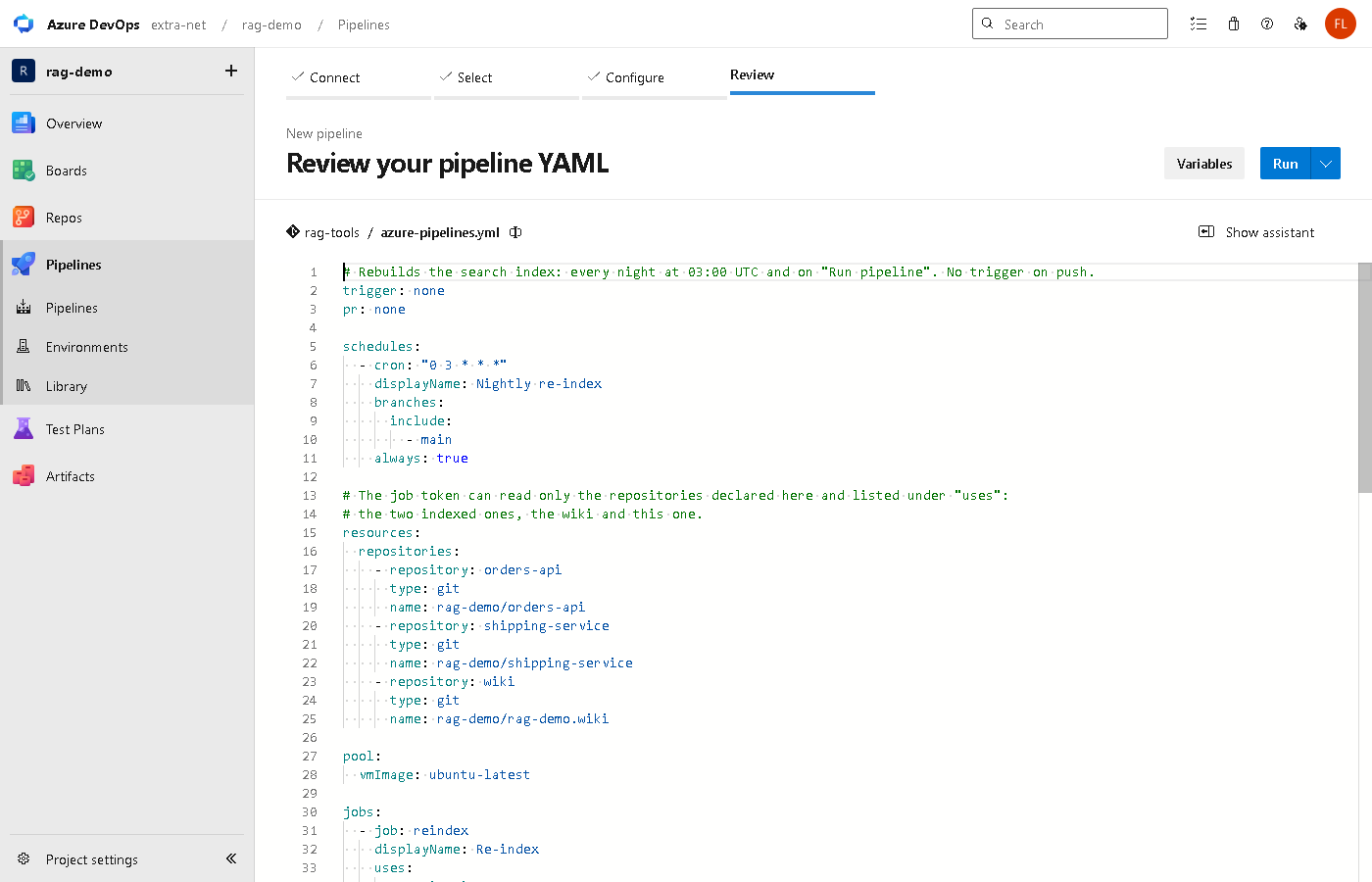
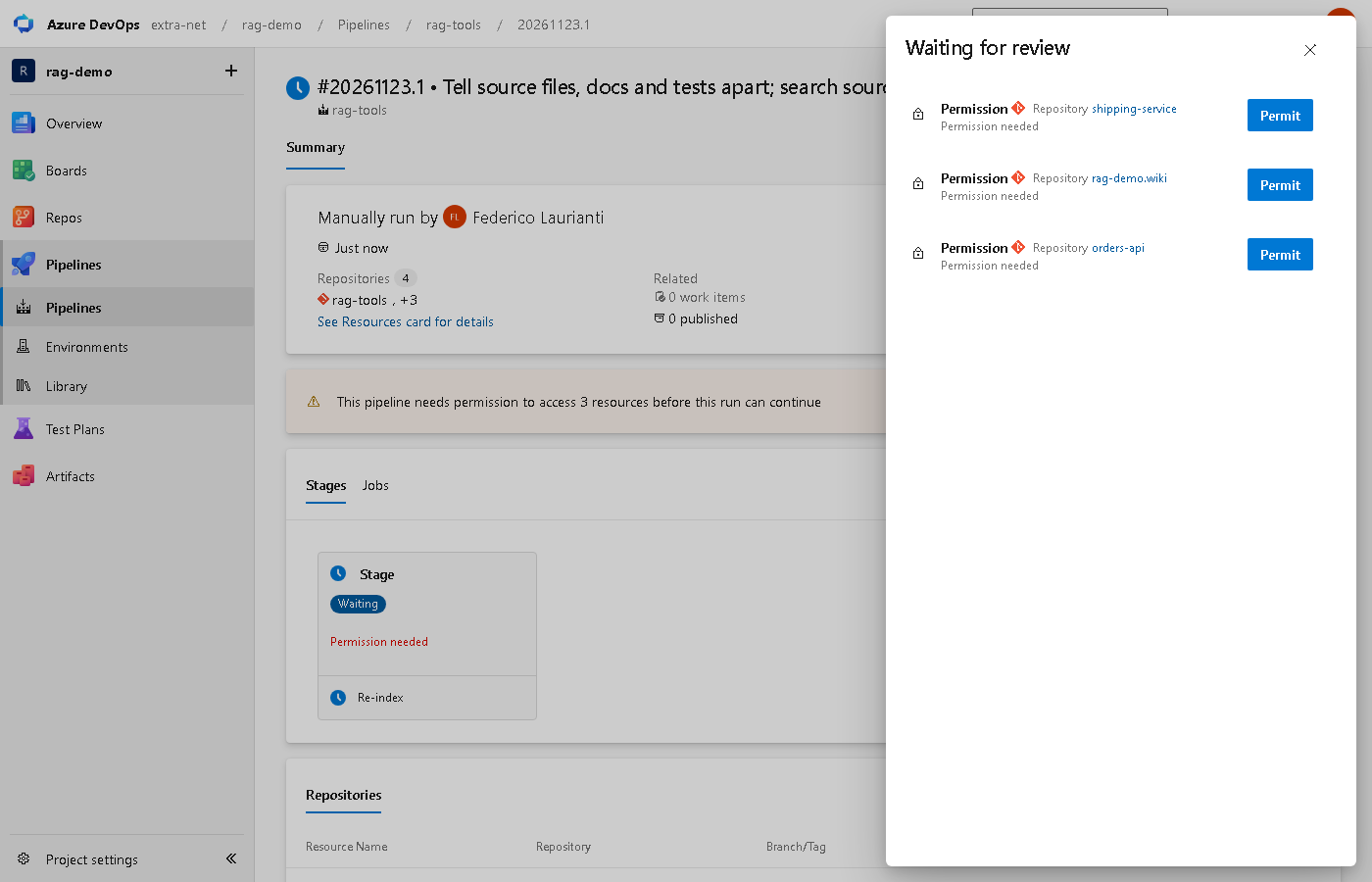
The first run stops with This pipeline needs permission to access 3 resources before this run can continue. Press View and, in Waiting for review, Permit for each of the three repositories, confirming every time.
The run resumes and finishes in about a minute. In the log of the Re-index the project step:
repository rag-tools: 12 files
repository shipping-service: 12 files
repository orders-api: 26 files
wiki rag-demo.wiki: 7 pages
work items: 42
137 pieces to index: 54 code, 16 doc, 10 test, 15 wiki, 42 workitem
embeddings computed
index rag-demo rebuilt with 137 documents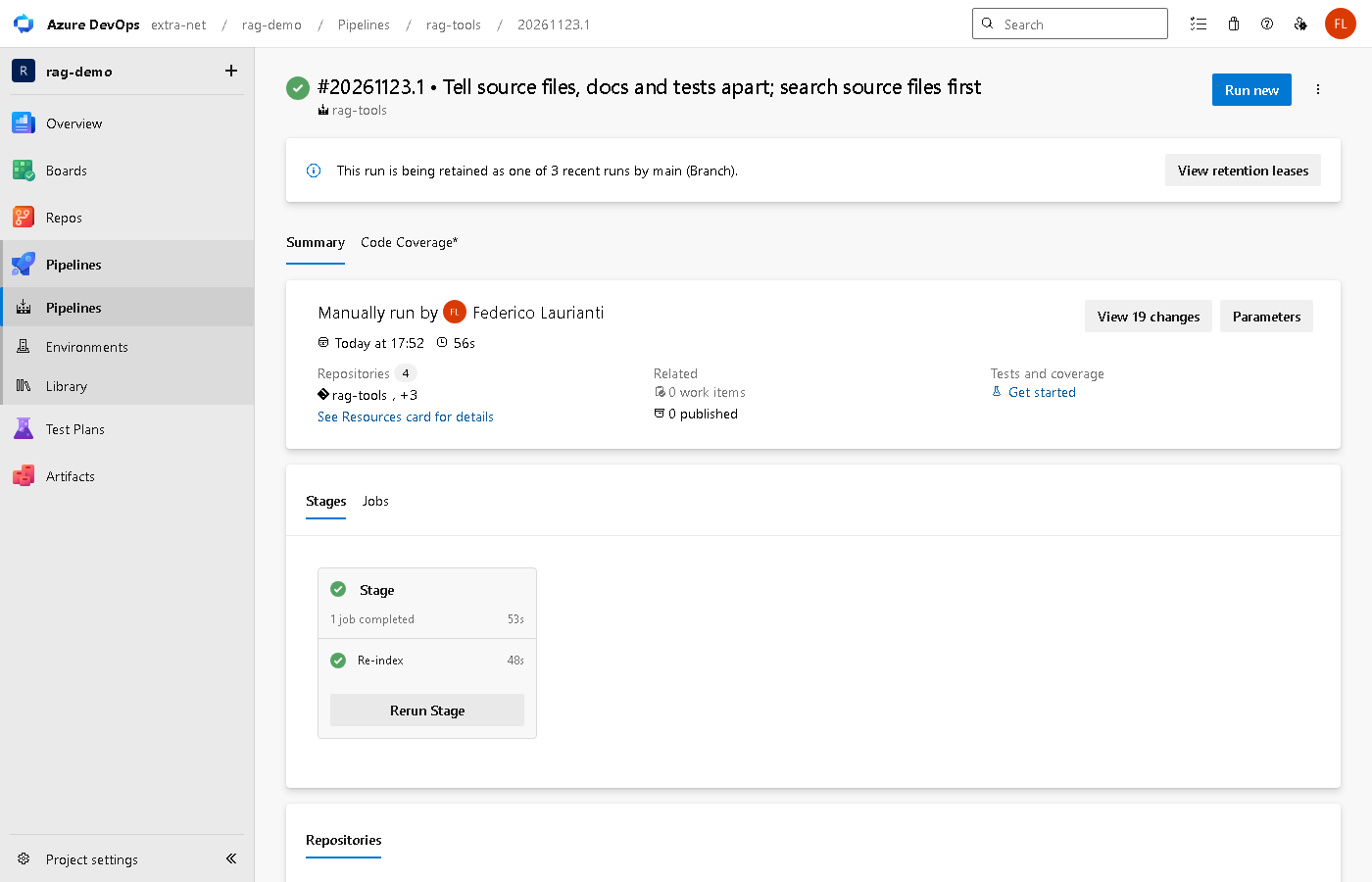
From here the index is rebuilt every night at 03:00 UTC and whenever you press Run pipeline. The organization needs at least one hosted parallel job: new organizations request it through Microsoft's form; here there was one, with 1,800 minutes a month.
The same search with no cloud service at all is in Fully local search over an Azure DevOps project: multilingual embeddings, reranking, Microsoft.Extensions.VectorData with HNSW and an API in .NET. The same service can also serve an engine with local embeddings and reranking, through Microsoft.Extensions.VectorData: Search over an Azure DevOps project with Microsoft.Extensions.VectorData on Azure AI Search.
Delete the resources
16. Delete the group, the pipeline and the service connection
On the portal delete the rg-rag-demo-01 group: the search service, the Foundry resource with its deployments and the role assignments go with it. In Azure DevOps delete the pipeline, from the ... menu of Pipelines, and the service connection, from the ... menu of Project settings > Service connections; if the extra-net-rag-demo-... application is still in Microsoft Entra ID > App registrations, delete it.
Command names, screenshots and responses recorded on November 23, 2026, West Europe region, with .NET 11.