


Procedure to plan and close a sprint in Azure Boards, up to the point where the code is what changes the state of the stories.
Required: an Azure DevOps organization, a project created with the Agile process (the one with Epic, Feature, User Story and Task) and a repository inside the project. Duration: about thirty minutes. Cost: nothing. Azure Boards is free for up to five users.
The portal in the screenshots is in English: command names are reported as they appear on screen.
The material
1. Turn the Epic level on
Project settings > Team configuration > Backlogs, and tick Epics.
In the Agile process the Epic level starts off: without this step the backlog shows user stories only.
2. Write the backlog
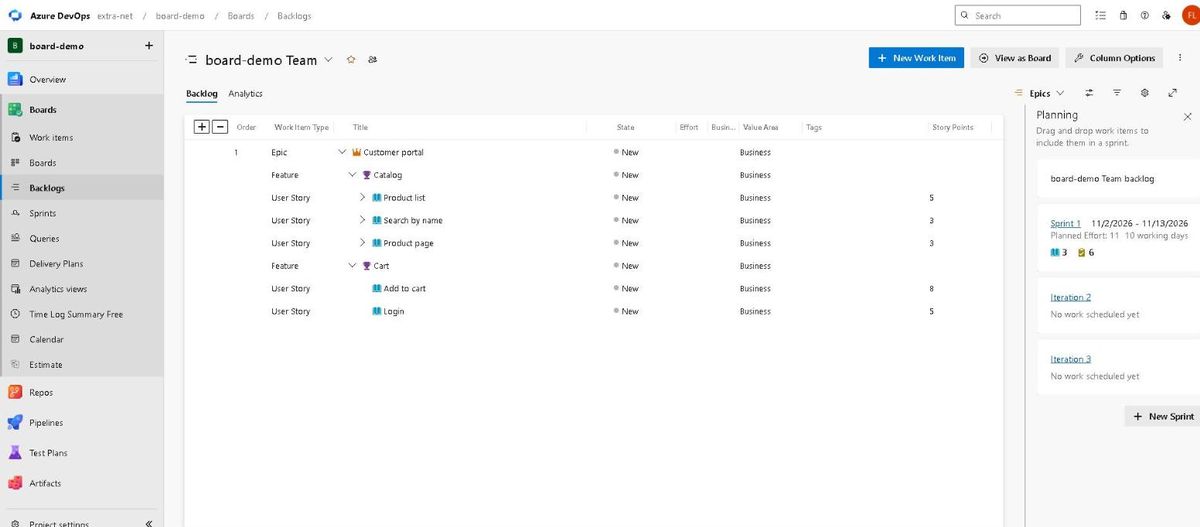
Boards > Backlogs, level Epics from the menu at the top right. New Work Item creates the epic; from the epic's row you add the features, and from those the user stories.
- Epic:
Customer portal - Feature:
Catalog, with the storiesProduct list(5 points),Search by name(3),Product page(3) - Feature:
Cart, with the storiesAdd to cart(8) andLogin(5)
Points go in the story's Story Points field. To see them in the list: Column Options > Add a column > Story Points. The + and − buttons above the grid open and close one level at a time.
3. Give the sprint its dates
Project settings > Project configuration > Iterations. Select Sprint 1 and fill in Start Date and End Date: here, 2 and 13 November 2026.
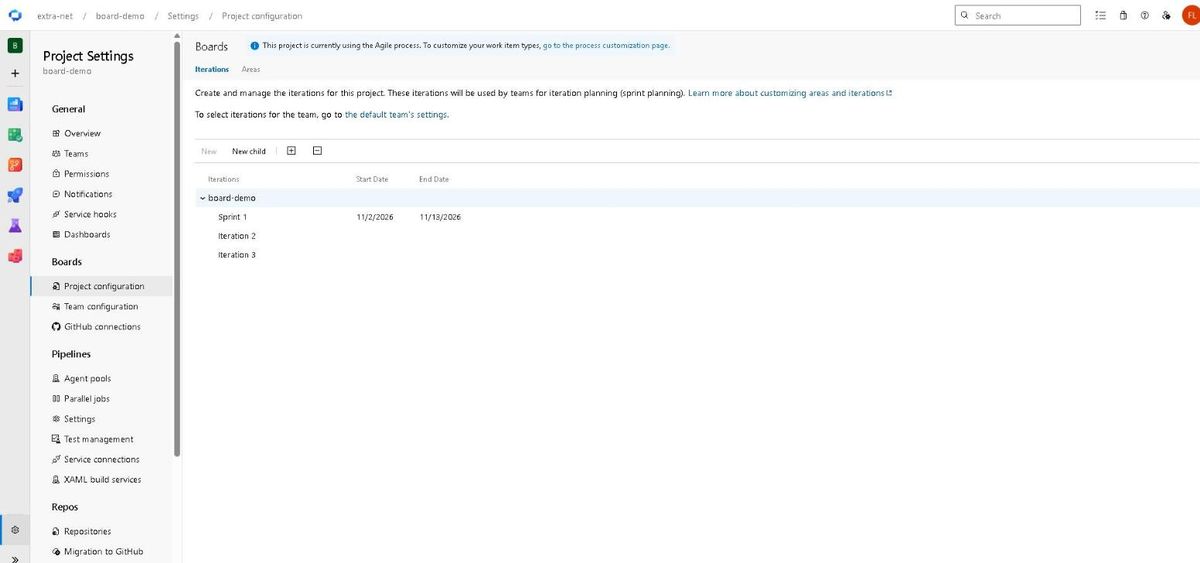
Ten working days. With no dates the sprint has neither capacity nor burndown.
4. Declare the capacity
Boards > Sprints > Capacity. For each person: Activity and Capacity per day. Here a single person, Development, 3 hours a day.
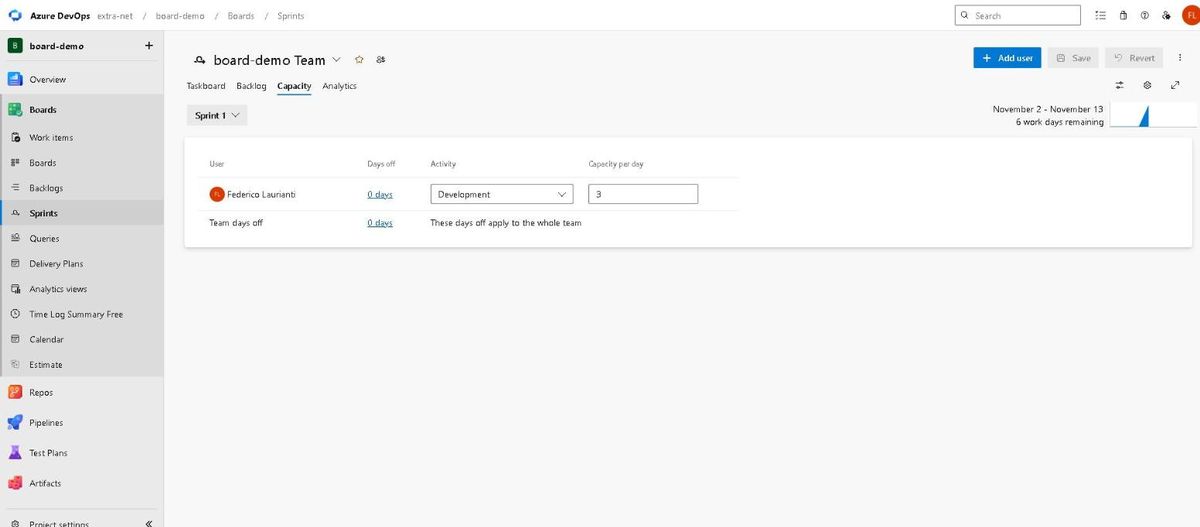
Three hours over ten days make 30 hours available.
The sprint
5. Move the stories into the sprint and break them down
In the backlog, with the Planning pane open, stories are dragged onto Sprint 1. Here the three catalogue ones go in: 5 + 3 + 3, that is 11 points.
From Sprints > Backlog each story is opened and given its tasks, with the hours in Remaining Work:
Product list:Products API8 hours,List page6Search by name:Search filter6,Search field4Product page:Detail page8,Link to detail2
34 hours in total against 30 of capacity: the sprint is already full.
6. Move the cards
Sprints > Taskboard. The columns are New, Active, Resolved, Closed, and each one carries the hours it holds at the top. Drag Products API into Active and List page into Closed.
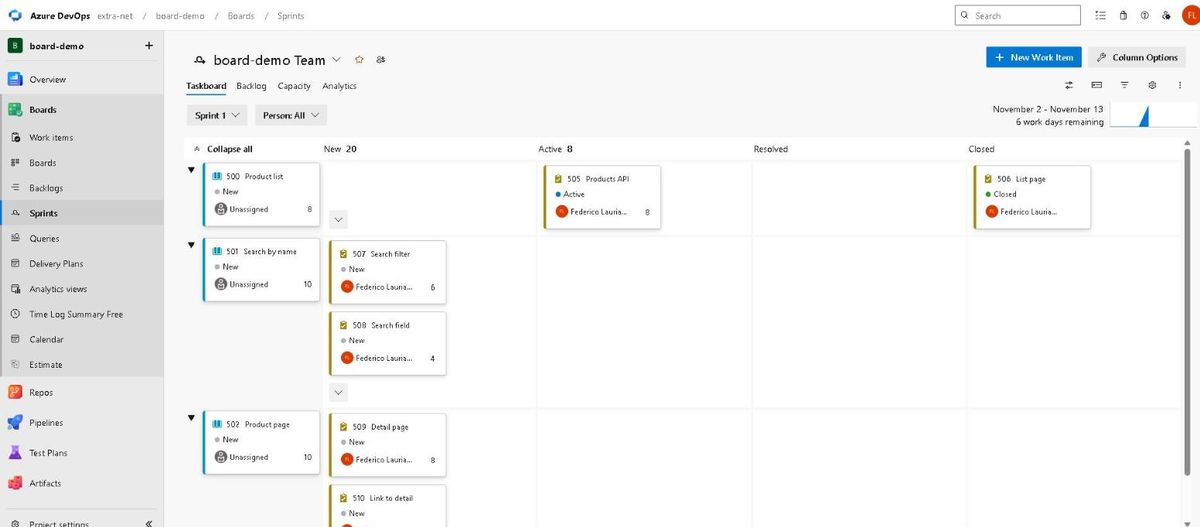
Closing List page takes its 6 hours out of the count: 34 becomes 28, split between New 20 and Active 8.
7. Look at the burndown
Sprints > Analytics.
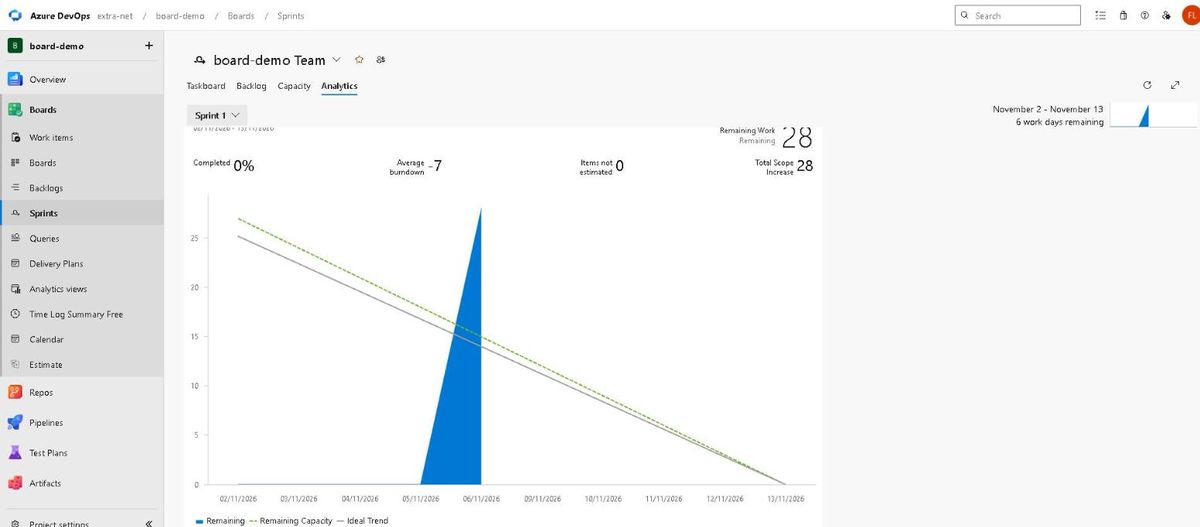
It reports Remaining Work 28, Completed 0%, and two reference lines: Ideal Trend, the theoretical descent to zero on 13 November, and Remaining Capacity, the hours the team has left. The blue line starts on the day the work was entered.
The code that moves the board
8. The commit that attaches itself to the story
It is enough to mention the story number in the commit message:
Product list: first endpoint #500A Fixed in Commit link appears on story #500. The state does not change, though: it stays New. The commit attaches, it does not close.
9. The pull request that closes it
A pull request is opened from the working branch. If the story does not attach by itself, add it with the + in the Work items section.
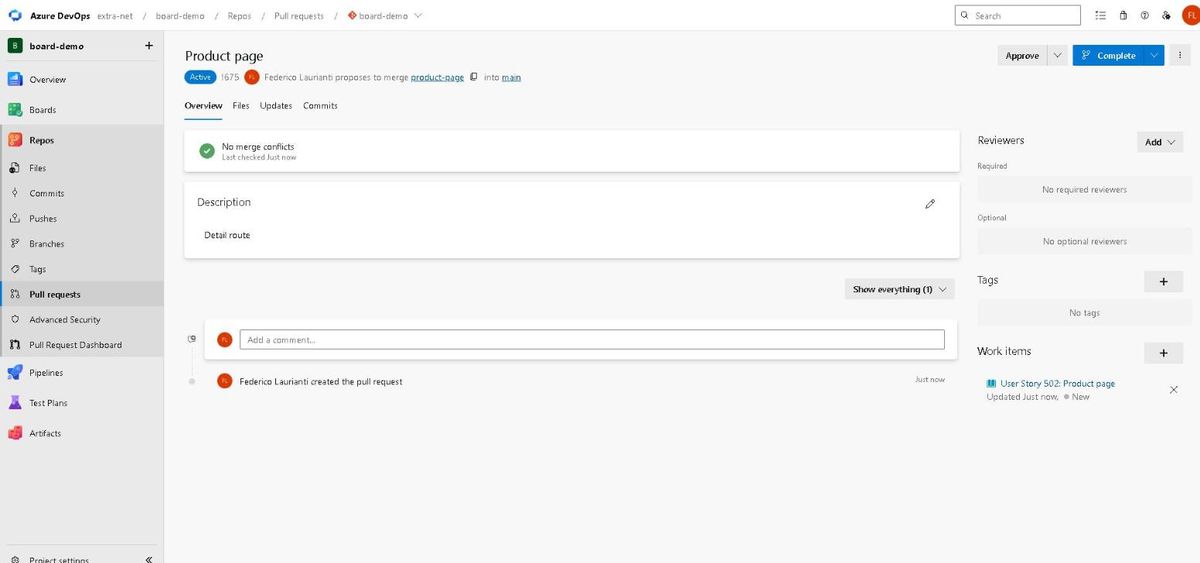
Press Complete. In the panel, under Post-completion options, the box Complete associated work items after merging is already ticked: that is the one that closes the story.
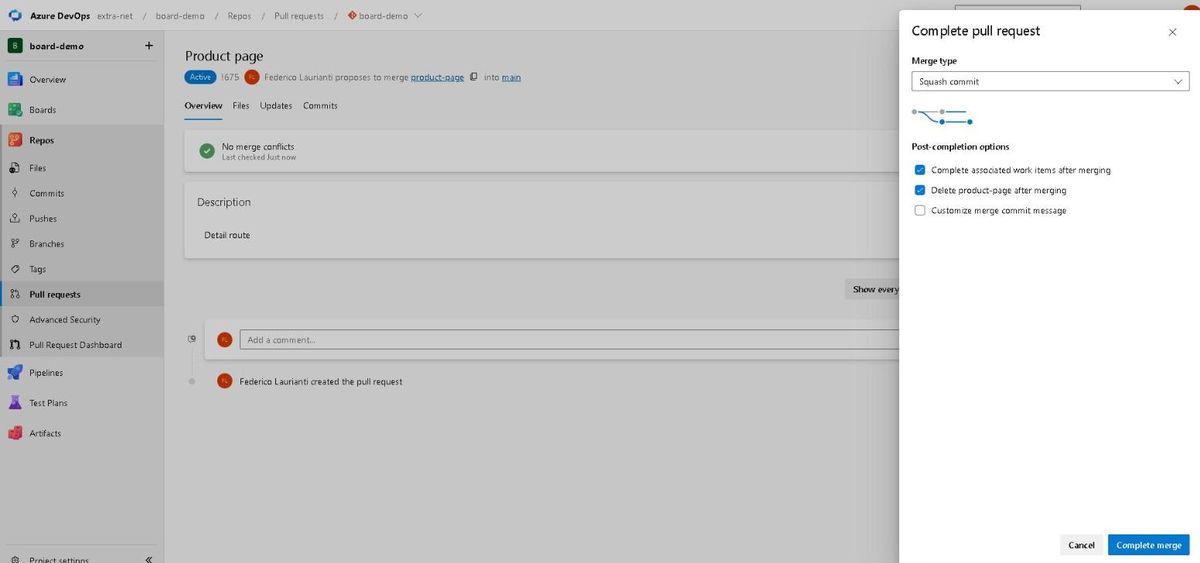
Press Complete merge.
10. The story closes by itself
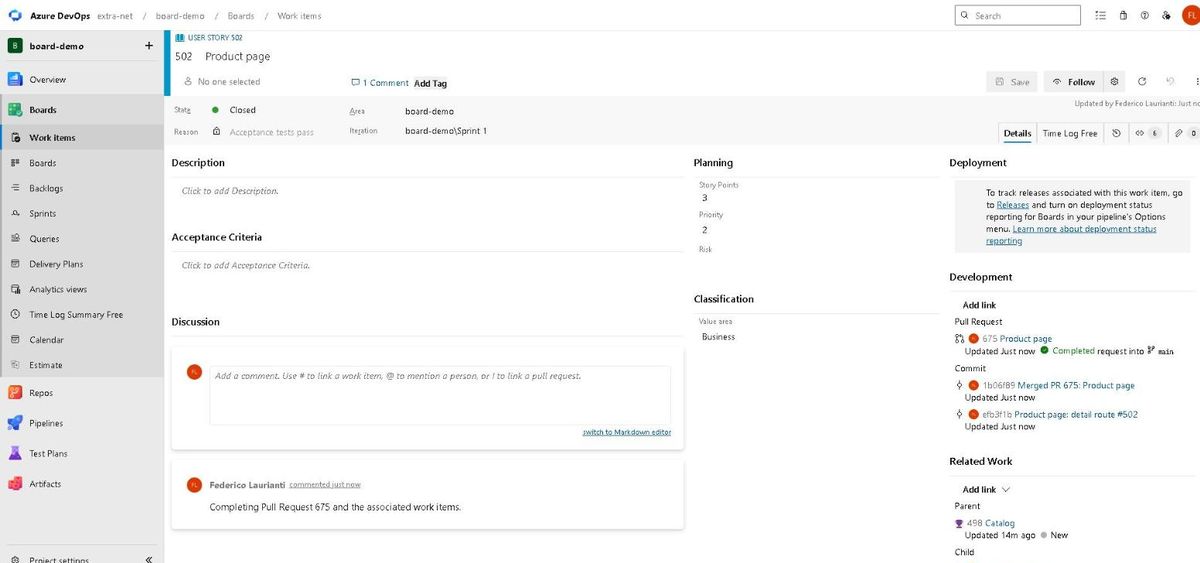
Story #502 is Closed, with Reason Acceptance tests pass. The Development section holds the pull request and the two commits, and in the merge commit message Azure DevOps wrote Related work items: #502.
Clean up
The project is deleted from Project settings > Overview, the Delete button, typing the project name again to confirm. It stays recoverable for 28 days.
Command names, screenshots and numbers recorded on Azure DevOps on 6 November 2026, with the Agile process.