


Procedure to create an Azure SQL database on the free offer and use it from a .NET program that holds no password: the program signs in with the Microsoft Entra identity of whoever runs it.
Required: an Azure account with an active subscription, .NET 10 on the computer, the Azure command-line interface already signed in (az login), a browser.
Duration: about twenty minutes.
Cost: the free offer gives 100,000 vCore seconds of compute and 32 GB of storage a month, for the lifetime of the subscription. Once the limit is reached the database pauses until the next month, with no charges.
The portal in the screenshots is in English: command names are reported as they appear on screen.
Create the database
1. Open the form and apply the free offer
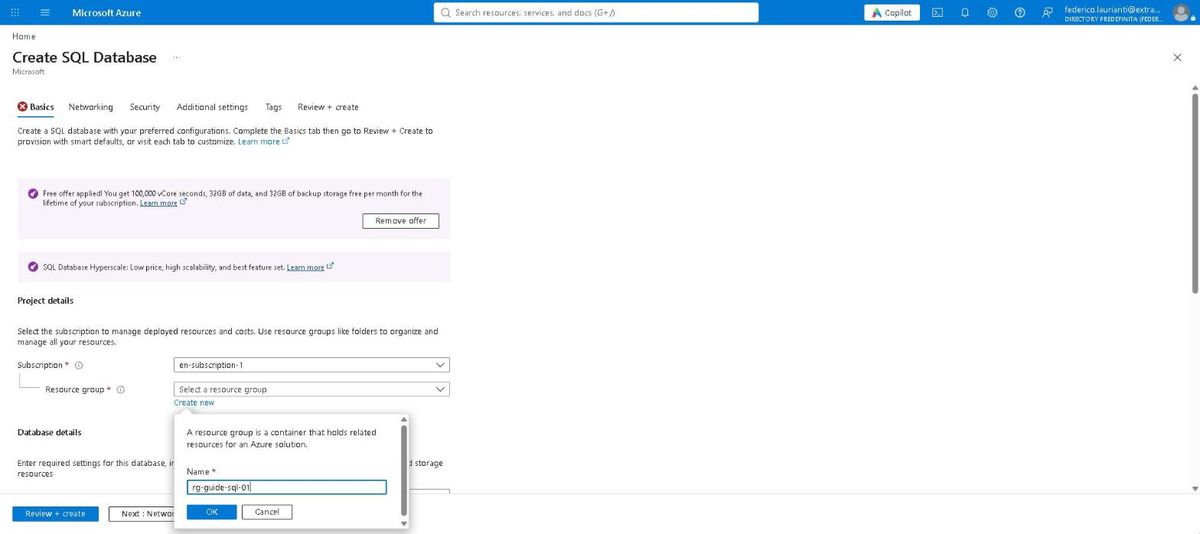
In the portal, Create a resource, search for SQL Database and press Create. At the top of the Basics tab there is the free offer: press Apply offer and the line turns into "Free offer applied!".
Next to Resource group, press Create new and type rg-guide-sql-01.
2. Name the database and create the server
- Database name:
db-guide-01 - Server: press Create new
In the server form:
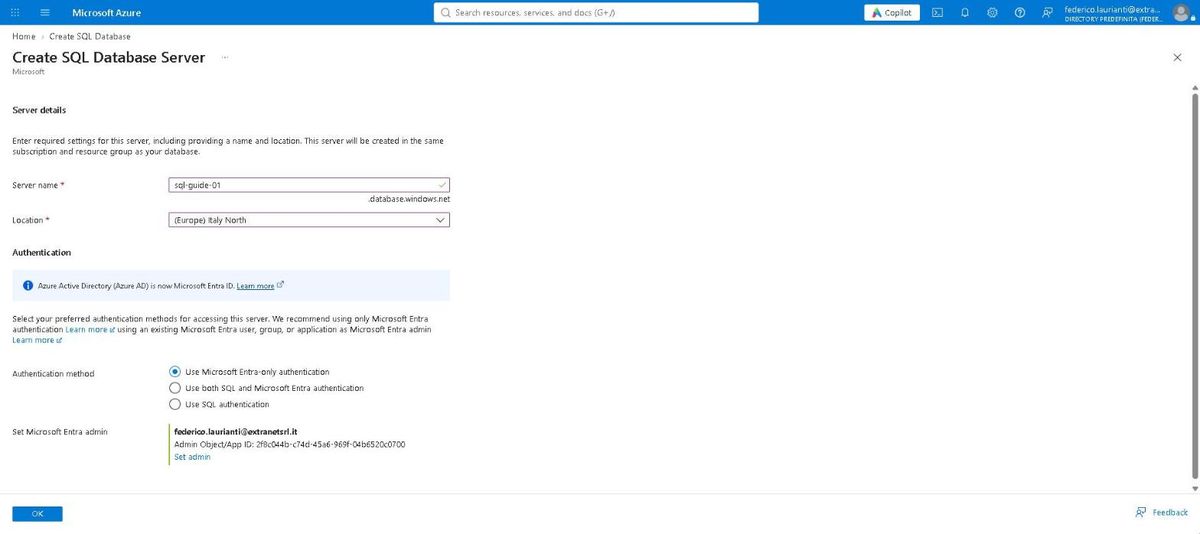
- Server name:
sql-guide-01 - Location: (Europe) Italy North
- Authentication method: Use Microsoft Entra-only authentication
The administrator is the user you signed into the portal with, and the portal writes it underneath. Press OK.
3. Check the tier
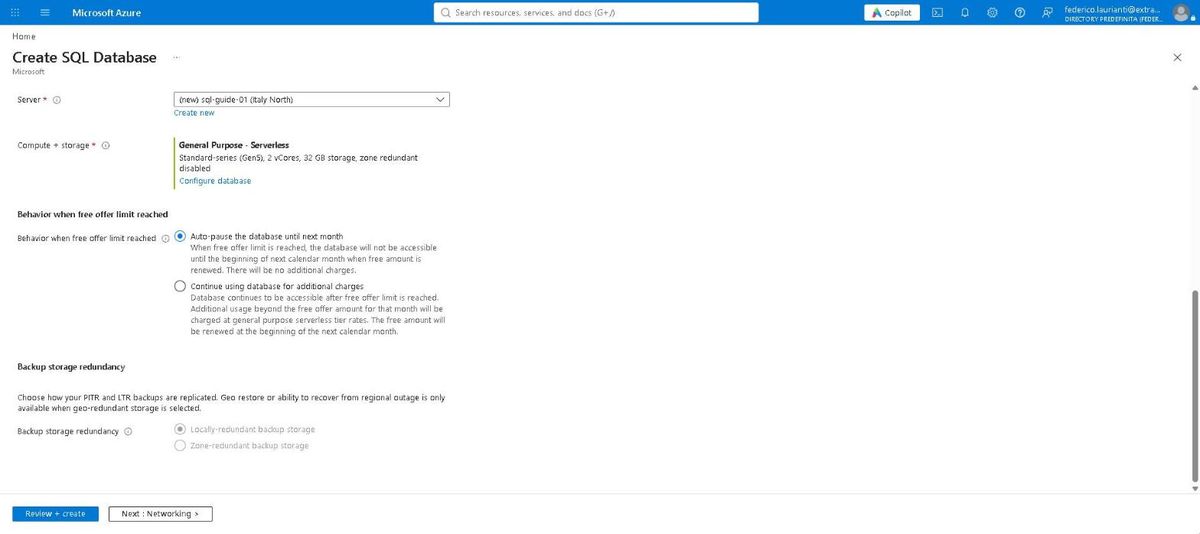
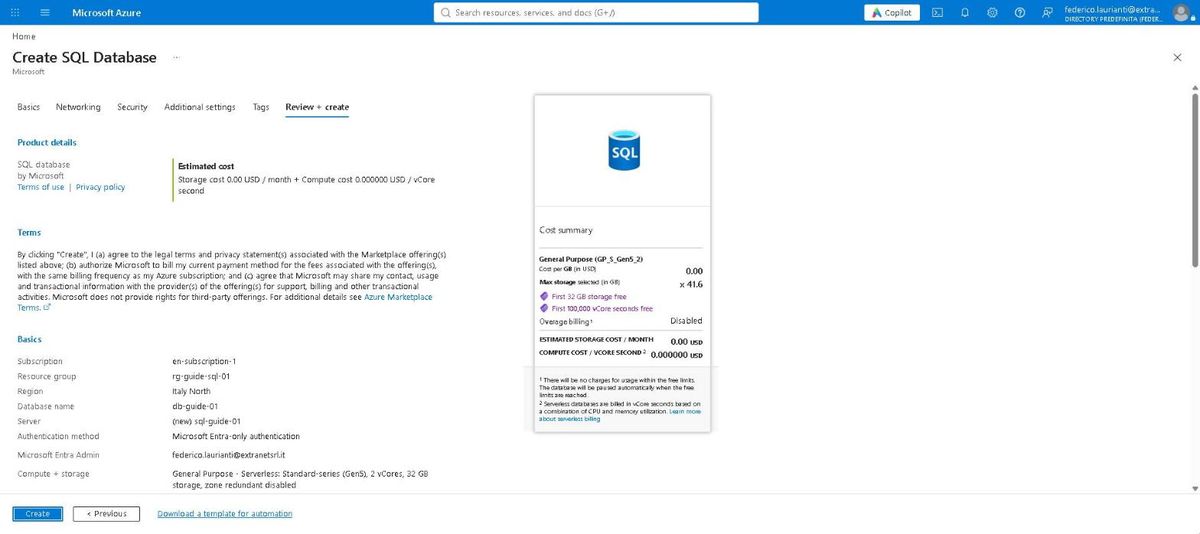
With the offer applied the portal picks the tier itself: General Purpose - Serverless, Standard-series (Gen5), 2 vCores, 32 GB of storage.
Below, Behavior when free offer limit reached is set to Auto-pause the database until next month: once the monthly credit is gone the database stops and nothing is charged. The other option, Continue using database for additional charges, keeps it running and billable.
4. Open the network towards your computer
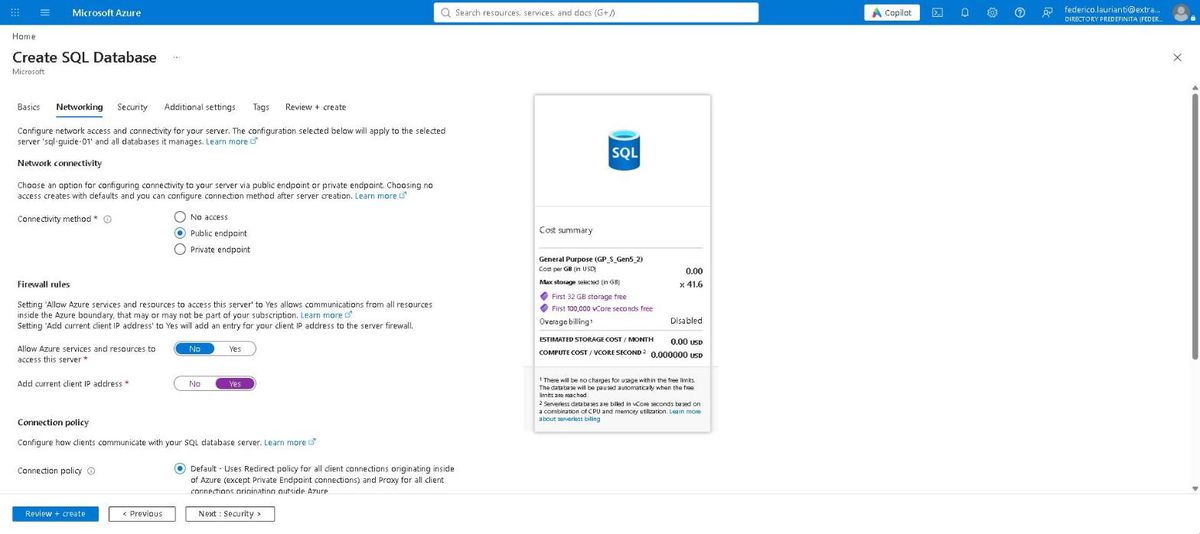
Press Next: Networking. Under Connectivity method pick Public endpoint: the firewall rules appear.
- Allow Azure services and resources to access this server: leave No
- Add current client IP address: set Yes
5. Review and create
Press Review + create. The summary reports the estimated cost: 0.00 USD a month for storage and 0.000000 USD per vCore second.
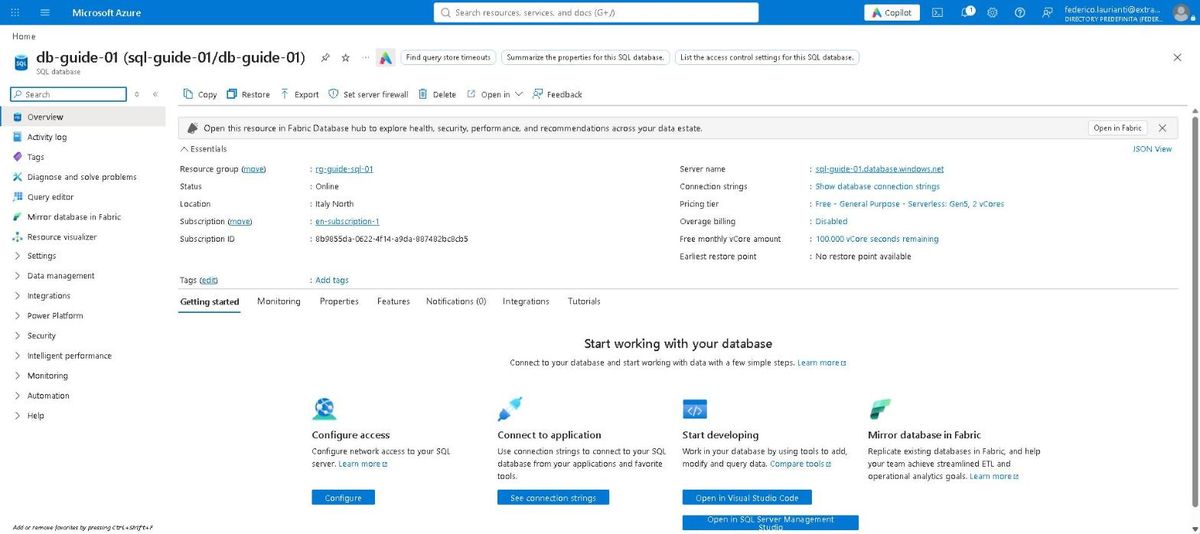
Press Create. Creation takes a few minutes. When it ends, the database page reports Status Online, the tier "Free - General Purpose - Serverless: Gen5, 2 vCores" and the credit left: 100,000 vCore seconds remaining.
Read and write from .NET
6. Copy the connection string
In the database menu, Settings > Connection strings. The first entry, ADO.NET (Microsoft Entra passwordless authentication), is the one to use: there is no password inside it.
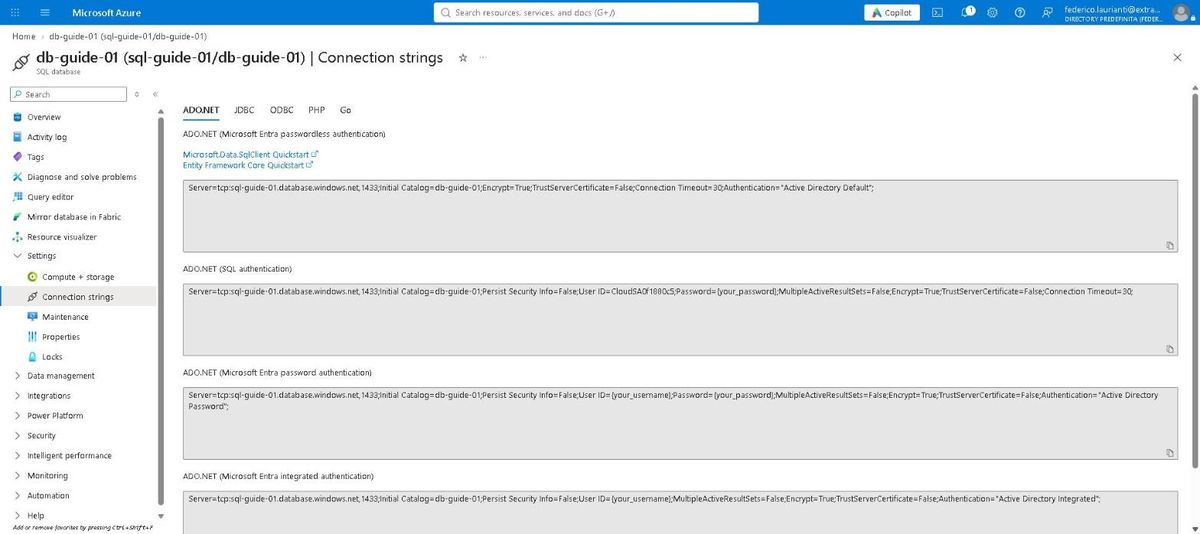
Server=tcp:sql-guide-01.database.windows.net,1433;Initial Catalog=db-guide-01;Encrypt=True;TrustServerCertificate=False;Connection Timeout=30;Authentication="Active Directory Default";7. Create the project
dotnet new console -n sql-demo
cd sql-demo
dotnet add package Microsoft.Data.SqlClient
dotnet add package Microsoft.Data.SqlClient.Extensions.Azure
The second package is genuinely needed: from version 7 onwards, Microsoft Entra authentication no longer ships inside Microsoft.Data.SqlClient. Without it the program compiles and then stops when opening the connection:
System.ArgumentException: Cannot find an authentication provider for
'ActiveDirectoryDefault'. Install the
'Microsoft.Data.SqlClient.Extensions.Azure' NuGet package to use
Active Directory (Entra ID) authentication methods.
A third package closes two warnings:
dotnet add package System.Security.Cryptography.Pkcs --version 10.0.14Microsoft.Data.SqlClient 7.1.1 drags in System.Security.Cryptography.Pkcs 9.0.18, which has two open security advisories (CVE-2026-70162 and CVE-2026-84008, both denial of service), and the build reports them as NU1902 and NU1903. They are fixed in 9.0.21 and 10.0.13: with a direct reference to 10.0.14 the build is clean again.
8. Write the program
The program creates the table if it is missing, empties it, writes three rows and reads them back. The connection string comes from an environment variable: the code holds neither an address nor a credential.
using System.Diagnostics;
using Microsoft.Data.SqlClient;

string connectionString = Environment.GetEnvironmentVariable("SQL_GUIDE")!;

Stopwatch time = Stopwatch.StartNew();

await using SqlConnection db = new(connectionString);
await db.OpenAsync();

Console.WriteLine($"Connected in {time.ElapsedMilliseconds} ms to {db.Database}.\n");

await Run(db, """
    IF OBJECT_ID('dbo.Items') IS NULL
        CREATE TABLE dbo.Items (
            Id INT IDENTITY PRIMARY KEY,
            Name NVARCHAR(60) NOT NULL,
            Price DECIMAL(8,2) NOT NULL);
    """);

await Run(db, "TRUNCATE TABLE dbo.Items;");

foreach ((string name, decimal price) in new[]
{
    ("Keyboard", 49.90m),
    ("Monitor", 199.00m),
    ("Network cable", 7.50m),
})
{
    await using SqlCommand insert = db.CreateCommand();
    insert.CommandText =
        "INSERT INTO dbo.Items (Name, Price) VALUES (@name, @price);";
    insert.Parameters.AddWithValue("@name", name);
    insert.Parameters.AddWithValue("@price", price);
    await insert.ExecuteNonQueryAsync();
}

await using SqlCommand select = db.CreateCommand();
select.CommandText = "SELECT Id, Name, Price FROM dbo.Items ORDER BY Price DESC;";

await using SqlDataReader rows = await select.ExecuteReaderAsync();
while (await rows.ReadAsync())
{
    Console.WriteLine($"{rows.GetInt32(0)}  {rows.GetString(1),-14} {rows.GetDecimal(2),8:N2} EUR");
}

Console.WriteLine($"\nAll of it in {time.ElapsedMilliseconds} ms.");

static async Task Run(SqlConnection db, string sql)
{
    await using SqlCommand command = db.CreateCommand();
    command.CommandText = sql;
    await command.ExecuteNonQueryAsync();
}
Values travel as parameters, @name and @price, not concatenated into the query text.
9. Run it
Put the string in the environment variable and start:
export SQL_GUIDE="<string copied from the portal>"
dotnet run
On Windows, in PowerShell:
$env:SQL_GUIDE = '<string copied from the portal>'
dotnet run
Connected in 3710 ms to db-guide-01.
2 Monitor 199.00 EUR
1 Keyboard 49.90 EUR
3 Network cable 7.50 EUR
All of it in 4067 ms.Nearly all of the time sits in the first connection: 3710 ms to authenticate and open it, 357 ms to create the table, write three rows and read them back.
The program never saw a password. Authentication="Active Directory Default" has the driver look for an identity already available on the machine, and it finds the one from the Azure command-line interface. The same program, moved onto a machine in Azure, would use that machine's managed identity without a single line changing.
10. Check from the portal
In the database menu, Query editor, then the Connect as button with your name: no password here either.
SELECT * FROM dbo.Items ORDER BY Price DESC;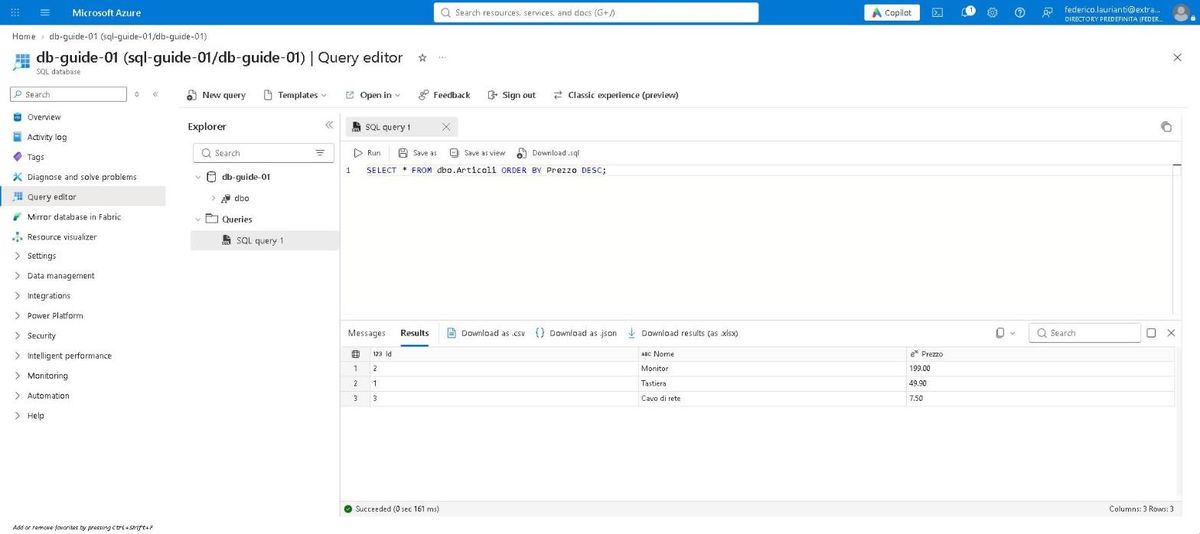
The three rows are there and the query took 161 ms.
Clean up
11. Delete the resource group
Open rg-guide-sql-01: it holds the database and the server.
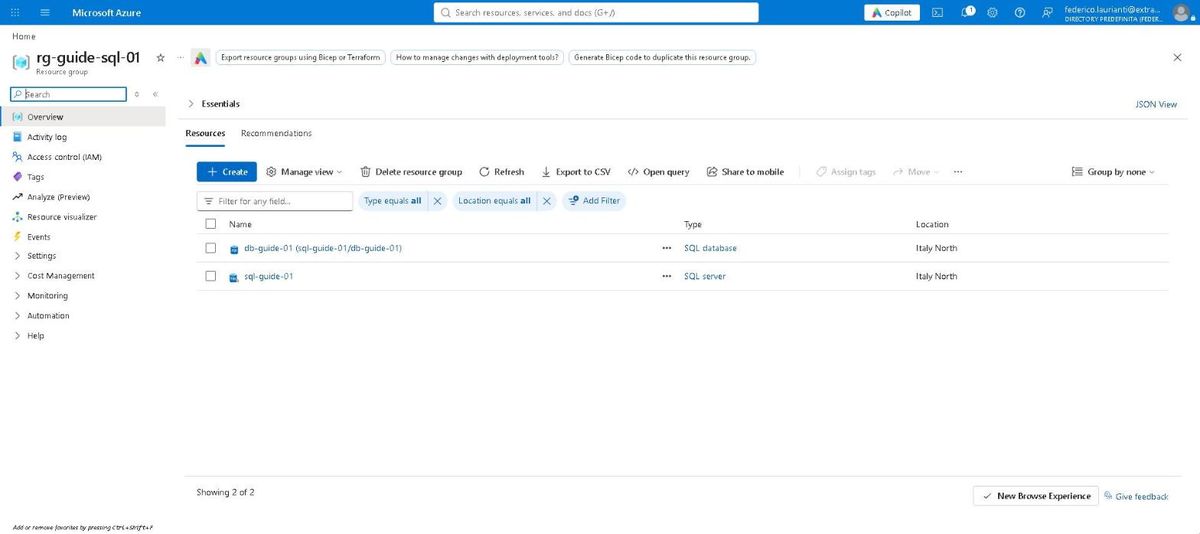
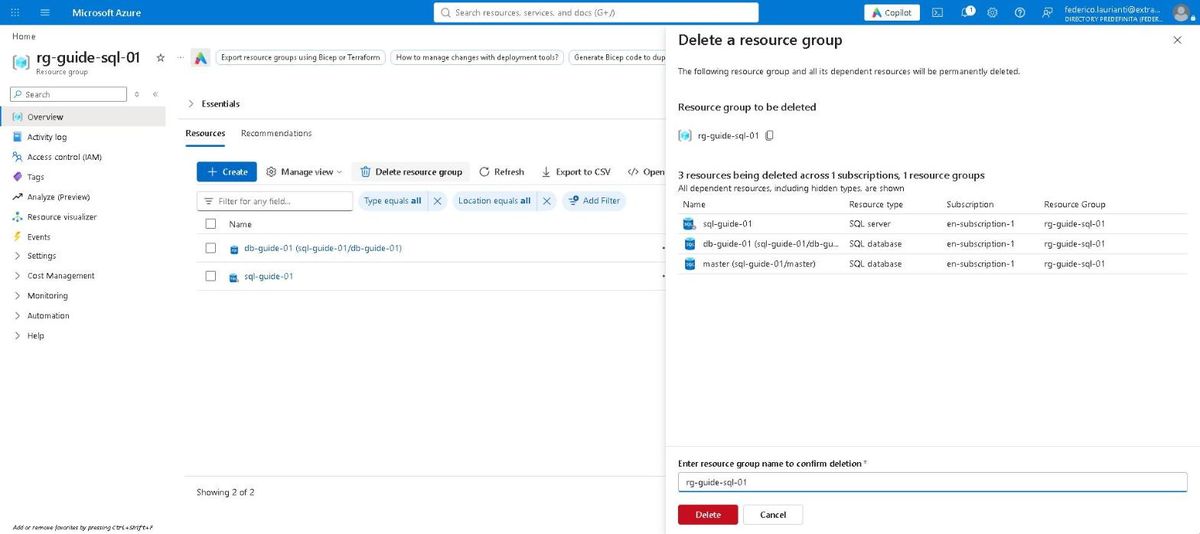
Press Delete resource group. The panel lists three resources, because the server always carries its own master alongside the database. Type the group name again and press Delete.
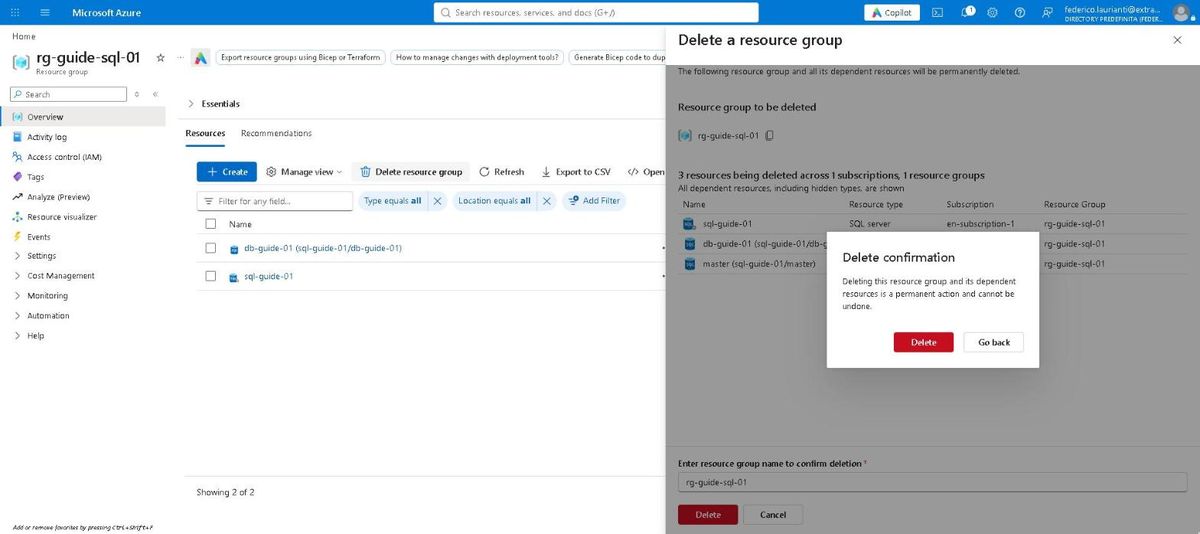
Confirm in the window that appears.
Once the group is gone the free credit stays available: the offer allows up to ten free databases per subscription.
Command names, screenshots and timings recorded on the Azure portal on 6 November 2026, Italy North region, with .NET 10.0.401 and Microsoft.Data.SqlClient 7.1.1.