


Procedure to search an Azure DevOps project with the quality of Azure AI Search, with no cloud service at all. The files of the repositories, the wiki pages and the work items become a folder of JSON files inside a Git repository, one file per source, with the pieces of text and their vectors. A multilingual embedding model computes the vectors in ONNX Runtime, inside the .NET process; the search merges keywords and meaning and then re-orders the candidates with a cross-encoder, what the semantic ranker does in Azure. The vectors sit in an HNSW graph behind Microsoft.Extensions.VectorData, the .NET abstraction for vector stores, so the store can change without rewriting the engine. A console prints the passages found with the links to the Azure DevOps pages, a minimal API does the same for whoever wants a shared endpoint, a pipeline updates the index every night and commits only the files that changed. The answer is written by whoever reads the passages, a person or a coding agent. Every licence is MIT or Apache 2.0.
It is the no-cloud variant of Index an Azure DevOps project on Azure AI Search and query it from .NET, on the same sample project. The same engine with the store on Azure AI Search is in Search over an Azure DevOps project with Microsoft.Extensions.VectorData on Azure AI Search.
You need: an Azure DevOps project with at least one repository, a wiki and some work items. Here it is rag-demo, in the extra-net organization: two .NET repositories, orders-api and shipping-service, a wiki of 7 pages and 42 work items; the rag-engine repository is the one written in this guide. Then .NET 11 and the Azure CLI signed in (az login). For the protected API, the permission to register applications in Microsoft Entra.
Time: about two hours; the first build downloads 250 MB of models.
Cost: zero. The pipeline uses the free minutes of the organization.
The Azure portal and Azure DevOps in the screenshots are in English: command names are written as they appear on screen.
The models
1. Create the repository and the solution
In Azure DevOps open Repos > Files, press the name of the repository at the top and choose New repository: name rag-engine, no README. On your computer, a library and three programs:
mkdir rag-engine && cd rag-engine
dotnet new sln -n RagEngine
dotnet new classlib -n Rag.Engine -o Rag.Engine
dotnet new console -n RagIndex -o RagIndex
dotnet new console -n RagSearch -o RagSearch
dotnet new web -n RagApi -o RagApi
dotnet sln add Rag.Engine RagIndex RagSearch RagApi
dotnet new gitignore
cd Rag.Engine && rm Class1.cs
dotnet add package Azure.Identity && dotnet add package Microsoft.ML.OnnxRuntime && dotnet add package Microsoft.ML.Tokenizers
dotnet add package Microsoft.Data.Sqlite && dotnet add package Hnsw.Net && dotnet add package Microsoft.Extensions.VectorData.Abstractions
cd ..
dotnet add RagIndex reference Rag.Engine && dotnet add RagSearch reference Rag.Engine && dotnet add RagApi reference Rag.Engine
cd RagApi && dotnet add package Microsoft.Identity.Web && cd ..
In the test the versions were Azure.Identity 1.21.0, Microsoft.ML.OnnxRuntime 1.32.0, Microsoft.ML.Tokenizers 3.0.0, Microsoft.Data.Sqlite 11.0.0, Hnsw.Net 0.1.4, Microsoft.Extensions.VectorData.Abstractions 11.0.1 and Microsoft.Identity.Web 4.18.0. ONNX Runtime runs the models, Microsoft.ML.Tokenizers reads their tokenizer, Microsoft.Data.Sqlite brings SQLite with FTS5, the keyword search; Hnsw.Net is an HNSW graph written in C#, with no native library, with its own connector for Microsoft.Extensions.VectorData.
At the root, the names of the project and of the store, shared by the three programs. The tenant id is in Microsoft Entra ID > Overview > Tenant ID.
{
  "tenantId": "4813d8ed-5a5c-44fd-805e-d338911fe0c1",
  "devOpsOrganization": "extra-net",
  "devOpsProject": "rag-demo",
  "store": "hnsw",
  "collection": "rag-engine"
}
And at the end of .gitignore the caches and the models, which do not go into Git:
# local caches and downloaded models
.cache/
Rag.Engine/.models/
2. Let the build download the models
Two models, chosen for language and licence: multilingual-e5-small by intfloat, MIT, for the embeddings, in the quantized ONNX export by Xenova, 118 MB; mmarco-mMiniLMv2-L12-H384-v1 by cross-encoder, Apache 2.0, for the re-ordering, 119 MB. Both use the XLM-RoBERTa tokenizer, a SentencePiece file of 5 MB. The multilingual model is not a detail: with an English-only model, in the test, questions in Italian found neither the code nor the bugs, because the keyword search does not cross languages and the search by meaning depends on the model.
An MSBuild file downloads them at the first build into Rag.Engine/.models and copies them next to every executable, in the models folder:
<Project>
  <!--
    The two ONNX models and their tokenizers, downloaded once from Hugging Face into Rag.Engine/.models
    (ignored by git) and copied next to every executable that references the library.
    Embeddings: intfloat/multilingual-e5-small (MIT), quantized export by Xenova.
    Reranking: cross-encoder/mmarco-mMiniLMv2-L12-H384-v1 (Apache 2.0), quantized export.
  -->
  <PropertyGroup>
    <RagModelsDir>$(MSBuildThisFileDirectory).models\</RagModelsDir>
  </PropertyGroup>

  <ItemGroup>
    <RagModelFile Include="embedding/model.onnx" Url="https://huggingface.co/Xenova/multilingual-e5-small/resolve/main/onnx/model_quantized.onnx" />
    <RagModelFile Include="embedding/sentencepiece.bpe.model" Url="https://huggingface.co/Xenova/multilingual-e5-small/resolve/main/sentencepiece.bpe.model" />
    <RagModelFile Include="reranker/model.onnx" Url="https://huggingface.co/cross-encoder/mmarco-mMiniLMv2-L12-H384-v1/resolve/main/onnx/model_quint8_avx2.onnx" />
    <RagModelFile Include="reranker/sentencepiece.bpe.model" Url="https://huggingface.co/cross-encoder/mmarco-mMiniLMv2-L12-H384-v1/resolve/main/sentencepiece.bpe.model" />
  </ItemGroup>

  <Target Name="AcquireRagModels" BeforeTargets="AssignTargetPaths">
    <DownloadFile Condition="!Exists('$(RagModelsDir)%(RagModelFile.Identity)')"
                  SourceUrl="%(RagModelFile.Url)"
                  DestinationFolder="$(RagModelsDir)%(RagModelFile.RelativeDir)"
                  DestinationFileName="%(RagModelFile.Filename)%(RagModelFile.Extension)" />
    <ItemGroup>
      <Content Include="$(RagModelsDir)%(RagModelFile.Identity)" Link="models\%(RagModelFile.Identity)" CopyToOutputDirectory="PreserveNewest" />
    </ItemGroup>
  </Target>
</Project>
In Rag.Engine/Rag.Engine.csproj, before the closing of Project:
<Import Project="Models.targets" />3. Write the tokenizer
Both models read text with the XLM-RoBERTa tokenizer: a SentencePiece model plus four special tokens. Microsoft.ML.Tokenizers reads the SentencePiece file; the Hugging Face vocabulary, though, puts <s>, <pad>, </s> and <unk> in front, so every id must be shifted by one. In the test the ids produced this way were identical to those of the Hugging Face reference tokenizer on the same sentences.
using Microsoft.ML.Tokenizers;
namespace Rag.Engine;
/// <summary>
/// The tokenizer of the XLM-RoBERTa family, used by both models: a SentencePiece model plus the
/// four special tokens of the Hugging Face vocabulary. Every SentencePiece id is shifted by one,
/// because the Hugging Face vocabulary puts <s>, <pad>, </s> and <unk> first.
/// </summary>
public sealed class XlmRobertaTokenizer
{
public const int BeginningOfSentence = 0;
public const int Padding = 1;
public const int EndOfSentence = 2;
private const int Shift = 1;
private readonly SentencePieceTokenizer _model;
public XlmRobertaTokenizer(string modelFile)
{
using FileStream stream = File.OpenRead(modelFile);
_model = SentencePieceTokenizer.Create(stream, addBeginningOfSentence: false, addEndOfSentence: false);
}
/// <summary>Ids of one text: <s> text </s>, cut to <paramref name="maxTokens"/>.</summary>
public int[] Encode(string text, int maxTokens)
{
List<int> ids = Pieces(text, maxTokens - 2);
return [BeginningOfSentence, .. ids, EndOfSentence];
}
/// <summary>Ids of a pair, as the cross-encoder expects: <s> first </s></s> second </s>; the second text is the one cut.</summary>
public int[] EncodePair(string first, string second, int maxTokens)
{
List<int> a = Pieces(first, maxTokens / 2);
List<int> b = Pieces(second, maxTokens - a.Count - 4);
return [BeginningOfSentence, .. a, EndOfSentence, EndOfSentence, .. b, EndOfSentence];
}
private List<int> Pieces(string text, int max)
{
IReadOnlyList<int> raw = _model.EncodeToIds(text);
return raw.Take(Math.Max(max, 0)).Select(id => id + Shift).ToList();
}
}4. Write the embedding
The model wants a prefix that says what the text is, query: for questions and passage: for pieces; it returns one vector per token, and the vector of the text is the mean, normalized to length one. The ONNX export also asks for BERT's token_type_ids, all zero: the code adds them if the model lists them among its inputs.
using Microsoft.ML.OnnxRuntime;
using Microsoft.ML.OnnxRuntime.Tensors;

namespace Rag.Engine;

/// <summary>
/// multilingual-e5-small in ONNX Runtime, inside the process: a text in, a vector of 384 numbers out.
/// The model wants a prefix that says what the text is: "query: " for questions, "passage: " for the
/// pieces of the index. Mean pooling over the tokens, then the vector is normalized to length one.
/// </summary>
public sealed class Embedder : IDisposable
{
    public const string ModelName = "multilingual-e5-small";
    public const int Dimensions = 384;
    private const int MaxTokens = 512;

    private readonly InferenceSession _session;
    private readonly XlmRobertaTokenizer _tokenizer;

    public Embedder(string modelsFolder)
    {
        string folder = Path.Combine(modelsFolder, "embedding");
        _session = new InferenceSession(Path.Combine(folder, "model.onnx"));
        _tokenizer = new XlmRobertaTokenizer(Path.Combine(folder, "sentencepiece.bpe.model"));
    }

    public float[] EmbedQuery(string text) => Embed("query: " + text);

    public float[] EmbedPassage(string text) => Embed("passage: " + text);

    private float[] Embed(string text)
    {
        int[] ids = _tokenizer.Encode(text, MaxTokens);
        DenseTensor<long> inputIds = new([1, ids.Length]);
        DenseTensor<long> mask = new([1, ids.Length]);
        for (int i = 0; i < ids.Length; i++)
        {
            inputIds[0, i] = ids[i];
            mask[0, i] = 1;
        }

        List<NamedOnnxValue> inputs =
        [
            NamedOnnxValue.CreateFromTensor("input_ids", inputIds),
            NamedOnnxValue.CreateFromTensor("attention_mask", mask),
        ];
        if (_session.InputMetadata.ContainsKey("token_type_ids"))
        {
            // some exports keep the segment ids of BERT: one segment, all zeros
            inputs.Add(NamedOnnxValue.CreateFromTensor("token_type_ids", new DenseTensor<long>([1, ids.Length])));
        }

        using IDisposableReadOnlyCollection<DisposableNamedOnnxValue> output = _session.Run(inputs);
        Tensor<float> hidden = output[0].AsTensor<float>();   // [1, tokens, 384]
        float[] vector = new float[Dimensions];
        for (int t = 0; t < ids.Length; t++)
        {
            for (int d = 0; d < Dimensions; d++)
            {
                vector[d] += hidden[0, t, d];
            }
        }

        float norm = MathF.Sqrt(vector.Sum(v => v * v));
        for (int d = 0; d < Dimensions; d++)
        {
            vector[d] /= norm;
        }

        return vector;
    }

    public void Dispose() => _session.Dispose();
}
5. Write the re-ordering
The cross-encoder reads question and passage together and gives a score: more precise than comparing vectors, but too slow for the whole index, so it works only on the candidates of the hybrid search.
using Microsoft.ML.OnnxRuntime;
using Microsoft.ML.OnnxRuntime.Tensors;

namespace Rag.Engine;

/// <summary>
/// mmarco-mMiniLMv2 in ONNX Runtime: a cross-encoder that reads the question and a passage together
/// and gives one score. Slower than comparing vectors, so it runs only on the candidates of the hybrid
/// search; it is what the semantic ranker does in Azure AI Search.
/// </summary>
public sealed class Reranker : IDisposable
{
    private const int MaxTokens = 512;

    private readonly InferenceSession _session;
    private readonly XlmRobertaTokenizer _tokenizer;

    public Reranker(string modelsFolder)
    {
        string folder = Path.Combine(modelsFolder, "reranker");
        _session = new InferenceSession(Path.Combine(folder, "model.onnx"));
        _tokenizer = new XlmRobertaTokenizer(Path.Combine(folder, "sentencepiece.bpe.model"));
    }

    public float Score(string question, string passage)
    {
        int[] ids = _tokenizer.EncodePair(question, passage, MaxTokens);
        DenseTensor<long> inputIds = new([1, ids.Length]);
        DenseTensor<long> mask = new([1, ids.Length]);
        for (int i = 0; i < ids.Length; i++)
        {
            inputIds[0, i] = ids[i];
            mask[0, i] = 1;
        }

        List<NamedOnnxValue> inputs =
        [
            NamedOnnxValue.CreateFromTensor("input_ids", inputIds),
            NamedOnnxValue.CreateFromTensor("attention_mask", mask),
        ];
        if (_session.InputMetadata.ContainsKey("token_type_ids"))
        {
            // some exports keep the segment ids of BERT: one segment, all zeros
            inputs.Add(NamedOnnxValue.CreateFromTensor("token_type_ids", new DenseTensor<long>([1, ids.Length])));
        }

        using IDisposableReadOnlyCollection<DisposableNamedOnnxValue> output = _session.Run(inputs);
        return output[0].AsTensor<float>()[0, 0];   // logits [1, 1]
    }

    public void Dispose() => _session.Dispose();
}
The index
6. Write the reading from Azure DevOps
The settings read from appsettings.json; the RAG_STORE environment variable wins over store.
using System.Text.Json;

namespace Rag.Engine;

/// <summary>
/// Names of the Azure DevOps project and the choice of the vector store, read from appsettings.json at the
/// root of the repository. Store is "hnsw", in the process; the RAG_STORE environment variable overrides it.
/// </summary>
public sealed record Settings(
    string TenantId,
    string DevOpsOrganization,
    string DevOpsProject,
    string Store = "hnsw",
    string Collection = "rag-engine")
{
    /// <summary>Application id of Azure DevOps in Microsoft Entra: the scope of the token for dev.azure.com.</summary>
    public const string DevOpsScope = "499b84ac-1321-427f-aa17-267ca6975798/.default";

    public static Settings Load(string root)
    {
        string path = Path.Combine(root, "appsettings.json");
        Settings settings = JsonSerializer.Deserialize<Settings>(File.ReadAllText(path), JsonSerializerOptions.Web)
            ?? throw new InvalidOperationException($"{path} is empty.");
        string? store = Environment.GetEnvironmentVariable("RAG_STORE");
        return string.IsNullOrEmpty(store) ? settings : settings with { Store = store };
    }
}
The piece of text with where it comes from, and the cut into pieces of about 1,500 characters, at the end of a line, with 200 characters of overlap:
namespace Rag.Engine;

/// <summary>One piece of text to index, with where it comes from. Kind is code, doc, test, wiki or workitem.</summary>
public sealed record Chunk(string Kind, string Repo, string Path, string Title, string Url, int Number, string Content);namespace Rag.Engine;
/// <summary>Splits a text into pieces of about <see cref="Size"/> characters, cut at a line break, with an overlap.</summary>
public static class Chunker
{
public const int Size = 1500;
public const int Overlap = 200;
public static IEnumerable<string> Split(string text)
{
text = text.Replace("\r\n", "\n").Trim();
if (text.Length <= Size)
{
if (text.Length > 0)
{
yield return text;
}
yield break;
}
int start = 0;
while (start < text.Length)
{
int end = Math.Min(start + Size, text.Length);
if (end < text.Length)
{
// cut at the last line break of the window, if it is not too early
int lineBreak = text.LastIndexOf('\n', end - 1, end - start);
if (lineBreak > start + Size / 2)
{
end = lineBreak + 1;
}
}
yield return text[start..end];
if (end >= text.Length)
{
yield break;
}
start = Math.Max(end - Overlap, start + 1);
}
}
}The reading with the REST APIs: the text files of the repositories, the wiki pages and the work items, with the sign-in of the Azure CLI on the computer and with the job token in the pipeline. Every piece has a kind: code for source files, doc for texts in the repositories, test for tests, wiki and workitem; the search uses it to look in the source files first. It skips the index/ folder, which is the index itself, not content.
using System.Net;
using System.Net.Http.Headers;
using System.Net.Http.Json;
using System.Text;
using System.Text.Json;
using System.Text.RegularExpressions;
using Azure.Core;

namespace Rag.Engine;

/// <summary>Reads the text of a project from the Azure DevOps REST API: files of the repositories, wiki pages and work items.</summary>
public sealed partial class DevOpsReader(HttpClient http, string organization, string project, TextWriter log)
{
    private const string Api = "api-version=7.1";

    /// <summary>Files read from the repositories; everything else (images, binaries) is skipped.</summary>
    private static readonly HashSet<string> TextExtensions =
    [
        ".cs", ".csproj", ".sln", ".slnx", ".props", ".targets",
        ".md", ".txt", ".json", ".yml", ".yaml", ".xml", ".sql", ".ps1", ".sh", ".http", ".razor", ".cshtml",
    ];

    private static readonly string[] TextFileNames = ["Dockerfile"];

    /// <summary>The folder where this very index is committed: it is not content, it is the index.</summary>
    private const string IndexFolder = "/" + IndexFiles.Folder + "/";

    public static async Task<DevOpsReader> ConnectAsync(TokenCredential credential, string organization, string project, TextWriter log)
    {
        // In the pipeline DEVOPS_TOKEN carries the token of the job itself (System.AccessToken);
        // on a workstation the signed-in user asks for one.
        string token = Environment.GetEnvironmentVariable("DEVOPS_TOKEN") is { Length: > 0 } jobToken
            ? jobToken
            : (await credential.GetTokenAsync(new TokenRequestContext([Settings.DevOpsScope]), CancellationToken.None)).Token;
        HttpClient http = new() { BaseAddress = new Uri($"https://dev.azure.com/{organization}/") };
        http.DefaultRequestHeaders.Authorization = new AuthenticationHeaderValue("Bearer", token);
        return new DevOpsReader(http, organization, project, log);
    }

    public async Task<List<Chunk>> ReadRepositoriesAsync()
    {
        List<Chunk> chunks = [];
        Page<Repository> repositories = (await http.GetFromJsonAsync<Page<Repository>>($"{project}/_apis/git/repositories?{Api}"))!;
        foreach (Repository repo in repositories.Value)
        {
            Page<Item> items;
            try
            {
                items = (await http.GetFromJsonAsync<Page<Item>>(
                    $"{project}/_apis/git/repositories/{repo.Id}/items?recursionLevel=Full&$format=json&{Api}"))!;
            }
            catch (HttpRequestException e) when (e.StatusCode == HttpStatusCode.NotFound)
            {
                // a repository without commits has no items yet
                log.WriteLine($"repository {repo.Name}: empty, skipped");
                continue;
            }

            int files = 0;
            foreach (Item item in items.Value.Where(item => !item.IsFolder && IsText(item.Path) && !item.Path.StartsWith(IndexFolder, StringComparison.Ordinal)))
            {
                Item full = (await http.GetFromJsonAsync<Item>(
                    $"{project}/_apis/git/repositories/{repo.Id}/items?path={Uri.EscapeDataString(item.Path)}&includeContent=true&$format=json&{Api}"))!;
                if (string.IsNullOrWhiteSpace(full.Content) || full.Content.Length > 200_000)
                {
                    continue;
                }

                string title = $"{repo.Name}{item.Path}";
                string url = $"{repo.WebUrl}?path={Uri.EscapeDataString(item.Path)}";
                string kind = KindOf(item.Path);
                chunks.AddRange(Chunker.Split(full.Content)
                    .Select((text, number) => new Chunk(kind, repo.Name, item.Path, title, url, number, $"File {title}\n\n{text}")));
                files++;
            }

            log.WriteLine($"repository {repo.Name}: {files} files");
        }

        return chunks;
    }

    public async Task<List<Chunk>> ReadWikiAsync()
    {
        List<Chunk> chunks = [];
        Page<Wiki> wikis = (await http.GetFromJsonAsync<Page<Wiki>>($"{project}/_apis/wiki/wikis?{Api}"))!;
        foreach (Wiki wiki in wikis.Value)
        {
            WikiPage root = (await http.GetFromJsonAsync<WikiPage>(
                $"{project}/_apis/wiki/wikis/{wiki.Id}/pages?path=/&recursionLevel=Full&{Api}"))!;
            int pages = 0;
            foreach (WikiPage page in Flatten(root).Where(page => page.Path != "/"))
            {
                WikiPage full = (await http.GetFromJsonAsync<WikiPage>(
                    $"{project}/_apis/wiki/wikis/{wiki.Id}/pages?path={Uri.EscapeDataString(page.Path)}&includeContent=true&{Api}"))!;
                if (string.IsNullOrWhiteSpace(full.Content))
                {
                    continue;
                }

                string title = page.Path.TrimStart('/');
                chunks.AddRange(Chunker.Split(full.Content)
                    .Select((text, number) => new Chunk("wiki", wiki.Name, page.Path, title, page.RemoteUrl, number, $"Wiki page {title}\n\n{text}")));
                pages++;
            }

            log.WriteLine($"wiki {wiki.Name}: {pages} pages");
        }

        return chunks;
    }

    public async Task<List<Chunk>> ReadWorkItemsAsync()
    {
        List<Chunk> chunks = [];
        using HttpResponseMessage response = await http.PostAsJsonAsync($"{project}/_apis/wit/wiql?{Api}",
            new { query = "SELECT [System.Id] FROM WorkItems WHERE [System.TeamProject] = @project ORDER BY [System.Id]" });
        response.EnsureSuccessStatusCode();
        WiqlResult result = (await response.Content.ReadFromJsonAsync<WiqlResult>())!;
        const string fields = "System.Id,System.WorkItemType,System.Title,System.State,System.Tags,System.Description," +
                              "Microsoft.VSTS.Common.AcceptanceCriteria,Microsoft.VSTS.TCM.ReproSteps";
        foreach (int[] ids in result.WorkItems.Select(reference => reference.Id).Chunk(200))
        {
            Page<WorkItem> items = (await http.GetFromJsonAsync<Page<WorkItem>>(
                $"{project}/_apis/wit/workitems?ids={string.Join(',', ids)}&fields={fields}&{Api}"))!;
            foreach (WorkItem item in items.Value)
            {
                string type = item.Field("System.WorkItemType");
                string title = item.Field("System.Title");
                StringBuilder text = new();
                text.AppendLine($"{type} #{item.Id}: {title}");
                text.AppendLine($"State: {item.Field("System.State")}");
                if (item.Field("System.Tags") is { Length: > 0 } tags)
                {
                    text.AppendLine($"Tags: {tags}");
                }

                AppendSection(text, "Description", item.Field("System.Description"));
                AppendSection(text, "Acceptance criteria", item.Field("Microsoft.VSTS.Common.AcceptanceCriteria"));
                AppendSection(text, "Repro steps", item.Field("Microsoft.VSTS.TCM.ReproSteps"));
                string url = $"https://dev.azure.com/{organization}/{project}/_workitems/edit/{item.Id}";
                chunks.AddRange(Chunker.Split(text.ToString())
                    .Select((piece, number) => new Chunk("workitem", type, "/" + item.Id, $"{type} #{item.Id}: {title}", url, number, piece)));
            }
        }

        log.WriteLine($"work items: {result.WorkItems.Count}");
        return chunks;
    }

    /// <summary>Source files are "code"; prose in the repository is "doc"; test projects are "test".</summary>
    private static string KindOf(string path)
    {
        string extension = System.IO.Path.GetExtension(path).ToLowerInvariant();
        if (extension is ".md" or ".txt")
        {
            return "doc";
        }

        return path.Contains("/tests/", StringComparison.OrdinalIgnoreCase) || path.EndsWith("Tests.cs", StringComparison.Ordinal)
            ? "test"
            : "code";
    }

    private static bool IsText(string path)
    {
        string name = path[(path.LastIndexOf('/') + 1)..];
        return TextFileNames.Contains(name) || TextExtensions.Contains(System.IO.Path.GetExtension(name).ToLowerInvariant());
    }

    private static IEnumerable<WikiPage> Flatten(WikiPage page)
    {
        yield return page;
        foreach (WikiPage sub in page.SubPages ?? [])
        {
            foreach (WikiPage inner in Flatten(sub))
            {
                yield return inner;
            }
        }
    }

    private static void AppendSection(StringBuilder text, string heading, string html)
    {
        string plain = StripHtml(html);
        if (plain.Length > 0)
        {
            text.AppendLine();
            text.AppendLine($"{heading}:");
            text.AppendLine(plain);
        }
    }

    /// <summary>Work item fields are HTML: keep the text, turn block ends into line breaks.</summary>
    private static string StripHtml(string html)
    {
        if (string.IsNullOrWhiteSpace(html))
        {
            return "";
        }

        string text = BlockEnd().Replace(html, "\n");
        text = Tag().Replace(text, " ");
        text = WebUtility.HtmlDecode(text);
        text = Spaces().Replace(text, " ");
        text = BlankLines().Replace(text, "\n");
        return text.Trim();
    }

    [GeneratedRegex("</(p|div|li|tr|h[1-6])>|<br ?/?>", RegexOptions.IgnoreCase)]
    private static partial Regex BlockEnd();

    [GeneratedRegex("<[^>]+>")]
    private static partial Regex Tag();

    [GeneratedRegex("[ \t]+")]
    private static partial Regex Spaces();

    [GeneratedRegex("\\s*\n\\s*")]
    private static partial Regex BlankLines();

    // Shapes of the JSON answers of Azure DevOps, only the properties used here.
    private sealed record Page<T>(List<T> Value);

    private sealed record Repository(string Id, string Name, string WebUrl);

    private sealed record Item(string Path, bool IsFolder, string? Content);

    private sealed record Wiki(string Id, string Name);

    private sealed record WikiPage(string Path, string RemoteUrl, string? Content, List<WikiPage>? SubPages);

    private sealed record WiqlResult(List<WorkItemReference> WorkItems);

    private sealed record WorkItemReference(int Id);

    private sealed record WorkItem(int Id, Dictionary<string, JsonElement> Fields)
    {
        public string Field(string name) =>
            Fields.TryGetValue(name, out JsonElement value) && value.ValueKind == JsonValueKind.String ? value.GetString()! : "";
    }
}
7. Write the format of the index
One JSON file per source, in index/{kind}/{repository}/{path}.json, with the pieces and the vectors in base64. Base64 weighs a third more than binary, but it stays text: Git versions it, a diff shows it, and whoever clones the repository searches without indexing. The file carries the name of the model, so a change of model redoes the vectors. The root of the repository is the folder with the solution file, found by walking up from the executable.
using System.Runtime.InteropServices;
using System.Text.Json;
using System.Text.Json.Serialization;

namespace Rag.Engine;

/// <summary>
/// One indexed source (a file, a wiki page or a work item) as stored in the repository: a JSON file
/// under index/, readable in a diff, with the vectors in base64. The repository holds only these files;
/// the SQLite database and the HNSW graph are local caches rebuilt from them.
/// </summary>
public sealed record IndexedSource(string Kind, string Repo, string Path, string Title, string Url, string Model, List<IndexedChunk> Chunks);

public sealed record IndexedChunk(int Number, string Text, string Vector)
{
    public static string Encode(float[] vector) => Convert.ToBase64String(MemoryMarshal.AsBytes(vector.AsSpan()));

    public float[] Decode() => MemoryMarshal.Cast<byte, float>(Convert.FromBase64String(Vector)).ToArray();
}

public static class IndexFiles
{
    public const string Folder = "index";

    public static readonly JsonSerializerOptions Json = new()
    {
        PropertyNamingPolicy = JsonNamingPolicy.CamelCase,
        WriteIndented = true,
        Encoder = System.Text.Encodings.Web.JavaScriptEncoder.UnsafeRelaxedJsonEscaping,
        DefaultIgnoreCondition = JsonIgnoreCondition.Never,
    };

    /// <summary>Root of the repository: the folder that holds the solution file, searched upwards from the executable.</summary>
    public static string Root()
    {
        string? dir = AppContext.BaseDirectory;
        while (dir is not null && Directory.GetFiles(dir, "*.sln*").Length == 0)
        {
            dir = System.IO.Path.GetDirectoryName(dir);
        }

        return dir ?? throw new InvalidOperationException("no solution file found above " + AppContext.BaseDirectory);
    }

    /// <summary>index/{kind}/{repo}/{path}.json, with the characters a file name cannot hold replaced.</summary>
    public static string PathFor(string root, string kind, string repo, string path)
    {
        string safe = string.Join('/', path.Split('/', StringSplitOptions.RemoveEmptyEntries).Select(Sanitize));
        return System.IO.Path.Combine(root, Folder, Sanitize(kind), Sanitize(repo), safe + ".json");
    }

    private static string Sanitize(string segment)
    {
        char[] invalid = System.IO.Path.GetInvalidFileNameChars();
        return new string(segment.Select(c => invalid.Contains(c) ? '_' : c).ToArray());
    }

    public static IEnumerable<string> All(string root)
    {
        string folder = System.IO.Path.Combine(root, Folder);
        return Directory.Exists(folder) ? Directory.EnumerateFiles(folder, "*.json", SearchOption.AllDirectories) : [];
    }

    public static IndexedSource Read(string file) =>
        JsonSerializer.Deserialize<IndexedSource>(File.ReadAllText(file), Json) ?? throw new InvalidOperationException(file + " is empty.");

    public static void Write(string file, IndexedSource source)
    {
        Directory.CreateDirectory(System.IO.Path.GetDirectoryName(file)!);
        File.WriteAllText(file, JsonSerializer.Serialize(source, Json) + "\n");
    }
}
The store
8. Write the record and the interface
Microsoft.Extensions.VectorData has three parts. The attributes [VectorStoreKey], [VectorStoreData] and [VectorStoreVector] on the properties of a class tell the store which is the key, which fields to filter or search by words, where the vector is and how long. VectorStoreCollection<TKey, TRecord> is the collection: EnsureCollectionExistsAsync, UpsertAsync, DeleteAsync, GetAsync, SearchAsync with a LINQ filter. Every store has its connector, a NuGet package with a VectorStore that hands out the collections. What the abstraction does not cover stays in the library: the word search in a store that only has vectors, the fusion of the two lists, the re-ordering, because Microsoft.Extensions.AI has no abstraction for rerankers yet either, the two passes and the limit per source.
The record is a piece as the store sees it. The key is the SHA-256 hash of kind, repository, path and number of the piece: the same piece of the same source gets the same key at every run, so an Upsert replaces and a Delete removes the right one. Kind is indexed for the filter of the first pass, Text for the words, Vector has the 384 dimensions of the model and the cosine distance.
using System.Security.Cryptography;
using System.Text;
using Microsoft.Extensions.VectorData;

namespace Rag.Engine.Store;

/// <summary>
/// One piece as the vector store sees it, through Microsoft.Extensions.VectorData: a key, the data
/// fields and one vector. The same class works with every connector; the attributes tell each store
/// what to index.
/// </summary>
public sealed class PieceRecord
{
    [VectorStoreKey]
    public string Id { get; set; } = "";

    [VectorStoreData(IsIndexed = true)]
    public string Kind { get; set; } = "";

    [VectorStoreData]
    public string Repo { get; set; } = "";

    [VectorStoreData]
    public string Path { get; set; } = "";

    [VectorStoreData]
    public string Title { get; set; } = "";

    [VectorStoreData]
    public string Url { get; set; } = "";

    [VectorStoreData]
    public int Number { get; set; }

    [VectorStoreData(IsFullTextIndexed = true)]
    public string Text { get; set; } = "";

    [VectorStoreVector(Embedder.Dimensions, DistanceFunction = DistanceFunction.CosineSimilarity)]
    public ReadOnlyMemory<float> Vector { get; set; }

    /// <summary>Stable key: the same piece of the same source gets the same id at every run.</summary>
    public static string IdFor(string kind, string repo, string path, int number) =>
        Convert.ToHexStringLower(SHA256.HashData(Encoding.UTF8.GetBytes($"{kind}|{repo}|{path}|{number}")));

    /// <summary>The records of one file of index/.</summary>
    public static IEnumerable<PieceRecord> From(IndexedSource source) =>
        source.Chunks.Select(chunk => new PieceRecord
        {
            Id = IdFor(source.Kind, source.Repo, source.Path, chunk.Number),
            Kind = source.Kind,
            Repo = source.Repo,
            Path = source.Path,
            Title = source.Title,
            Url = source.Url,
            Number = chunk.Number,
            Text = chunk.Text,
            Vector = chunk.Decode(),
        });

    /// <summary>All the records of index/.</summary>
    public static IEnumerable<PieceRecord> FromIndex(string root) =>
        IndexFiles.All(root).Select(IndexFiles.Read).SelectMany(From);
}
The interface is what the engine needs and nothing more: prepare the store, write and delete pieces, give the candidates for a question, words and vector together, with the filter by kind.
namespace Rag.Engine.Store;

/// <summary>
/// Where the pieces live for searching. The source of truth stays index/ in the repository; a store is
/// a projection of it that answers "which pieces fit this question", by keywords and by vector together.
/// </summary>
public interface IPassageStore : IDisposable
{
    string Name { get; }

    /// <summary>Creates the collection, or the local caches, if they are missing or stale.</summary>
    Task EnsureAsync();

    Task UpsertAsync(IReadOnlyList<PieceRecord> records);

    Task DeleteAsync(IReadOnlyList<string> ids);

    /// <summary>The best candidates for a question, keywords and vector merged, optionally of one kind.</summary>
    Task<List<PieceRecord>> CandidatesAsync(string question, ReadOnlyMemory<float> vector, string? kind, int top);
}
9. Write the in-process store
HNSW, Hierarchical Navigable Small World, is a graph in which every vector is linked to its most similar neighbours, on several levels: the search enters from the sparsest level and goes down jumping from neighbour to neighbour towards the ones most similar to the question, without comparing it with every vector. With a few hundred pieces the gain does not show; with hundreds of thousands it is the difference between milliseconds and seconds.
The store keeps the vectors in the collection of the Hnsw.Net connector, which saves and reloads them from a file with Save and Load, and the words in a SQLite FTS5 table; the two lists are merged by reciprocal rank fusion. Both live in .cache/ and are rebuilt from index/ when a file there is newer. FTS5 wants an integer key: the chunk table keeps next to the id the rowno row that the text key cannot give.
using System.Diagnostics;
using System.Text.RegularExpressions;
using HnswNet;
using Microsoft.Data.Sqlite;
using Microsoft.Extensions.VectorData;

namespace Rag.Engine.Store;

/// <summary>
/// The in-process store: the vectors in the HNSW collection of Hnsw.Net, through Microsoft.Extensions.VectorData,
/// and the keywords in a SQLite FTS5 table, merged by reciprocal rank fusion. Both live in .cache/ and are
/// rebuilt from index/ when a file there is newer; the collection is saved to a file by the provider.
/// </summary>
public sealed class HnswStore : IPassageStore
{
    private readonly string _root;
    private readonly string _dbFile;
    private readonly string _graphFile;
    private readonly HnswCollection<string, PieceRecord> _collection;
    private readonly TextWriter _log;
    private SqliteConnection? _db;

    public HnswStore(string root, string collection, TextWriter? log = null)
    {
        _root = root;
        _log = log ?? TextWriter.Null;
        string cache = Path.Combine(root, ".cache");
        Directory.CreateDirectory(cache);
        _dbFile = Path.Combine(cache, "keywords.db");
        _graphFile = Path.Combine(cache, "vectors.hnsw");
        HnswVectorStore store = new(new HnswVectorStoreOptions { Seed = 42 });
        _collection = (HnswCollection<string, PieceRecord>)store.GetCollection<string, PieceRecord>(collection);
    }

    public string Name => "hnsw";

    public async Task EnsureAsync()
    {
        List<string> files = IndexFiles.All(_root).ToList();
        DateTime newest = files.Count == 0 ? DateTime.MinValue : files.Max(File.GetLastWriteTimeUtc);
        bool fresh = File.Exists(_dbFile) && File.Exists(_graphFile)
            && File.GetLastWriteTimeUtc(_dbFile) >= newest && File.GetLastWriteTimeUtc(_graphFile) >= newest;
        await _collection.EnsureCollectionExistsAsync();
        if (fresh)
        {
            using FileStream stream = File.OpenRead(_graphFile);
            _collection.Load(stream);
            Open();
            return;
        }

        // Only when .cache/ is missing or older than index/: afterwards the store starts at once.
        // With an empty index/ (the very first indexing) there is nothing to tell.
        Stopwatch clock = Stopwatch.StartNew();
        TextWriter log = files.Count == 0 ? TextWriter.Null : _log;
        log.WriteLine($"index/ changed: rebuilding .cache/ from {files.Count} files, once");
        File.Delete(_dbFile);
        File.Delete(_graphFile);
        Open();
        Execute("CREATE TABLE chunk (id TEXT PRIMARY KEY, rowno INTEGER UNIQUE, kind TEXT, title TEXT, text TEXT)");
        Execute("CREATE VIRTUAL TABLE chunk_fts USING fts5(title, text, content='chunk', content_rowid='rowno')");
        List<PieceRecord> records = files.Select(IndexFiles.Read).SelectMany(PieceRecord.From).ToList();
        log.WriteLine($"  read {records.Count} pieces ({clock.Elapsed.TotalSeconds:0} s)");
        WriteKeywords(records);
        log.WriteLine($"  keywords ready ({clock.Elapsed.TotalSeconds:0} s)");
        int done = 0;
        foreach (PieceRecord[] batch in records.Chunk(2000))
        {
            await _collection.UpsertAsync(batch);
            done += batch.Length;
            log.WriteLine($"  graph: {done}/{records.Count} pieces ({clock.Elapsed.TotalSeconds:0} s)");
        }

        Save();
        log.WriteLine($".cache/ ready: {records.Count} pieces in {clock.Elapsed.TotalSeconds:0} s");
    }

    public async Task UpsertAsync(IReadOnlyList<PieceRecord> records)
    {
        if (records.Count == 0)
        {
            return;
        }

        WriteKeywords(records);
        await _collection.UpsertAsync(records);
        Save();
    }

    private void WriteKeywords(IReadOnlyList<PieceRecord> records)
    {
        using (SqliteTransaction transaction = _db!.BeginTransaction())
        {
            foreach (PieceRecord record in records)
            {
                using SqliteCommand insert = _db.CreateCommand();
                insert.CommandText = "INSERT OR REPLACE INTO chunk (id, rowno, kind, title, text) VALUES ($id, " +
                                     "COALESCE((SELECT rowno FROM chunk WHERE id = $id), (SELECT COALESCE(MAX(rowno), 0) + 1 FROM chunk)), $kind, $title, $text)";
                insert.Parameters.AddWithValue("$id", record.Id);
                insert.Parameters.AddWithValue("$kind", record.Kind);
                insert.Parameters.AddWithValue("$title", record.Title);
                insert.Parameters.AddWithValue("$text", record.Text);
                insert.ExecuteNonQuery();
            }

            Execute("INSERT INTO chunk_fts(chunk_fts) VALUES ('rebuild')");
            transaction.Commit();
        }
    }

    public async Task DeleteAsync(IReadOnlyList<string> ids)
    {
        if (ids.Count == 0)
        {
            return;
        }

        foreach (string id in ids)
        {
            using SqliteCommand delete = _db!.CreateCommand();
            delete.CommandText = "DELETE FROM chunk WHERE id = $id";
            delete.Parameters.AddWithValue("$id", id);
            delete.ExecuteNonQuery();
        }

        Execute("INSERT INTO chunk_fts(chunk_fts) VALUES ('rebuild')");
        await _collection.DeleteAsync(ids);
        Save();
    }

    public async Task<List<PieceRecord>> CandidatesAsync(string question, ReadOnlyMemory<float> vector, string? kind, int top)
    {
        List<string> keywords = KeywordRanking(question, kind, top);
        VectorSearchOptions<PieceRecord> options = new();
        if (kind is not null)
        {
            options.Filter = r => r.Kind == kind;
        }

        List<string> vectors = [];
        await foreach (VectorSearchResult<PieceRecord> hit in _collection.SearchAsync(vector, top, options))
        {
            vectors.Add(hit.Record.Id);
        }

        List<string> fused = Fuse(keywords, vectors).Take(top).ToList();
        Dictionary<string, PieceRecord> records = [];
        await foreach (PieceRecord record in _collection.GetAsync(fused))
        {
            records[record.Id] = record;
        }

        return fused.Where(records.ContainsKey).Select(id => records[id]).ToList();
    }

    // Keywords: every word of the question, any of them, ranked by BM25 (FTS5 returns lower is better).
    private List<string> KeywordRanking(string question, string? kind, int top)
    {
        string[] words = Regex.Matches(question, @"[\p{L}\p{N}_]{2,}").Select(m => m.Value).Distinct().ToArray();
        if (words.Length == 0)
        {
            return [];
        }

        using SqliteCommand command = _db!.CreateCommand();
        command.CommandText = "SELECT c.id FROM chunk_fts f JOIN chunk c ON c.rowno = f.rowid WHERE chunk_fts MATCH $q" +
                              (kind is null ? "" : " AND c.kind = $kind") + $" ORDER BY bm25(chunk_fts) LIMIT {top}";
        command.Parameters.AddWithValue("$q", string.Join(" OR ", words.Select(w => $"\"{w}\"")));
        if (kind is not null)
        {
            command.Parameters.AddWithValue("$kind", kind);
        }

        List<string> ids = [];
        using SqliteDataReader reader = command.ExecuteReader();
        while (reader.Read())
        {
            ids.Add(reader.GetString(0));
        }

        return ids;
    }

    // Reciprocal rank fusion: a piece high in either list comes first, one high in both comes before them all.
    private static IEnumerable<string> Fuse(List<string> keywords, List<string> vectors)
    {
        Dictionary<string, double> score = [];
        foreach (List<string> ranking in new[] { keywords, vectors })
        {
            for (int rank = 0; rank < ranking.Count; rank++)
            {
                score[ranking[rank]] = score.GetValueOrDefault(ranking[rank]) + 1.0 / (60 + rank);
            }
        }

        return score.OrderByDescending(s => s.Value).Select(s => s.Key);
    }

    private void Open()
    {
        _db = new SqliteConnection($"Data Source={_dbFile}");
        _db.Open();
    }

    private void Execute(string sql)
    {
        using SqliteCommand command = _db!.CreateCommand();
        command.CommandText = sql;
        command.ExecuteNonQuery();
    }

    private void Save()
    {
        using FileStream stream = File.Create(_graphFile);
        _collection.Save(stream);
    }

    public void Dispose()
    {
        _db?.Dispose();
        _collection.Dispose();
    }
}
The rebuild says how far it is, line by line: whoever builds the store hands it a TextWriter, and the console uses standard error so as not to dirty the --json output. In the test, with an index of 22,578 pieces, it took 30 seconds, almost all for the graph, and the next search three and a half seconds.
The factory builds the store from the name in the settings: today there is one, and another one is added here without touching the engine.
using Azure.Core;

namespace Rag.Engine.Store;

/// <summary>The store named in the settings. Each one is a Microsoft.Extensions.VectorData collection of PieceRecord.</summary>
public static class StoreFactory
{
    public static IPassageStore Create(Settings settings, string root, TokenCredential credential, TextWriter? log = null) => settings.Store switch
    {
        "hnsw" => new HnswStore(root, settings.Collection, log),
        _ => throw new InvalidOperationException($"unknown store '{settings.Store}': use hnsw"),
    };
}
Indexing and search
10. Write the indexing and build the index
The indexing reads the project, groups the pieces by source and for each one compares the text with the file already in index/. If it is the same it touches nothing; otherwise it computes the vectors and rewrites the file. At the end it deletes the files of the sources that disappeared and sends the same differences to the store: the new or rewritten pieces with Upsert, the ones that disappeared with Delete. So a commit holds only what really changed. index/ stays the source of truth, and RagIndex --sync reloads everything into a store that is new or fell behind.
using Azure.Core;
using Rag.Engine.Store;

namespace Rag.Engine;

/// <summary>
/// Reads the project from Azure DevOps and keeps the folder index/ of the repository up to date:
/// one JSON file per source, rewritten only when its text changed, so that a commit holds only what changed.
/// Then it sends the same changes to the store, which is a projection of index/.
/// </summary>
public static class IndexBuilder
{
    public static async Task<string> RunAsync(string root, Settings settings, TokenCredential credential, IPassageStore store, string modelsFolder, TextWriter log)
    {
        DevOpsReader devOps = await DevOpsReader.ConnectAsync(credential, settings.DevOpsOrganization, settings.DevOpsProject, log);
        List<Chunk> chunks = [];
        chunks.AddRange(await devOps.ReadRepositoriesAsync());
        chunks.AddRange(await devOps.ReadWikiAsync());
        chunks.AddRange(await devOps.ReadWorkItemsAsync());
        log.WriteLine($"{chunks.Count} pieces read: " +
            string.Join(", ", chunks.GroupBy(c => c.Kind).OrderBy(g => g.Key).Select(g => $"{g.Count()} {g.Key}")));

        // the store first: a local cache that is missing or stale is rebuilt from index/ as it is now, then it gets the changes
        await store.EnsureAsync();
        using Embedder embedder = new(modelsFolder);
        HashSet<string> written = [];
        List<PieceRecord> changed = [];
        List<string> removed = [];
        int unchanged = 0, updated = 0, created = 0;
        foreach (IGrouping<(string Kind, string Repo, string Path), Chunk> source in chunks.GroupBy(c => (c.Kind, c.Repo, c.Path)))
        {
            string file = IndexFiles.PathFor(root, source.Key.Kind, source.Key.Repo, source.Key.Path);
            written.Add(Path.GetFullPath(file));
            List<Chunk> pieces = source.OrderBy(c => c.Number).ToList();

            if (File.Exists(file))
            {
                IndexedSource existing = IndexFiles.Read(file);
                bool same = existing.Model == Embedder.ModelName
                    && existing.Chunks.Count == pieces.Count
                    && existing.Chunks.Zip(pieces).All(pair => pair.First.Text == pair.Second.Content);
                if (same)
                {
                    unchanged++;
                    continue;
                }

                // pieces beyond the new count disappear from the store too
                removed.AddRange(existing.Chunks.Skip(pieces.Count).Select(c => PieceRecord.IdFor(existing.Kind, existing.Repo, existing.Path, c.Number)));
                updated++;
            }
            else
            {
                created++;
            }

            Chunk first = pieces[0];
            List<IndexedChunk> indexed = pieces
                .Select(piece => new IndexedChunk(piece.Number, piece.Content, IndexedChunk.Encode(embedder.EmbedPassage(piece.Content))))
                .ToList();
            IndexedSource fresh = new(first.Kind, first.Repo, first.Path, first.Title, first.Url, Embedder.ModelName, indexed);
            IndexFiles.Write(file, fresh);
            changed.AddRange(PieceRecord.From(fresh));
        }

        int stale = 0;
        foreach (string file in IndexFiles.All(root).Where(file => !written.Contains(Path.GetFullPath(file))).ToList())
        {
            IndexedSource gone = IndexFiles.Read(file);
            removed.AddRange(gone.Chunks.Select(c => PieceRecord.IdFor(gone.Kind, gone.Repo, gone.Path, c.Number)));
            File.Delete(file);
            stale++;
        }

        string summary = $"index/: {created} new, {updated} updated, {unchanged} unchanged, {stale} removed";
        log.WriteLine(summary);

        await store.DeleteAsync(removed);
        await store.UpsertAsync(changed);
        log.WriteLine($"store {store.Name}: {changed.Count} pieces upserted, {removed.Count} deleted");
        return summary;
    }

    /// <summary>Sends the whole of index/ to the store: for a new store, or one that fell behind.</summary>
    public static async Task SyncAsync(string root, IPassageStore store, TextWriter log)
    {
        await store.EnsureAsync();
        List<PieceRecord> records = PieceRecord.FromIndex(root).ToList();
        await store.UpsertAsync(records);
        log.WriteLine($"store {store.Name}: {records.Count} pieces upserted from index/");
    }
}using Azure.Identity;
using Rag.Engine;
using Rag.Engine.Store;
// Updates index/ of this repository from Azure DevOps and the configured store with it.
// With --sync it only sends the whole of index/ to the store, for a store that is new or fell behind.
string root = IndexFiles.Root();
Settings settings = Settings.Load(root);
DefaultAzureCredential credential = new(new DefaultAzureCredentialOptions { TenantId = settings.TenantId });
using IPassageStore store = StoreFactory.Create(settings, root, credential, Console.Out);
if (args.Contains("--sync"))
{
await IndexBuilder.SyncAsync(root, store, Console.Out);
}
else
{
await IndexBuilder.RunAsync(root, settings, credential, store, Path.Combine(AppContext.BaseDirectory, "models"), Console.Out);
}dotnet run --project RagIndexIn the test, after the build that downloads the models:
229 pieces read: 141 code, 21 doc, 10 test, 15 wiki, 42 workitem
index/: 142 new, 0 updated, 0 unchanged, 0 removed
store hnsw: 229 pieces upserted, 0 deleted
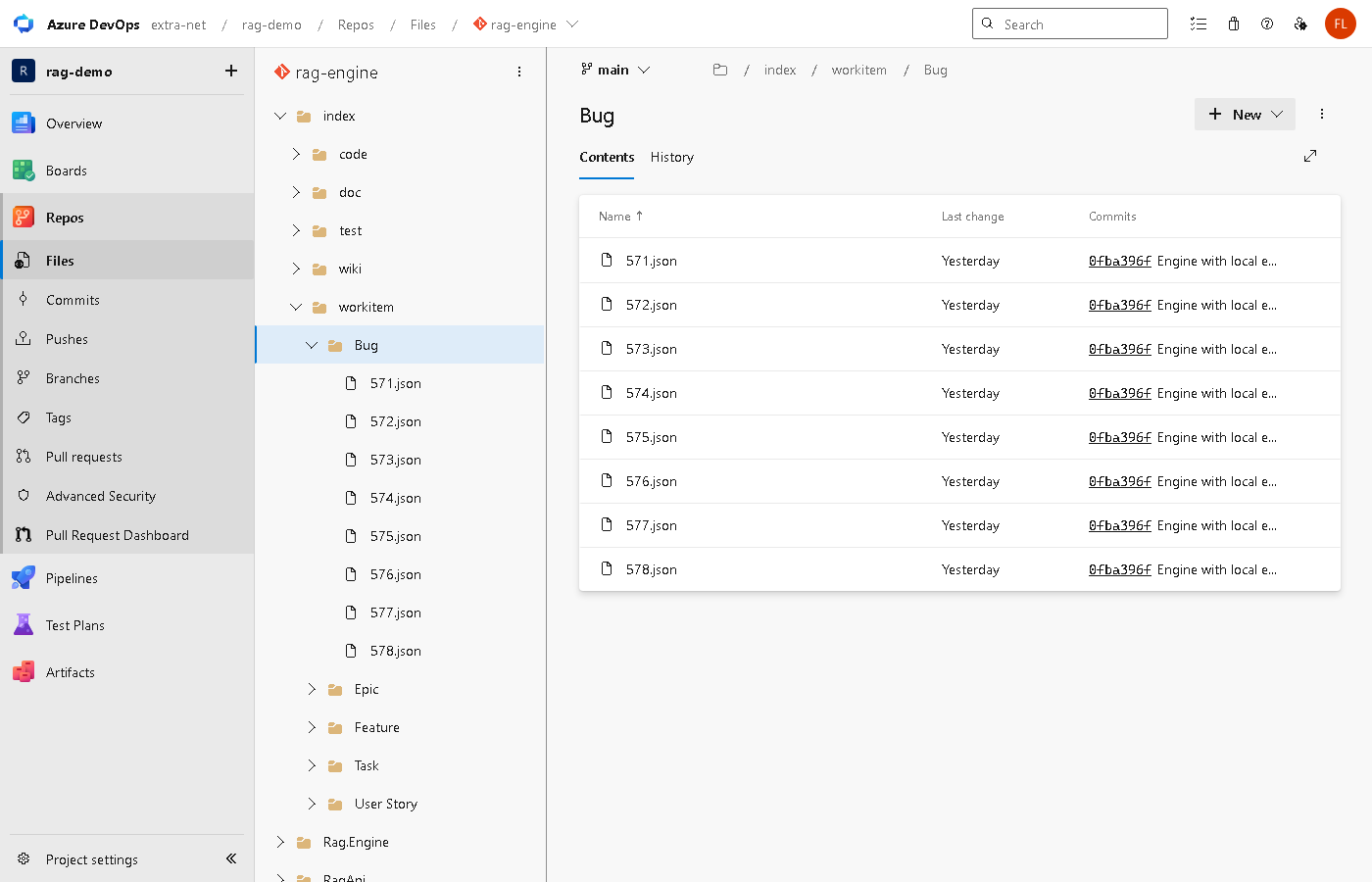
Seventeen seconds, computing the vectors included. Run again right after, index/ does not change and the store receives nothing. One file per source, for example index/workitem/Bug/573.json:
11. Write the engine
The engine does not know what is under the store. The search is in two passes, the source files first and then everything: for each one it asks the store for fifty candidates, passes the first twenty to the cross-encoder and keeps the best, at most two per source. CreateAsync prepares the store before the first question.
using Rag.Engine.Store;

namespace Rag.Engine;

/// <summary>One passage found, with where it comes from and the score of the reranker.</summary>
public sealed record Passage(string Id, string Kind, string Title, string Url, string Path, string Text, float Score);

/// <summary>
/// The search: the store gives the candidates, keywords and vector together, and the cross-encoder
/// re-orders them. Two passes, source files first and then everything, at most two passages per source.
/// </summary>
public sealed class SearchEngine : IDisposable
{
    private const int Candidates = 50;
    private const int Reranked = 20;

    private readonly IPassageStore _store;
    private readonly Embedder _embedder;
    private readonly Reranker _reranker;

    private SearchEngine(IPassageStore store, string modelsFolder)
    {
        _store = store;
        _embedder = new Embedder(modelsFolder);
        _reranker = new Reranker(modelsFolder);
    }

    public static async Task<SearchEngine> CreateAsync(IPassageStore store, string modelsFolder)
    {
        await store.EnsureAsync();
        return new SearchEngine(store, modelsFolder);
    }

    public string StoreName => _store.Name;

    public async Task<List<Passage>> SearchAsync(string question, int codePassages = 5, int otherPassages = 4)
    {
        float[] query = _embedder.EmbedQuery(question);
        List<Passage> passages = [];
        foreach ((string? kind, int keep) in new (string?, int)[] { ("code", codePassages), (null, otherPassages) })
        {
            List<PieceRecord> candidates = await _store.CandidatesAsync(question, query, kind, Candidates);
            IEnumerable<Passage> ranked = candidates
                .Take(Reranked)
                .Select(r => new Passage(r.Id, r.Kind, r.Title, r.Url, r.Path, r.Text, _reranker.Score(question, r.Text)))
                .OrderByDescending(p => p.Score);
            int kept = 0;
            foreach (Passage passage in ranked)
            {
                if (passages.Any(p => p.Id == passage.Id) || passages.Count(p => p.Title == passage.Title) >= 2)
                {
                    continue;
                }

                passages.Add(passage);
                if (++kept == keep)
                {
                    break;
                }
            }
        }

        return passages;
    }

    public void Dispose()
    {
        _embedder.Dispose();
        _reranker.Dispose();
        _store.Dispose();
    }
}
12. Write the console that searches and ask the questions
using System.Text.Json;
using Azure.Identity;
using Rag.Engine;
using Rag.Engine.Store;

// Prints the passages for a question; the answer is up to whoever reads them, a person or a coding agent.
bool json = args.Contains("--json");
string question = string.Join(' ', args.Where(a => a != "--json"));
if (question.Length == 0)
{
    Console.WriteLine("usage: dotnet run --project RagSearch -- [--json] \"your question\"");
    return 1;
}

string root = IndexFiles.Root();
Settings settings = Settings.Load(root);
DefaultAzureCredential credential = new(new DefaultAzureCredentialOptions { TenantId = settings.TenantId });
using SearchEngine engine = await SearchEngine.CreateAsync(StoreFactory.Create(settings, root, credential, Console.Error), Path.Combine(AppContext.BaseDirectory, "models"));
List<Passage> passages = await engine.SearchAsync(question);
if (json)
{
    Console.WriteLine(JsonSerializer.Serialize(passages, new JsonSerializerOptions { WriteIndented = true, PropertyNamingPolicy = JsonNamingPolicy.CamelCase }));
    return 0;
}

Console.Error.WriteLine($"store: {engine.StoreName}");
for (int i = 0; i < passages.Count; i++)
{
    Console.WriteLine($"[{i + 1}] {passages[i].Kind}: {passages[i].Title}  (score {passages[i].Score:0.00})");
    Console.WriteLine($"    {passages[i].Url}");
    Console.WriteLine();
    Console.WriteLine(passages[i].Text);
    Console.WriteLine();
}

return 0;
dotnet run --project RagSearch -- "Dove sta la logica che impedisce di annullare un ordine già spedito?"The console does not write an answer: it prints the passages, each with kind, title, link and text. In the test, the titles with the score of the reranker:
[1] code: orders-api/src/Orders.Domain/OrderStatus.cs  (score -2.34)
[2] code: orders-api/src/Orders.Domain/Order.cs  (score -4.09)
[3] code: orders-api/src/Orders.Api/appsettings.Development.json  (score -4.14)
[4] code: orders-api/src/Orders.Api/Program.cs  (score -4.37)
[5] code: orders-api/src/Orders.Api/Program.cs  (score -4.52)
[6] workitem: User Story #541: Annullamento solo prima della spedizione  (score -0.43)
[7] workitem: Epic #558: Resi  (score -3.07)
[8] wiki: Runbook incidenti  (score -3.51)
[9] wiki: Glossario  (score -4.40)
The second passage is Order.cs, the file with the Cancel() method, and user story 541 is the first among the work items. With "Quali bug sulle spedizioni sono ancora aperti?" the shipping bugs come in a row, with 573, the only open one, in front; with "Quando si può rilasciare in produzione e chi approva?" the «Processo di rilascio» page is the first of the second pass, with a positive score. A question takes between three and five seconds, almost all of it to load the two models: the API of step 14 loads them once. With --json the same passages come out as JSON, for whoever integrates them or hands them to a coding agent.
The API
13. Register the application in Microsoft Entra
If the API is called only from the same computer, or by a gateway that already checks who comes in, skip this step: the variant without Microsoft Entra is at the end of step 14.
In the portal search for App registrations and press New registration: Name rag-engine-api, Supported account types Accounts in this organizational directory only, Register. Then, in the application, Expose an API:
- Application ID URI: press Add and accept
api://followed by the id of the application - Add a scope: Scope name
user_impersonation, Who can consent Admins and users, display name and description as you like, Add scope - Add a client application: Client ID
04b07795-8ddb-461a-bbee-02f9e1bf7b46, that is the Azure CLI, with the scope ticked
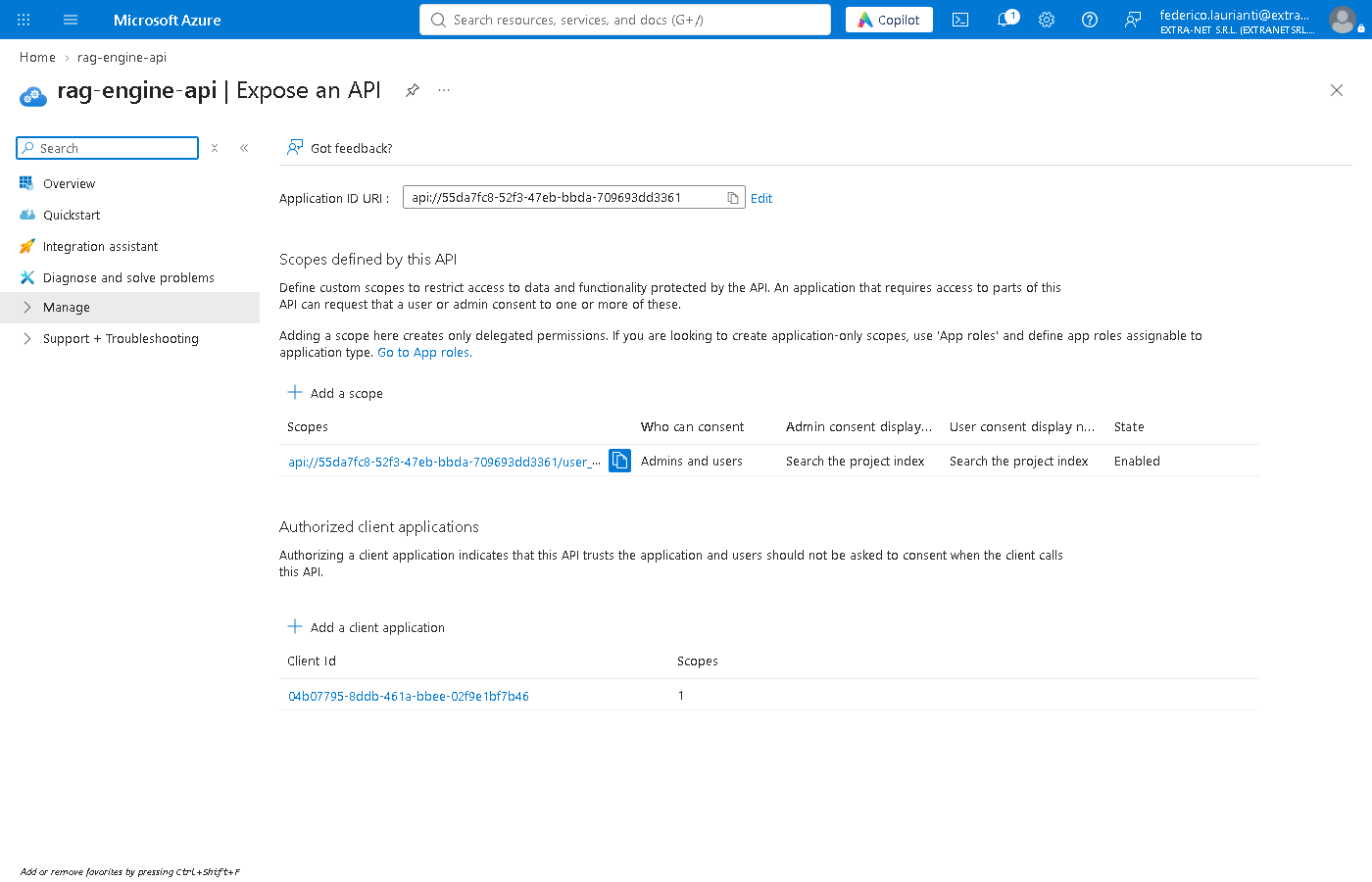
The last item lets whoever ran az login ask for a token for this API with no further consent. In the test the registration was made with the Microsoft Graph APIs: the pre-authorization of the Azure CLI has to be saved in a second change, after the scope, otherwise Graph answers that the scope does not exist.
14. Write the API
In RagApi/appsettings.json add the section with tenant and application id:
  "AzureAd": {
    "Instance": "https://login.microsoftonline.com/",
    "TenantId": "<id of your Microsoft Entra tenant>",
    "ClientId": "<application (client) ID of rag-engine-api>"
  }
A single engine, created at start-up and shared by every request: the models load once.
using Azure.Identity;
using Microsoft.AspNetCore.Authentication.JwtBearer;
using Microsoft.Identity.Web;
using Rag.Engine;
using Rag.Engine.Store;

// The same search as the console, behind an HTTP endpoint protected by Microsoft Entra: callers need a
// token for this application with the user_impersonation scope. One engine, shared by every request.
var builder = WebApplication.CreateBuilder(args);
builder.Services.AddAuthentication(JwtBearerDefaults.AuthenticationScheme)
    .AddMicrosoftIdentityWebApi(builder.Configuration.GetSection("AzureAd"));
builder.Services.AddAuthorizationBuilder()
    .AddPolicy("search", policy => policy.RequireAuthenticatedUser().RequireClaim("http://schemas.microsoft.com/identity/claims/scope", "user_impersonation"));

string root = IndexFiles.Root();
Settings settings = Settings.Load(root);
DefaultAzureCredential credential = new(new DefaultAzureCredentialOptions { TenantId = settings.TenantId });
SearchEngine engine = await SearchEngine.CreateAsync(StoreFactory.Create(settings, root, credential, Console.Error), Path.Combine(AppContext.BaseDirectory, "models"));
builder.Services.AddSingleton(engine);

var app = builder.Build();
app.UseAuthentication();
app.UseAuthorization();

app.MapGet("/health", (SearchEngine engine) => Results.Ok(new { status = "ok", store = engine.StoreName }));
app.MapGet("/search", async (string q, SearchEngine engine) => string.IsNullOrWhiteSpace(q)
        ? Results.BadRequest("q is required")
        : Results.Ok(await engine.SearchAsync(q)))
    .RequireAuthorization("search");

app.Run();
Start the API and call it, without a token and with the token of the Azure CLI user:
dotnet run --project RagApi --urls http://localhost:5090curl -s http://localhost:5090/health
curl -s -o /dev/null -w "%{http_code}\n" "http://localhost:5090/search?q=test"
TOKEN=$(az account get-access-token --resource api://<application (client) ID> --query accessToken -o tsv)
curl -s -H "Authorization: Bearer $TOKEN" --get --data-urlencode "q=Quando si può rilasciare in produzione e chi approva?" http://localhost:5090/searchIn the test: {"status":"ok","store":"hnsw"}, then 401 without a token, then with the token 200 and the same passages as the console in JSON, with «Processo di rilascio» at the top of the second pass. On Windows, from Git Bash, curl sends accented letters in Latin-1, può becomes pu%F2, and the question arrives mangled: the passages change. From PowerShell, Invoke-RestMethod with the question in -Body @{ q = "..." } sends it in UTF-8. The API is a process like any other: in a container, on a server, on Kubernetes; the clone of the repository with index/ and the models are all it needs.
Variant without Microsoft Entra
No registration and no token: the API answers whoever reaches the port, so keep it on localhost or behind a gateway that checks who comes in. Remove the Microsoft Entra package and do not add the AzureAd section to RagApi/appsettings.json:
cd RagApi && dotnet remove package Microsoft.Identity.Web && cd ..using Azure.Identity;
using Rag.Engine;
using Rag.Engine.Store;
// The same search as the console, behind an HTTP endpoint with no authentication: run it only where
// the callers are trusted, on localhost or behind a gateway that checks them. One engine, shared by every request.
var builder = WebApplication.CreateBuilder(args);
string root = IndexFiles.Root();
Settings settings = Settings.Load(root);
DefaultAzureCredential credential = new(new DefaultAzureCredentialOptions { TenantId = settings.TenantId });
SearchEngine engine = await SearchEngine.CreateAsync(StoreFactory.Create(settings, root, credential, Console.Error), Path.Combine(AppContext.BaseDirectory, "models"));
builder.Services.AddSingleton(engine);
var app = builder.Build();
app.MapGet("/health", (SearchEngine engine) => Results.Ok(new { status = "ok", store = engine.StoreName }));
app.MapGet("/search", async (string q, SearchEngine engine) => string.IsNullOrWhiteSpace(q)
? Results.BadRequest("q is required")
: Results.Ok(await engine.SearchAsync(q)));
app.Run();The credential is needed only by a store on Azure; the in-process one asks for nothing.
dotnet run --project RagApi --urls http://localhost:5090
curl -s http://localhost:5090/health
curl -s --get --data-urlencode "q=Quando si può rilasciare in produzione e chi approva?" http://localhost:5090/search
In the test the API listened only on 127.0.0.1 and [::1], answered 200 with no token and gave the same passages as the console.
The pipeline
15. Let the pipeline write to the repository
Publish the repository, index/ included: whoever clones it searches without indexing.
git add .
git commit -m "Search engine over the rag-demo project"
git remote add origin https://dev.azure.com/extra-net/rag-demo/_git/rag-engine
git push -u origin main
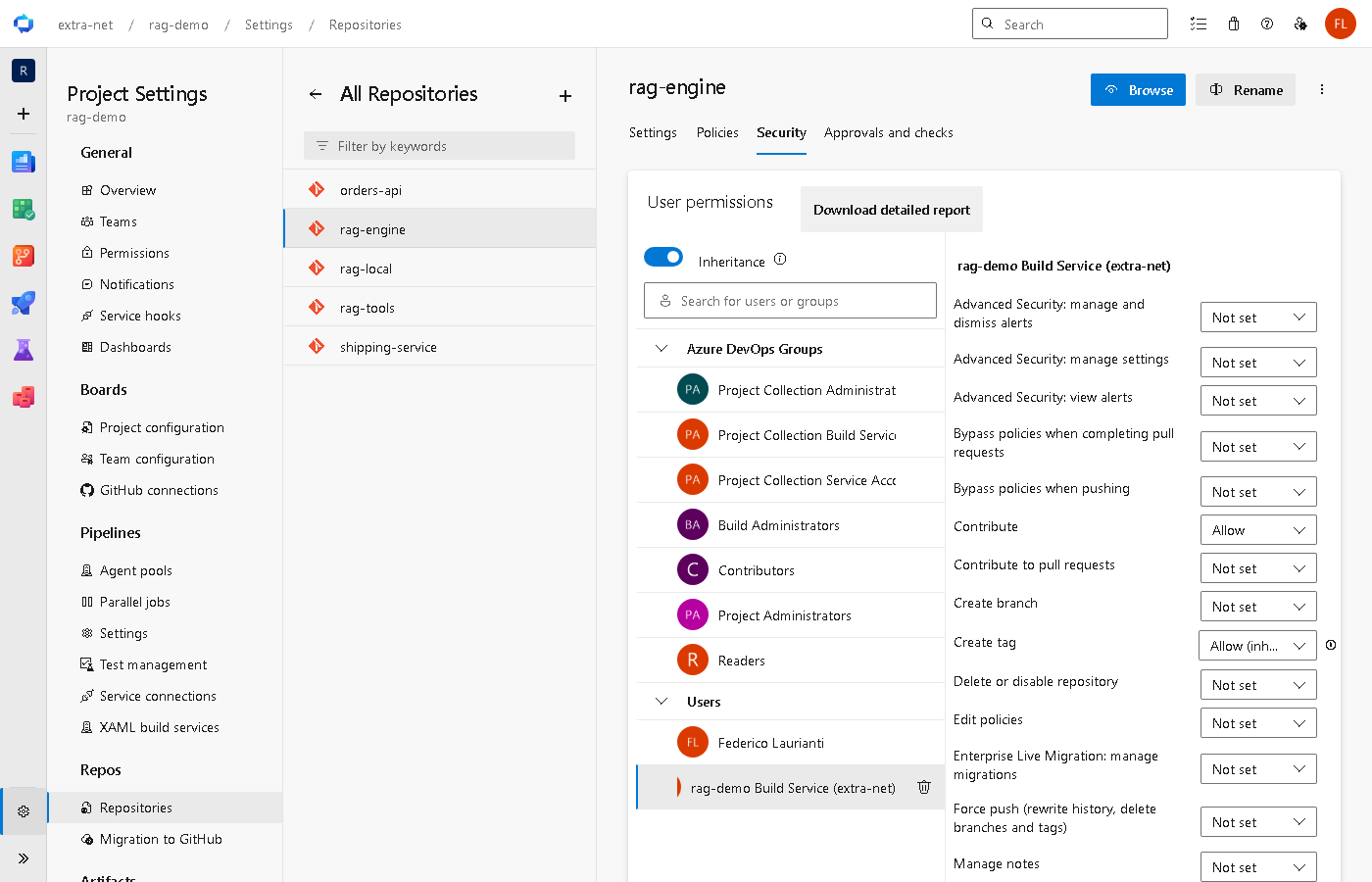
The pipeline commits the index with the identity of the job, which by default only reads. Open Project settings > Repositories, choose rag-engine and the Security tab; in the Search for users or groups box search for rag-demo Build Service, choose the identity and set Contribute to Allow.
16. Add the pipeline and run it
At the root of the solution:
# Keeps index/ up to date: every night at 04:00 UTC and on "Run pipeline". Commits only what changed.
trigger: none
pr: none

schedules:
  - cron: "0 4 * * *"
    displayName: Nightly index
    branches:
      include:
        - main
    always: true

# The job token can read only the repositories declared here and listed under "uses".
resources:
  repositories:
    - repository: orders-api
      type: git
      name: rag-demo/orders-api
    - repository: shipping-service
      type: git
      name: rag-demo/shipping-service
    - repository: rag-tools
      type: git
      name: rag-demo/rag-tools
    - repository: rag-local
      type: git
      name: rag-demo/rag-local
    - repository: wiki
      type: git
      name: rag-demo/rag-demo.wiki

pool:
  vmImage: ubuntu-latest

jobs:
  - job: index
    displayName: Index
    uses:
      repositories:
        - orders-api
        - shipping-service
        - rag-tools
        - rag-local
        - wiki
    steps:
      - checkout: self
        persistCredentials: true

      - task: UseDotNet@2
        displayName: Install .NET 11
        inputs:
          version: 11.0.x

      - script: dotnet run --project RagIndex -c Release
        displayName: Update index/
        env:
          DEVOPS_TOKEN: $(System.AccessToken)

      - script: |
          git config user.name "rag-engine pipeline"
          git config user.email "pipeline@rag-engine"
          git add index
          if git diff --cached --quiet; then
            echo "index/ unchanged: nothing to commit"
          else
            git commit -m "Index update $(date -u +%Y-%m-%d)"
            git push origin HEAD:main
          fi
        displayName: Commit the changes
persistCredentials: true leaves the job token to the final git push; always: true starts the nightly run even with no change, because wiki and work items change outside Git. The token reads only the repositories declared in resources and in uses: those to index, the wiki, which is a repository too, and its own. Commit the file and publish it with git push.
Open Pipelines and press Create Pipeline > Azure Repos Git > rag-engine; in Review your pipeline YAML press Run. The first run stops with This pipeline needs permission to access 5 resources before this run can continue: press View and Permit for each repository, confirming every time.
The run starts again and in little more than a minute the log of the Update index/ step shows the cache rebuilt on the agent and then the sources that changed; the Commit the changes step commits and pushes. In the test, the run after a change to the code of the engine:
229 pieces read: 141 code, 21 doc, 10 test, 15 wiki, 42 workitem
index/ changed: rebuilding .cache/ from 142 files, once
  read 228 pieces (0 s)
  keywords ready (0 s)
  graph: 228/228 pieces (1 s)
.cache/ ready: 228 pieces in 1 s
index/: 0 new, 5 updated, 137 unchanged, 0 removed
store hnsw: 12 pieces upserted, 0 deleted
Five sources rewritten, the files of the engine itself, and a commit with those five files.
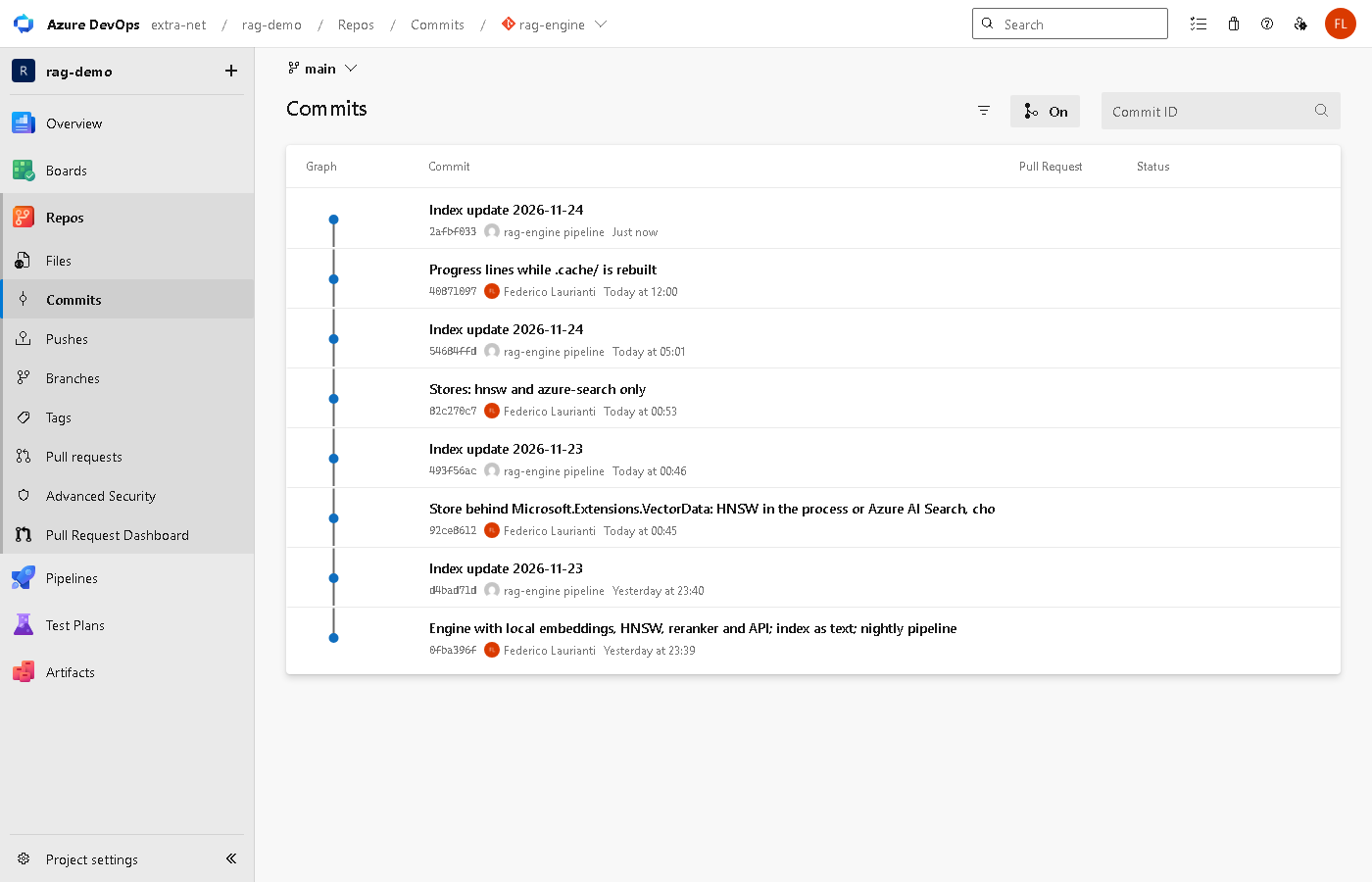
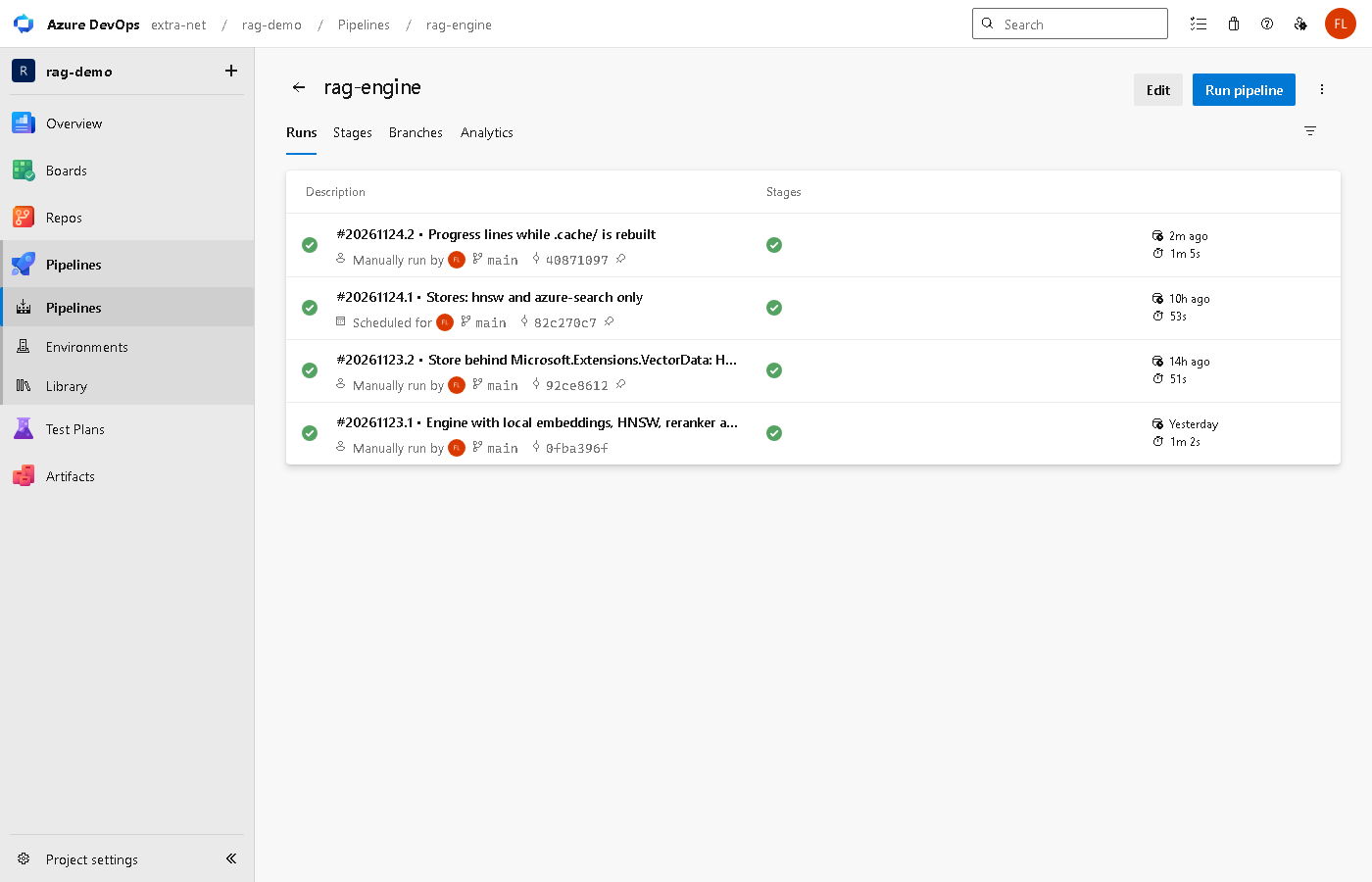
From here the index is updated every night at 04:00 UTC and whenever you press Run pipeline; whoever searches runs git pull and starts the console, which rebuilds the cache by itself.
Delete the resources
17. Delete repository, pipeline and application
Nothing on Azure, apart from the registration if you made it: in Microsoft Entra ID > App registrations delete rag-engine-api. In Azure DevOps delete the pipeline, from the ... menu of Pipelines, and the rag-engine repository, from Project settings > Repositories > ... menu > Delete.
Command names, screenshots and responses recorded on November 23 and 24, 2026, with .NET 11.