


Procedure to let an AI model read a document without giving it the personal data the document contains. Azure AI Language finds the data, the program replaces it with placeholders such as [PERSON_1], only the masked text reaches the model, and the real data goes back into the answer at the end, on the machine that holds the document.
This is an example, not a finished solution. It shows how the pieces fit together. Which data to cover, which to leave and which checks to add depend on the document, on the sector and on what it is used for: decide case by case, and verify on real documents, not on the sample one.
Required: an Azure account with an active subscription, .NET 10 and the Azure command-line interface on the computer, a browser. Duration: about thirty minutes. Cost: the Language resource on the free F0 tier costs 0 USD and accepts 5000 calls every 30 days. The model is billed per token: the test run in this guide uses a few thousand characters.
The portal in the screenshots is in English: command names are reported as they appear on screen.
Prepare the services
1. Create the Language resource
In the portal, Create a resource, search for Language service and press Create. The portal offers the extra features: none is needed, press Continue to create your resource.
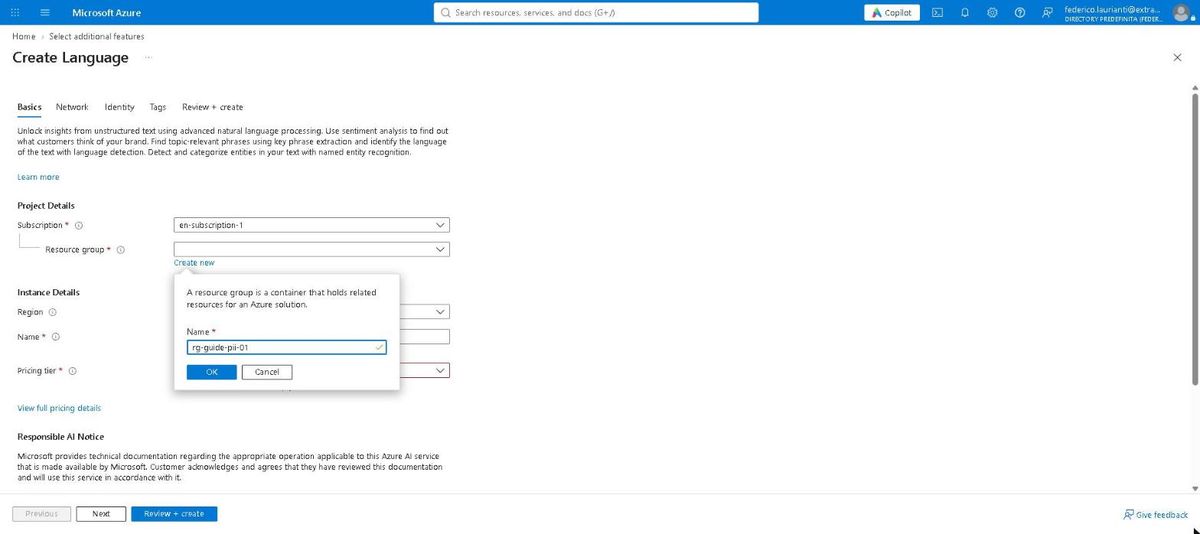
On the Basics tab, next to Resource group, press Create new and type rg-guide-pii-01.
2. Pick the free tier
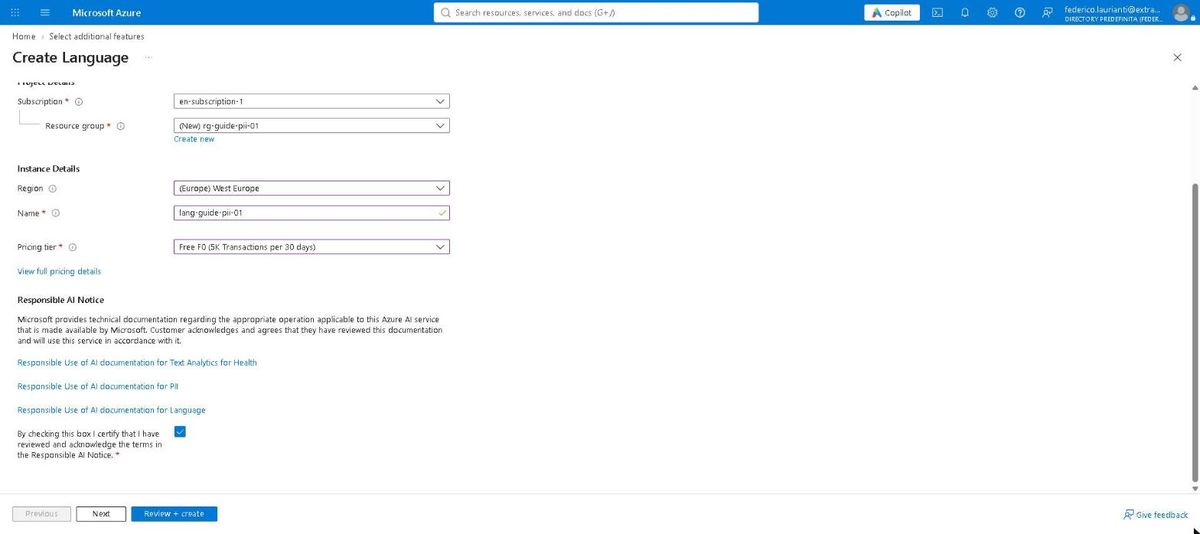
Fill in the rest of the tab:
- Region: West Europe
- Name:
lang-guide-pii-01 - Pricing tier: Free F0 (5K Transactions per 30 days)
At the bottom there is a box to tick: it acknowledges Microsoft's responsible AI notice, and without it the create button stays disabled.
3. Review and create
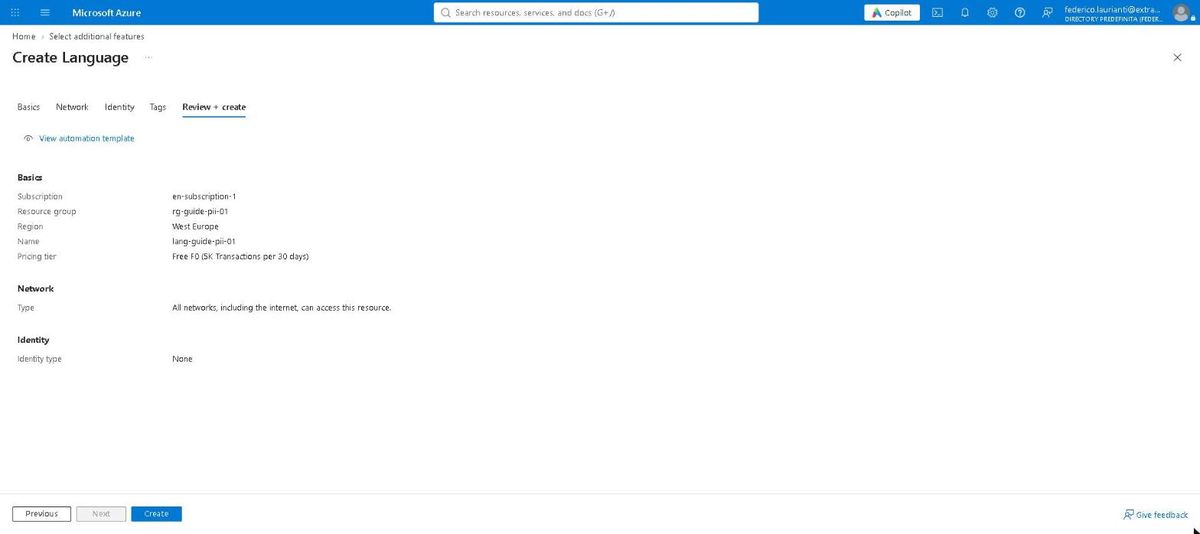
Press Review + create, check the summary and press Create.
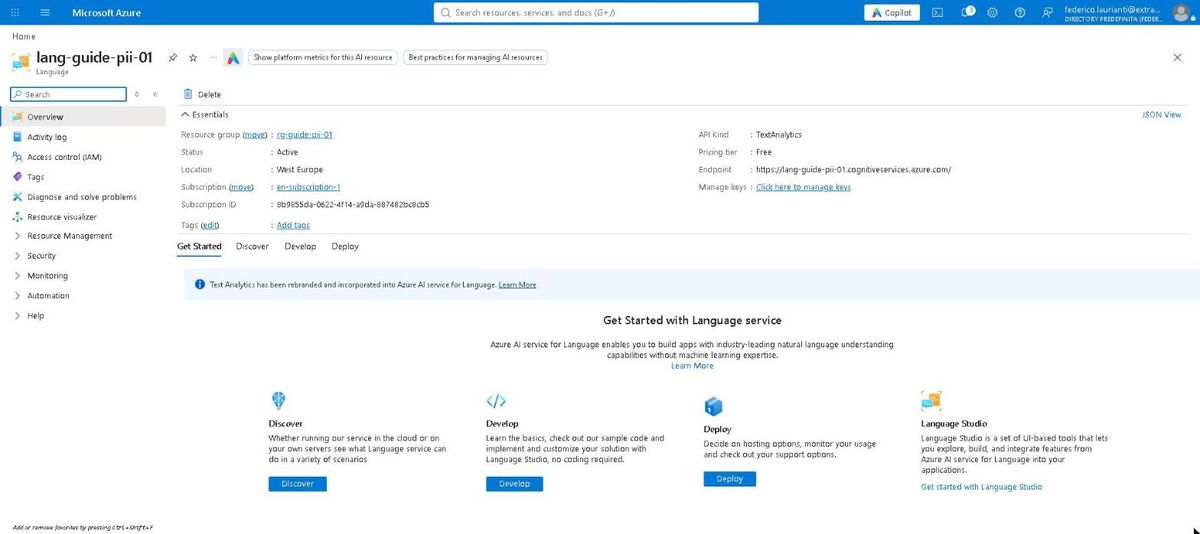
When it finishes, open the resource: the overview shows the service endpoint, which the program needs.
4. Create the resource for the model
The model lives on a different resource. In the portal, Create a resource, search for Azure AI Foundry and press Create. On the Basics tab:
- Resource group:
rg-guide-pii-01, the same as before - Name:
ai-guide-pii-01 - Region: West Europe
- Default project name: leave
proj-default
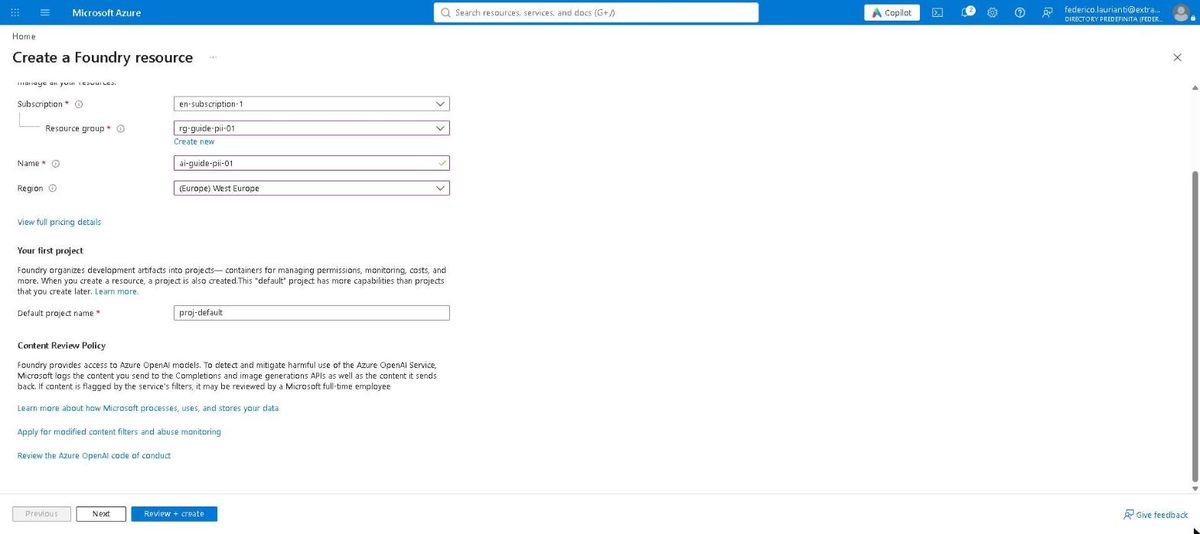
Press Review + create and then Create.
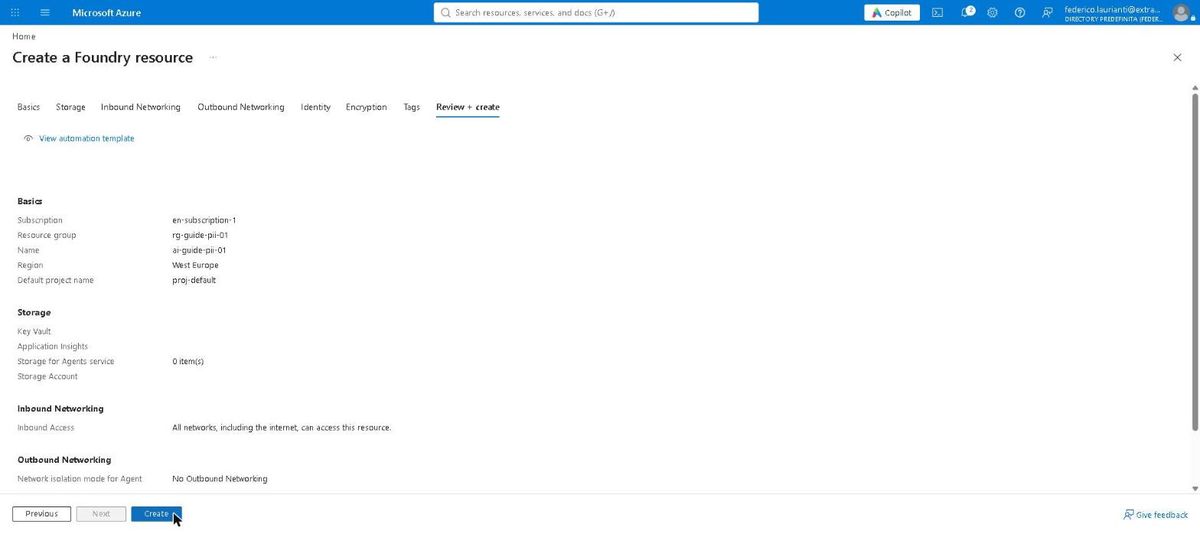
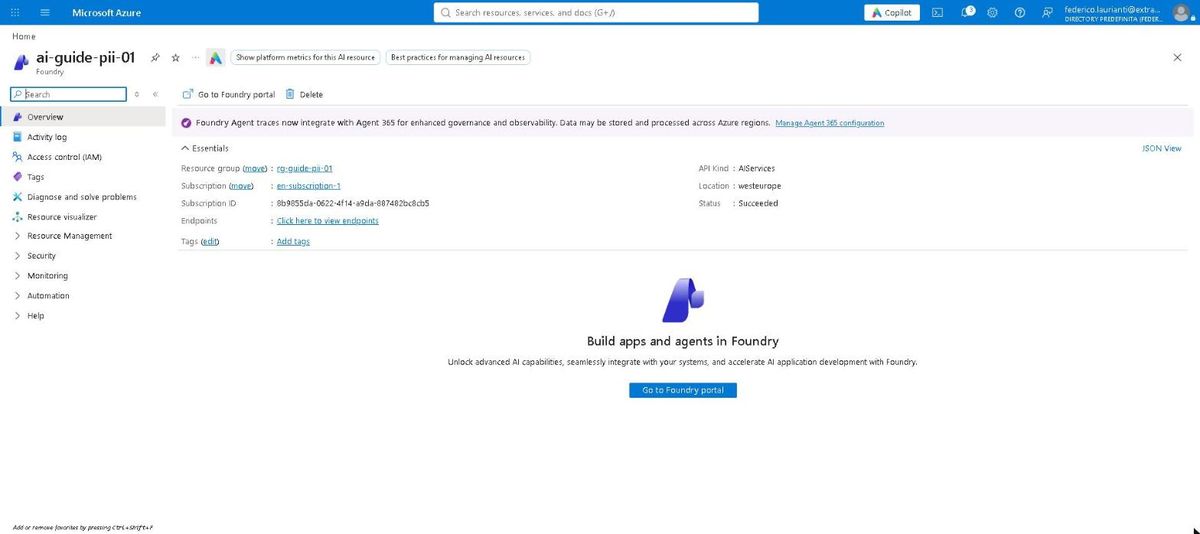
5. Deploy the model
From the command line, in one command:
az cognitiveservices account deployment create \
  --resource-group rg-guide-pii-01 \
  --name ai-guide-pii-01 \
  --deployment-name gpt-5.4-mini \
  --model-name gpt-5.4-mini \
  --model-version 2026-03-17 \
  --model-format OpenAI \
  --sku-name GlobalStandard \
  --sku-capacity 10
The models on offer change over time and by region. To see the ones your resource can host:
az cognitiveservices account list-models \
  --resource-group rg-guide-pii-01 \
  --name ai-guide-pii-01 \
  --query "[?format=='OpenAI'].{name:name, version:version}" -o table
A model on its way out can no longer be deployed: the command answers ServiceModelDeprecating and you pick the next one.
6. Give yourself the permissions
The program uses no keys: it signs in as the user you used for Azure. Two roles are needed, one per service.
USER_ID=$(az ad signed-in-user show --query id -o tsv)

LANGUAGE=$(az cognitiveservices account show \
  -g rg-guide-pii-01 -n lang-guide-pii-01 --query id -o tsv)

MODELS=$(az cognitiveservices account show \
  -g rg-guide-pii-01 -n ai-guide-pii-01 --query id -o tsv)

az role assignment create \
  --assignee-object-id $USER_ID --assignee-principal-type User \
  --role "Cognitive Services Language Reader" \
  --scope $LANGUAGE

az role assignment create \
  --assignee-object-id $USER_ID --assignee-principal-type User \
  --role "Cognitive Services OpenAI User" \
  --scope $MODELS
The program
7. Create the project
dotnet new console -n pii-demo
cd pii-demo
dotnet add package Azure.AI.TextAnalytics --version 5.3.0
dotnet add package Azure.Identity --version 1.21.0
dotnet add package OpenAI --version 2.14.0
8. Add the sample document
In the project folder, a document.txt file. It is in Italian, because the detection used here is the Italian one:
Spett.le Ufficio Sinistri,

con la presente il sottoscritto Marco Bianchi, nato a Verona il 12 marzo 1981,
codice fiscale BNCMRC81C12L781D, residente in via Giuseppe Mazzini 14, 37121 Verona,
telefono 345 7781234, posta elettronica marco.bianchi@esempio.it,
chiede il rimborso delle spese sostenute per il sinistro del 3 ottobre 2026.

L'importo di 1.240,50 euro va accreditato sul conto IT60X0542811101000000123456
intestato al sottoscritto. Allego la fattura 2026/417 dell'officina Rossi S.r.l.
e il verbale redatto dall'agente Laura Verdi.

Resto a disposizione per chiarimenti.

Marco Bianchi
People, places, contacts and codes are invented. So that the file lands next to the program, add this to the .csproj:
  <ItemGroup>
    <None Update="document.txt" CopyToOutputDirectory="PreserveNewest" />
  </ItemGroup>
9. Write the program
Replace Program.cs:
using Azure.AI.TextAnalytics;
using Azure.Identity;
using OpenAI;
using OpenAI.Chat;
using System.ClientModel.Primitives;
using System.Text;

#pragma warning disable OPENAI001

const string language = "https://lang-guide-pii-01.cognitiveservices.azure.com/";
const string models = "https://ai-guide-pii-01.openai.azure.com/openai/v1";
const string model = "gpt-5.4-mini";

Dictionary<string, string> labels = new()
{
    ["Person"] = "PERSON",
    ["Address"] = "ADDRESS",
    ["PhoneNumber"] = "PHONE",
    ["Email"] = "EMAIL",
    ["DateTime"] = "DATE",
    ["Organization"] = "COMPANY",
    ["InternationalBankingAccountNumber"] = "IBAN",
    ["ITFiscalCode"] = "FISCALCODE",
};

DefaultAzureCredential credential = new();
string document = File.ReadAllText("document.txt");

// 1. The service finds the personal data.
TextAnalyticsClient client = new(new Uri(language), credential);
PiiEntityCollection found = await client.RecognizePiiEntitiesAsync(document, "it");

// 2. Each item becomes a placeholder; go from the end of the text
//    so the offsets of the remaining ones stay valid.
Dictionary<string, string> byText = [];
Dictionary<string, string> originals = [];
Dictionary<string, int> counters = [];
StringBuilder masked = new(document);

foreach (PiiEntity item in found.OrderByDescending(e => e.Offset))
{
    if (!labels.TryGetValue(item.Category.ToString(), out string? label))
    {
        continue;
    }

    if (!byText.TryGetValue(item.Text, out string? placeholder))
    {
        counters[label] = counters.GetValueOrDefault(label) + 1;
        placeholder = $"[{label}_{counters[label]}]";
        byText[item.Text] = placeholder;
        originals[placeholder] = item.Text;
    }

    masked.Remove(item.Offset, item.Length).Insert(item.Offset, placeholder);
}

string forTheModel = masked.ToString();
Console.WriteLine($"Items replaced: {originals.Count}\n");
Console.WriteLine(forTheModel);

// 3. Only the masked text reaches the model.
BearerTokenPolicy tokenPolicy = new(
    credential,
    "https://cognitiveservices.azure.com/.default");
ChatClient chat = new(
    model,
    tokenPolicy,
    new OpenAIClientOptions { Endpoint = new Uri(models) });

ChatCompletion answer = await chat.CompleteChatAsync(
    new SystemChatMessage(
        "Answer in English. Keep the placeholders in square brackets "
        + "exactly as they are, and never invent names."),
    new UserChatMessage(
        "Summarise in three lines who writes, what they ask for "
        + $"and where they want the payment.\n\n{forTheModel}"));

string answerText = answer.Content[0].Text;
Console.WriteLine("\n--- the model's answer ---\n");
Console.WriteLine(answerText);

// 4. The real data goes back in, here and nowhere else.
foreach ((string placeholder, string real) in originals)
{
    answerText = answerText.Replace(placeholder, real);
}

Console.WriteLine("\n--- answer with the data put back ---\n");
Console.WriteLine(answerText);
The same text found twice gets the same placeholder: Marco Bianchi at the top and at the bottom both become [PERSON_1]. The replacements start from the end of the document because each one changes the length of the text, and starting from the beginning the later offsets would no longer line up.
10. Run it
dotnet runThe document that leaves for the model:
Items replaced: 11

Spett.le [COMPANY_2],

con la presente il sottoscritto [PERSON_1], nato a Verona il [DATE_2],
codice fiscale [FISCALCODE_1], residente in [ADDRESS_1],
telefono [PHONE_1], posta elettronica [EMAIL_1],
chiede il rimborso delle spese sostenute per il sinistro del [DATE_1].

L'importo di 1.240,50 euro va accreditato sul conto [IBAN_1]
intestato al sottoscritto. Allego la fattura 2026/417 dell'officina [COMPANY_1]
e il verbale redatto dall'agente [PERSON_2].
The model's answer, which never saw the real data:
[PERSON_1] writes to [COMPANY_2] to request reimbursement of expenses
for the accident of [DATE_1].
They ask for a refund of 1.240,50 euro and attach invoice 2026/417
from [COMPANY_1] and the report by [PERSON_2].
They want the payment credited to [IBAN_1], the account held in their name.
And the same answer after the data goes back in, which happens on the machine that holds the document:
Marco Bianchi writes to Ufficio Sinistri to request reimbursement of
expenses for the accident of 3 ottobre 2026.
They ask for a refund of 1.240,50 euro and attach invoice 2026/417
from Rossi S.r.l. and the report by Laura Verdi.
They want the payment credited to IT60X0542811101000000123456, the
account held in their name.
What the service does not cover
These three came out of running the procedure, and they are why real work does not end here.
The fiscal code is validated. The service does not stop at the shape: it checks the control character. The first test document had a badly invented fiscal code and the service did not recognise it, leaving it in the clear; with a formally valid one it finds it straight away. A typo in a real document can therefore send the code through to the model. If the document must be covered anyway, a rule of your own belongs next to the service.
"Verona" stays in the clear. A city name on its own is not personal data, but there it is the place of birth, and together with the date it identifies a person. The service cannot know that: whoever knows the document has to decide.
Biometric data is a different matter. The service reads text. A photo of a face, a fingerprint, a handwritten signature are not text and stay where they are: those need different tools, and for faces Microsoft requires a separate approval.
The choice of what to mask is a choice, not a result. Here the dates are covered, and indeed the summary cannot say when the accident happened: if the model needs that date, take DateTime out of the list. The table at the top of the program is there for that.
Microsoft itself writes that the service relies on trained models and that there is no guarantee it finds all sensitive information: further checks should be in place. That holds for this guide's program as for any other.
If the documents must not leave the machine at all, the same scheme can run locally with Presidio, which is also Microsoft's and runs in a container: what changes is who finds the data, not the rest of the procedure.
Clean up
11. Delete the resource group
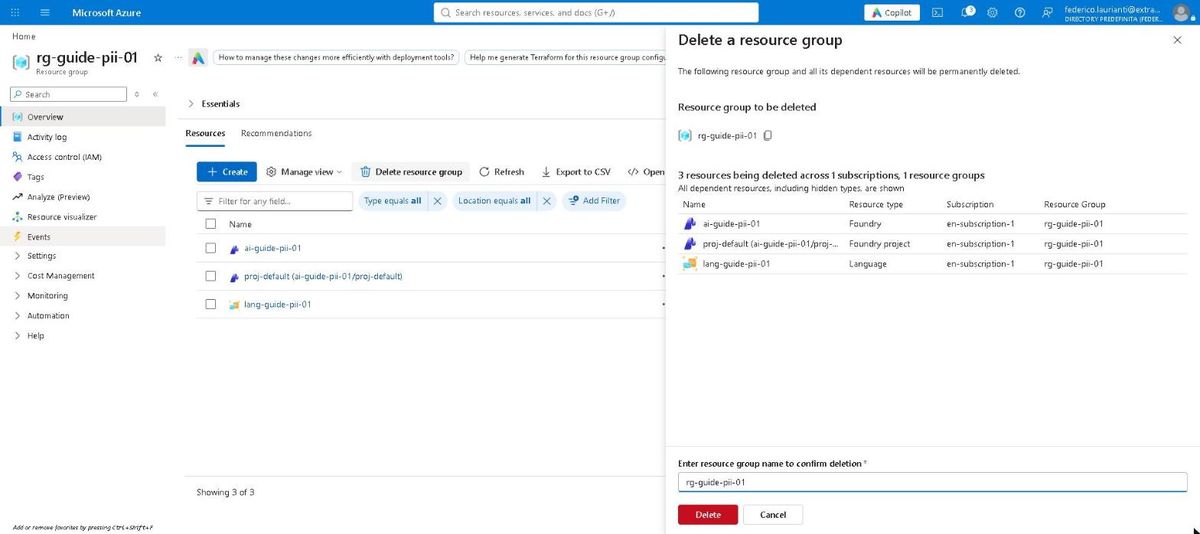
Open rg-guide-pii-01: it holds the Language resource, the Foundry one and the project Foundry creates by itself.
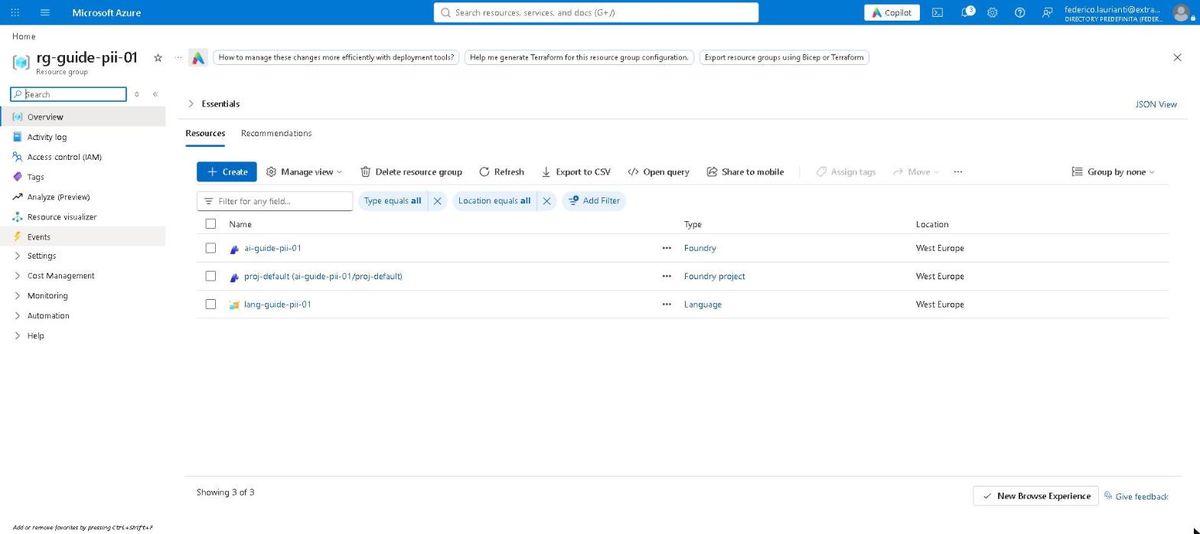
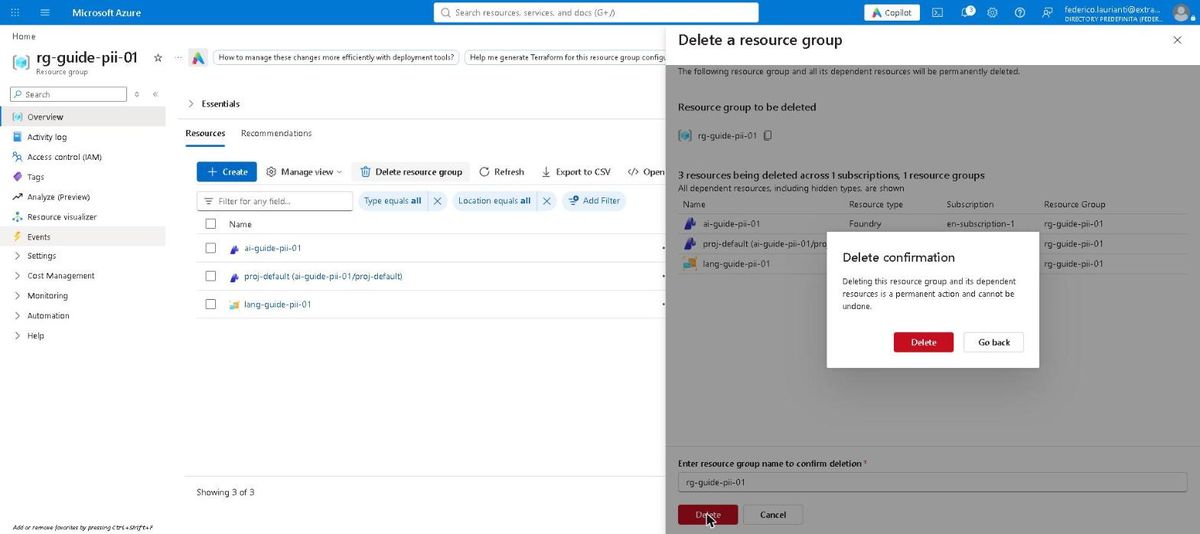
Press Delete resource group, type the group name again and press Delete.
Confirm in the window that appears.
Command names and screenshots taken on the Azure portal on 5 November 2026, West Europe region, with .NET 10.0.401 and the Azure command-line interface 2.91.0.