


Procedure that adds to the engine of the previous guide a second store, an Azure AI Search index, chosen from appsettings.json or from an environment variable. The code of the engine does not change: the hybrid search, words and vector together, is done by the service through the Microsoft.Extensions.VectorData connector, and the re-ordering with the cross-encoder, the two passes and the index in Git stay as they were. The in-process store stays the default; this one is for whoever wants a managed service without rewriting the engine.
It starts from Fully local search over an Azure DevOps project: multilingual embeddings, reranking, Microsoft.Extensions.VectorData with HNSW and an API in .NET, on the same rag-engine repository; the search service is the one of Index an Azure DevOps project on Azure AI Search and query it from .NET.
You need: the rag-engine repository of the previous guide, .NET 11 and the Azure CLI signed in (az login). Then an Azure AI Search service with Microsoft Entra authentication enabled and the roles Search Service Contributor and Search Index Data Contributor on your user: here it is srch-rag-demo-extranet-01, Free tier.
Time: about twenty minutes.
Cost: zero. The extra index fits in the three of the Free tier.
The Azure portal in the screenshots is in English: command names are written as they appear on screen.
The store
1. Add the connector
cd Rag.Engine
dotnet add package CommunityToolkit.VectorData.AzureAISearch
cd ..
In the test the version was 1.0.1, which brings Azure.Search.Documents 11.7.0 along. It is the successor of the package formerly named Microsoft.SemanticKernel.Connectors.AzureAISearch, now deprecated.
2. Write the hybrid store
Here the connector does almost everything. The Azure AI Search collection implements IKeywordHybridSearchable<TRecord>, the extra interface of the stores that do the hybrid search themselves: the filter by kind and the fusion are done by the service, the engine receives the candidates already merged. Writes go in batches, because Azure AI Search takes at most a thousand documents per request. The class works for any store with that interface.
using System.Text.RegularExpressions;
using Microsoft.Extensions.VectorData;

namespace Rag.Engine.Store;

/// <summary>
/// A store behind a Microsoft.Extensions.VectorData connector that does the hybrid search itself,
/// keywords and vector together, as Azure AI Search does. The engine does not know which.
/// </summary>
public sealed class MevdStore(string name, VectorStoreCollection<string, PieceRecord> collection) : IPassageStore
{
    public string Name => name;

    public Task EnsureAsync() => collection.EnsureCollectionExistsAsync();

    // in batches: Azure AI Search takes at most 1000 documents per request
    public async Task UpsertAsync(IReadOnlyList<PieceRecord> records)
    {
        foreach (PieceRecord[] batch in records.Chunk(200))
        {
            await collection.UpsertAsync(batch);
        }
    }

    public async Task DeleteAsync(IReadOnlyList<string> ids)
    {
        foreach (string[] batch in ids.Chunk(200))
        {
            await collection.DeleteAsync(batch);
        }
    }

    public async Task<List<PieceRecord>> CandidatesAsync(string question, ReadOnlyMemory<float> vector, string? kind, int top)
    {
        IKeywordHybridSearchable<PieceRecord> hybrid = (IKeywordHybridSearchable<PieceRecord>)collection;
        List<string> keywords = Regex.Matches(question, @"[\p{L}\p{N}_]{2,}").Select(m => m.Value).Distinct().ToList();
        HybridSearchOptions<PieceRecord> options = new();
        if (kind is not null)
        {
            options.Filter = r => r.Kind == kind;
        }

        List<PieceRecord> records = [];
        await foreach (VectorSearchResult<PieceRecord> hit in hybrid.HybridSearchAsync(vector, keywords, top, options))
        {
            records.Add(hit.Record);
        }

        return records;
    }

    public void Dispose()
    {
    }
}
3. Add it to the factory and the settings
The settings take searchEndpoint; collection becomes the name of the index. In the factory, one more branch. The credential is the same DefaultAzureCredential with the tenant, which takes the sign-in of the Azure CLI: Search Service Contributor is needed to create the index, Search Index Data Contributor to write and search.
using System.Text.Json;

namespace Rag.Engine;

/// <summary>
/// Names of the Azure DevOps project and the choice of the vector store, read from appsettings.json at the
/// root of the repository. Store is "hnsw" (in the process, the default) or "azure-search"; the RAG_STORE
/// environment variable overrides it, so the same clone can be tried against each store.
/// </summary>
public sealed record Settings(
    string TenantId,
    string DevOpsOrganization,
    string DevOpsProject,
    string Store = "hnsw",
    string Collection = "rag-engine",
    string? SearchEndpoint = null)
{
    /// <summary>Application id of Azure DevOps in Microsoft Entra: the scope of the token for dev.azure.com.</summary>
    public const string DevOpsScope = "499b84ac-1321-427f-aa17-267ca6975798/.default";

    public static Settings Load(string root)
    {
        string path = Path.Combine(root, "appsettings.json");
        Settings settings = JsonSerializer.Deserialize<Settings>(File.ReadAllText(path), JsonSerializerOptions.Web)
            ?? throw new InvalidOperationException($"{path} is empty.");
        string? store = Environment.GetEnvironmentVariable("RAG_STORE");
        return string.IsNullOrEmpty(store) ? settings : settings with { Store = store };
    }
}{
"tenantId": "4813d8ed-5a5c-44fd-805e-d338911fe0c1",
"devOpsOrganization": "extra-net",
"devOpsProject": "rag-demo",
"store": "hnsw",
"collection": "rag-engine",
"searchEndpoint": "https://srch-rag-demo-extranet-01.search.windows.net"
}using Azure.Core;
using Azure.Search.Documents.Indexes;
using CommunityToolkit.VectorData.AzureAISearch;
namespace Rag.Engine.Store;
/// <summary>The store named in the settings. Each one is a Microsoft.Extensions.VectorData collection of PieceRecord.</summary>
public static class StoreFactory
{
public static IPassageStore Create(Settings settings, string root, TokenCredential credential, TextWriter? log = null) => settings.Store switch
{
"hnsw" => new HnswStore(root, settings.Collection, log),
"azure-search" => new MevdStore("azure-search",
new AzureAISearchVectorStore(new SearchIndexClient(new Uri(settings.SearchEndpoint ?? throw new InvalidOperationException("searchEndpoint is missing")), credential))
.GetCollection<string, PieceRecord>(settings.Collection)),
_ => throw new InvalidOperationException($"unknown store '{settings.Store}': use hnsw or azure-search"),
};
}store stays hnsw: Azure AI Search is chosen with the RAG_STORE variable, or by changing store to azure-search.
The test
4. Load the index and search
RAG_STORE=azure-search dotnet run --project RagIndex -- --sync
RAG_STORE=azure-search dotnet run --project RagSearch -- "Dove sta la logica che impedisce di annullare un ordine già spedito?"
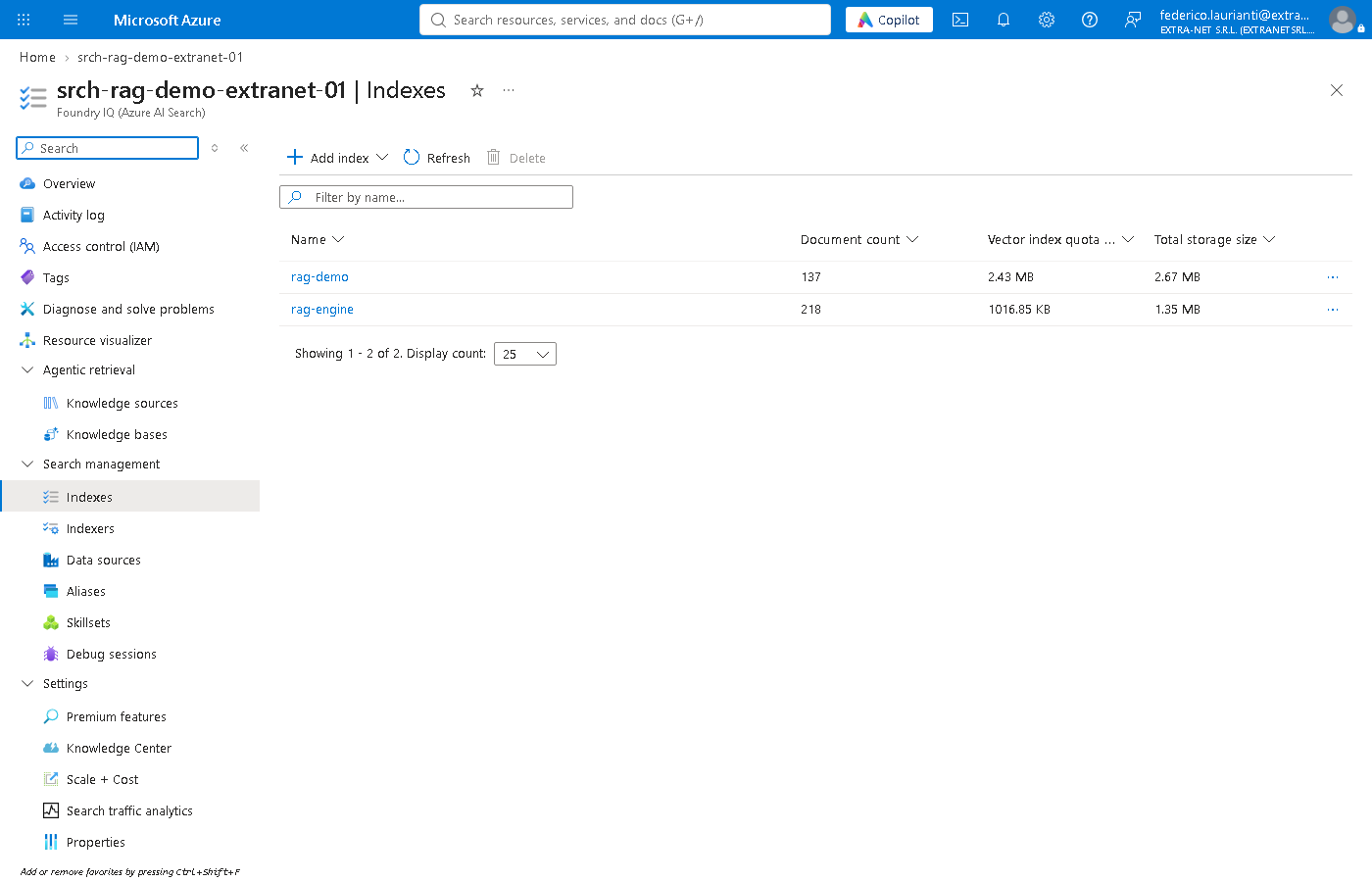
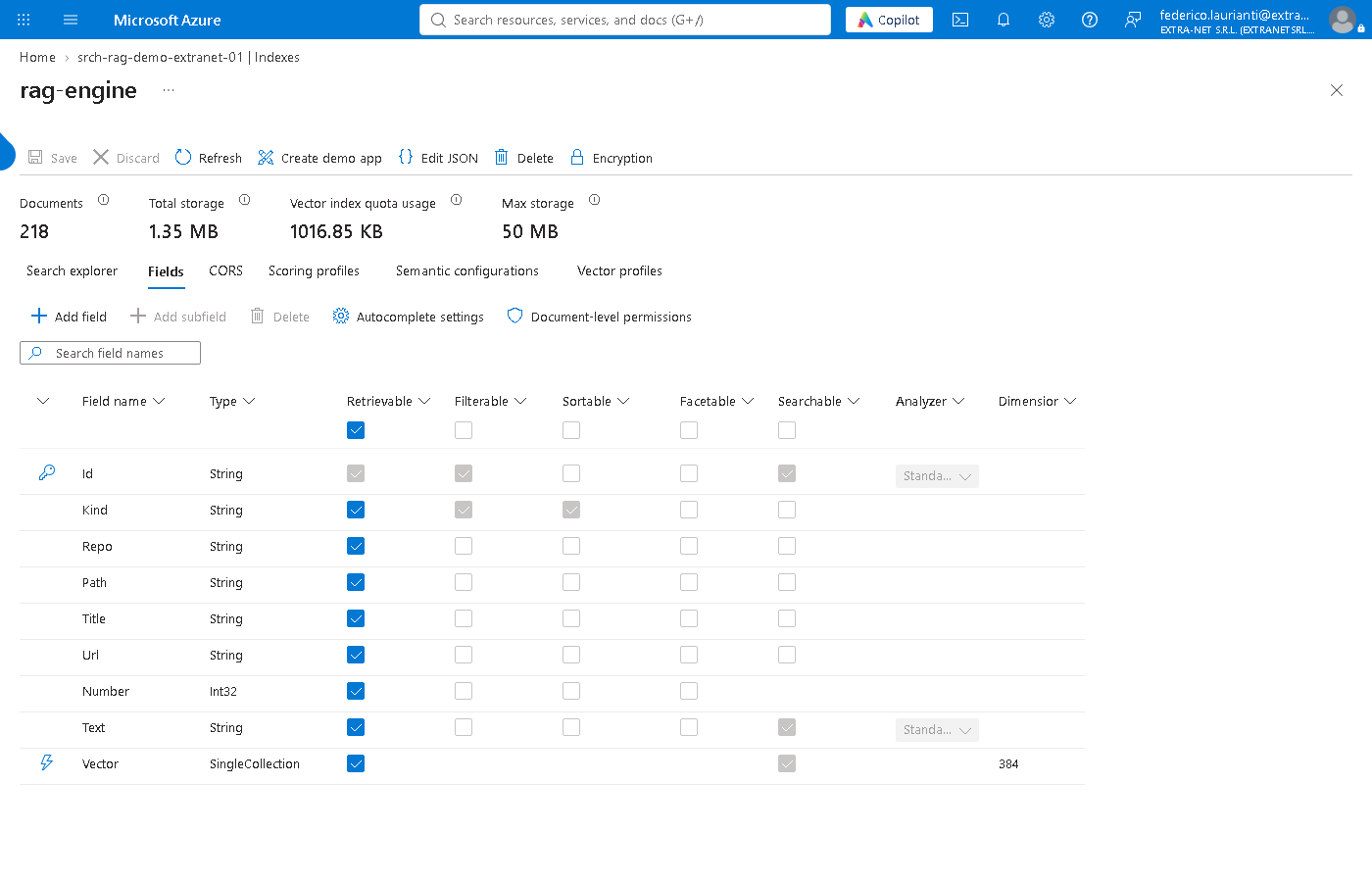
At the first run the connector creates the index from the record: Id key, Kind filterable, Text searchable, Vector as a Collection(Edm.Single) of 384 dimensions with an HNSW profile and cosine distance. In the test the synchronization loaded 218 pieces in six seconds, 1.35 MB of index.
The answers, the same as with the in-process store:
[1] code: orders-api/src/Orders.Domain/OrderStatus.cs  (score -2.34)
[2] code: orders-api/src/Orders.Domain/Order.cs  (score -4.09)
[3] code: orders-api/src/Orders.Api/appsettings.Development.json  (score -4.14)
[4] code: orders-api/src/Orders.Api/Program.cs  (score -4.37)
[5] code: orders-api/src/Orders.Api/Program.cs  (score -4.52)
[6] workitem: User Story #541: Annullamento solo prima della spedizione  (score -0.43)
[7] workitem: Epic #558: Resi  (score -3.07)
[8] wiki: Runbook incidenti  (score -3.51)
[9] wiki: Glossario  (score -4.40)
With the three questions of the previous guide, the first two give the same nine passages as the in-process store. In the third, "Quando si può rilasciare in produzione e chi approva?", the pass over everything is the same, with «Processo di rilascio» first at 1.18; the pass over the source files changes, because the candidates are chosen by the hybrid search of the service and not by FTS5 with the fusion, and among source files that have nothing to do with that question the order is another. A question takes about seven seconds against three and a half in the process: two round trips to the service, one per pass, plus the loading of the models, which the API does once.
Delete the resources
5. Delete the index
On the Azure AI Search service, in Search management > Indexes, delete rag-engine; the service and the rest are those of the first guide.
Command names, screenshots and responses recorded on November 24, 2026, with .NET 11.